

🛒 Best Price Today on Amazon
Prime members get fast, free shipping on everything above, plus member-only deals. New members get a 30-day free trial — cancel anytime.
- Top Dual Band Routers Picks for 2026
- Best Dual Band Routers at a Glance
- 1. TP-Link AX1800 WiFi 6 Router (Archer AX21 V5), Dual Band Gigabit
- 2. TP-Link Smart WiFi 6 Router (Archer AX10), 4 Gigabit LAN, Dual Band
- 3. TP-Link Archer AC1750 WiFi Router, Dual Band Gigabit (Qualcomm)
- 4. TP-Link Archer C7 AC1750 Wireless Dual Band Gigabit Router
- 5. TP-Link Archer A6 AC1200 Gigabit WiFi Router, MU-MIMO Dual Band
- 6. TP-Link Deco X55 AX3000 WiFi 6 Mesh System (up to 2500 Sq.Ft.)
- How to Choose a Dual Band Router
- Frequently Asked Questions
- Related Guides
- Related Articles
Top Dual Band Routers Picks for 2026
Here are our current top dual band routers picks, compared on real Amazon owner reviews, price, and features. Live prices update below.
As an Amazon Associate we earn from qualifying purchases at no extra cost to you.





A dual band router broadcasts on two frequencies at once — 2.4GHz for range and compatibility, and 5GHz for speed — so your devices can pick the band that suits them. That split is what makes a dual band router the sensible default for most homes: the 5GHz band handles fast tasks like gaming, 4K streaming and large downloads, while the 2.4GHz band reaches farther through walls for smart-home gadgets and devices at the edge of coverage. This guide rounds up the best dual band routers in 2026 across Wi-Fi standards and budgets, and flags where a product is actually something else.
Our picks were chosen on what genuinely matters in a dual band router: the balance of the two bands, the Wi-Fi generation (Wi-Fi 5 versus the newer, more efficient Wi-Fi 6), wired gigabit ports, real-world coverage and value. We have included a spread from around $38 to around $70 and are honest about category — one product here is actually a tri-band mesh system rather than a single dual band router, and we flag it clearly. The list spans value Wi-Fi 5 routers and modern Wi-Fi 6 options. Below is an at-a-glance comparison of all six, then a closer look at each and a buyer’s guide built around bands, Wi-Fi generation, ports and coverage.
Best Dual Band Routers at a Glance
| Router | Best For | Standout Spec | Approx Price |
|---|---|---|---|
| TP-Link Archer AX21 (AX1800 Wi-Fi 6) | Best dual band Wi-Fi 6 value | Wi-Fi 6, gigabit, dual band | around $52 |
| TP-Link Archer AX10 (AX10) | Wi-Fi 6 on a budget | Wi-Fi 6, 4 gigabit LAN, dual band | around $59 |
| TP-Link Archer AC1750 (Qualcomm) | Reliable Wi-Fi 5 all-rounder | AC1750 dual band, gigabit | around $38 |
| TP-Link Archer C7 AC1750 | Proven Wi-Fi 5 classic | AC1750 dual band gigabit | price varies |
| TP-Link Archer A6 (AC1200) | Budget MU-MIMO dual band | AC1200, MU-MIMO, dual band | around $39 |
| TP-Link Deco X55 (AX3000 Mesh) | Whole-home coverage (tri-band mesh) | Wi-Fi 6 mesh, up to 2500 sq.ft | around $69 |
1. TP-Link AX1800 WiFi 6 Router (Archer AX21 V5), Dual Band Gigabit
The TP-Link Archer AX21 (AX1800) is the best dual band Wi-Fi 6 value on this list. It is a true dual band router pairing 2.4GHz and 5GHz radios with the newer Wi-Fi 6 standard, gigabit wired ports, and TP-Link’s mature software with app-based setup. At around $52 it hits the sweet spot of modern features and price, and it is one of the most recommended routers in its class.
This is the router to choose for most modern homes that want Wi-Fi 6 without overspending. The dual band design lets fast devices use the 5GHz band for gaming and 4K streaming while the 2.4GHz band reaches farther for smart-home gear, and Wi-Fi 6 improves efficiency when many devices connect at once — a real benefit in a busy household. The gigabit ports, easy app setup and broad feature set round it out. For a dependable, well-priced dual band Wi-Fi 6 router, the Archer AX21 is the standout pick.
Pros: True dual band Wi-Fi 6, gigabit ports, efficient with many devices, easy app setup, great value.
Cons: Single-unit coverage suits small-to-medium homes; not a mesh system for large layouts.
2. TP-Link Smart WiFi 6 Router (Archer AX10), 4 Gigabit LAN, Dual Band
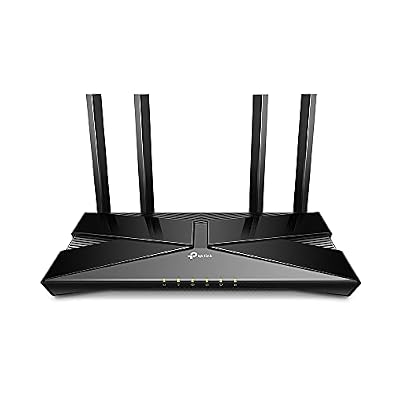
TP-Link Smart WiFi 6 Dual Band Router 4 Gigabit LAN Ports | 802.11AX Router, Beamforming, OFDMA, MU-MIMO, Parental Controls, Dual-Core 900MHz Processor, Works with Alexa (Archer AX10)


As an Amazon Associate we earn from qualifying purchases. Product prices and availability are accurate as of the date/time indicated.
The TP-Link Archer AX10 is the budget Wi-Fi 6 pick. It brings the newer Wi-Fi 6 standard to a dual band design with four gigabit LAN ports, at one of the lowest prices you will find for a Wi-Fi 6 router. At around $59 it is an affordable way to step up to the current generation while keeping the familiar 2.4GHz-plus-5GHz dual band layout.
This is the router to choose for a budget-conscious home that still wants the efficiency benefits of Wi-Fi 6. The dual bands let devices split between range and speed as usual, Wi-Fi 6 handles a crowd of connected devices more gracefully than older standards, and the four gigabit LAN ports cover wired gaming PCs, consoles and a NAS. It is an entry-level Wi-Fi 6 unit rather than a high-throughput flagship, but for affordable, modern dual band networking, the Archer AX10 delivers the essentials well.

Pros: Affordable Wi-Fi 6, dual band, four gigabit LAN ports, good for busy device counts.
Cons: Entry-level Wi-Fi 6 throughput; best for small-to-medium homes.
3. TP-Link Archer AC1750 WiFi Router, Dual Band Gigabit (Qualcomm)

TP-Link Archer AC1750 WiFi Router - Dualband Gigabit, Qualcomm inside, Works with Alexa(A7), Black
As an Amazon Associate we earn from qualifying purchases. Product prices and availability are accurate as of the date/time indicated.
The TP-Link Archer AC1750 is the reliable Wi-Fi 5 all-rounder of this list, and the most affordable router here at around $38. It is a dual band AC1750-class router built on a Qualcomm platform, with gigabit wired ports and broad device compatibility. For a dependable home network without paying for the latest standard, it is a sensible, budget-friendly choice.
This is the router to choose for a home that wants solid, no-drama dual band coverage at the lowest sensible price and does not specifically need Wi-Fi 6. The dual bands cover the usual split of range and speed, the AC1750 rating handles everyday streaming, browsing and gaming for a typical household, and the gigabit ports support wired devices. It is a Wi-Fi 5 router, so it lacks the efficiency gains of Wi-Fi 6 in very busy homes, but for affordable, reliable dual band networking, the Archer AC1750 is a strong value pick.
Pros: Very affordable, reliable dual band AC1750 Wi-Fi 5, gigabit ports, broad compatibility.
Cons: Wi-Fi 5 rather than Wi-Fi 6; less efficient with very high device counts.
4. TP-Link Archer C7 AC1750 Wireless Dual Band Gigabit Router

tp-link WiFi Router AC1750 Wireless Dual Band Gigabit (Archer C7), Router-AC1750


As an Amazon Associate we earn from qualifying purchases. Product prices and availability are accurate as of the date/time indicated.
The TP-Link Archer C7 is the proven Wi-Fi 5 classic, a long-running and hugely popular dual band router that earned a strong reputation for reliability and value over many years. It is an AC1750-class dual band router with gigabit wired ports and a track record of dependable home performance. Pricing varies as it is an older model, but it remains a recognisable value option.
This is the router to choose if you want a time-tested, dependable dual band unit with a long history of stable performance. The dual bands deliver the familiar range-and-speed split, the AC1750 rating is comfortable for everyday household streaming and gaming, and the gigabit ports handle wired devices. As a Wi-Fi 5 router it does not offer Wi-Fi 6’s efficiency improvements, and being an older model availability and price can vary, but the Archer C7’s reputation as a reliable workhorse is well deserved.

Pros: Proven reliable dual band AC1750 Wi-Fi 5, gigabit ports, long track record.
Cons: Older Wi-Fi 5 model; availability and price vary, and it lacks Wi-Fi 6 efficiency.
5. TP-Link Archer A6 AC1200 Gigabit WiFi Router, MU-MIMO Dual Band

TP-Link AC1200 Gigabit Dual Band WiFi Router (Archer A6) | MU-MIMO Wireless Internet Router, 4 x Antennas, OneMesh and AP Mode, Long Range Coverage


As an Amazon Associate we earn from qualifying purchases. Product prices and availability are accurate as of the date/time indicated.
The TP-Link Archer A6 (AC1200) is the budget MU-MIMO dual band pick. It is an AC1200-class dual band router that adds MU-MIMO — technology that serves multiple devices simultaneously rather than one at a time — along with gigabit ports, at a wallet-friendly price. At around $39 it brings a useful multi-device feature to an affordable dual band package.
This is the router to choose for a budget home with several devices online at once that wants smoother simultaneous performance without stepping up to Wi-Fi 6. The dual bands provide the standard range-and-speed split, MU-MIMO helps the router handle multiple connected devices more efficiently than basic single-user routing, and the gigabit ports cover wired gear. The AC1200 rating is more modest than AC1750, so it suits lighter-to-moderate use, but for affordable dual band networking with MU-MIMO, the Archer A6 is a smart budget choice.
Pros: Affordable dual band AC1200, MU-MIMO for multiple devices, gigabit ports, good value.
Cons: AC1200 is a more modest rating than AC1750; Wi-Fi 5 rather than Wi-Fi 6.
6. TP-Link Deco X55 AX3000 WiFi 6 Mesh System (up to 2500 Sq.Ft.)

TP-Link Deco X55 AX3000 WiFi 6 Mesh System, Deco X55(1-Pack) | Covers up to 2500 Sq.Ft., Replaces Wireless Router and Extender, 3 Gigabit Ports, Supports Ethernet Backhaul




As an Amazon Associate we earn from qualifying purchases. Product prices and availability are accurate as of the date/time indicated.
Rounding out the list is the TP-Link Deco X55, included as the whole-home coverage option — but it must be flagged clearly: this is a tri-band mesh Wi-Fi system, not a single dual band router. Rather than one unit, it uses multiple Deco nodes that work together to blanket a large area — TP-Link rates it for up to 2500 square feet — using the Wi-Fi 6 (AX3000) standard. At around $69 it targets larger homes with coverage problems.
As a mesh system it is excellent, and the Deco line is well regarded for easy setup and seamless roaming as you move between nodes. Choose it if your priority is eliminating dead zones across a big or multi-storey home, where a single router — dual band or otherwise — struggles to reach. But it works differently from the standalone dual band routers on this list: it is a multi-unit, tri-band mesh designed for coverage rather than one box plugged in by the modem. If you specifically want a single dual band router, choose one of the Archer models above; if whole-home coverage is the goal, the Deco X55 is a strong pick.

Pros: Whole-home Wi-Fi 6 coverage up to 2500 sq.ft, seamless roaming between nodes, easy app setup.
Cons: Not a single dual band router — it is a tri-band mesh system (different category); priciest pick here.
How to Choose a Dual Band Router
With a dual band router, the starting point is understanding the two bands and how your devices use them. The 5GHz band is faster but has shorter range, ideal for gaming, 4K streaming and large downloads on devices near the router; the 2.4GHz band is slower but reaches farther through walls, better for smart-home gadgets and devices at the edge of coverage. Every router here is dual band (except the Deco, which is a tri-band mesh), so this split is the foundation of how the network behaves.
Wi-Fi generation is the next major decision. Wi-Fi 6 routers like the Archer AX21 and AX10 are more efficient than Wi-Fi 5 models, especially when many devices connect at once, which matters in a modern home full of phones, consoles, TVs and smart gadgets. Wi-Fi 5 routers like the Archer AC1750, C7 and A6 remain reliable and cheaper and are fine for lighter device counts, but if you want the most future-proof, crowd-friendly performance, favour a Wi-Fi 6 model.
Wired ports and speeds still matter, even in a wireless world. Gigabit LAN ports — found across these routers — let you hardwire a gaming PC, console or NAS for the lowest, most consistent latency, which competitive gamers in particular value. Count the ports you need (the Archer AX10 offers four gigabit LAN, for example) and make sure the WAN and LAN ports are gigabit so a fast internet plan is not bottlenecked at the router.
Finally, match coverage to your home, and be clear about category. A single dual band router like the Archer models suits a small-to-medium home where one well-placed unit can reach every room. If you have a large or multi-storey house with dead zones, a mesh system like the TP-Link Deco X55 — which is a tri-band mesh, not a single dual band router — uses multiple nodes to blanket the space with seamless roaming. Decide whether you need one router or a mesh, pick your Wi-Fi generation, confirm the ports, and choose the option here that fits your home and budget.
Frequently Asked Questions
What is a dual band router, and why does it matter?
A dual band router broadcasts on two frequencies at once: 2.4GHz and 5GHz. The 5GHz band is faster with shorter range, great for gaming, 4K streaming and downloads on nearby devices, while the 2.4GHz band is slower but reaches farther through walls for smart-home gadgets and distant devices. Having both lets each device connect on the band that suits it, which is why dual band is the sensible default for most homes.
Is the TP-Link Deco X55 a dual band router?
Not exactly — it is worth flagging. The Deco X55 is a tri-band mesh Wi-Fi system, not a single dual band router. It uses multiple nodes to cover a large area (up to about 2500 square feet) with seamless roaming, which is ideal for big or multi-storey homes with dead zones. If you specifically want a single dual band router that plugs in by your modem, choose one of the TP-Link Archer models in this guide instead.
Do I need Wi-Fi 6, or is Wi-Fi 5 still fine?
Wi-Fi 5 routers like the Archer AC1750, C7 and A6 are reliable and affordable and remain perfectly capable for everyday streaming, browsing and gaming with a moderate number of devices. Wi-Fi 6 models like the Archer AX21 and AX10 are more efficient when many devices connect at once and are more future-proof, so if you have a busy, device-heavy household or want longevity, Wi-Fi 6 is the better choice for a small price premium.
Should I connect my gaming PC by Wi-Fi or Ethernet?
For competitive gaming, a wired Ethernet connection to one of the router’s gigabit LAN ports gives the lowest, most consistent latency and avoids wireless interference. The dual band routers here all include gigabit ports for exactly this, and a model like the Archer AX10 offers four gigabit LAN ports. Use the 5GHz band for wireless gaming when hardwiring is not practical, but cable up if you can.
Related Guides
- Best Routers for Gaming
- Best Wi-Fi 6 Routers
- Best Mesh Wi-Fi Systems
- Best Network Switches
- Best Powerline Adapters
- Best Gaming PC
Affiliate Disclosure: As an Amazon Associate, we earn from qualifying purchases. If you click a link and make a purchase, we may earn a small commission at no extra cost to you. Prices and availability are accurate as of publication and may change.










