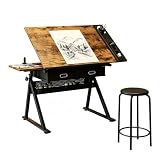
- Top Pick: VECELO Drafting Table Art Desk Art Table Adjustable Drawing Table Tilted Tabletop with 2 Storage Drawers and Stool, Drawing Desk for Artist Painters Drawing, Crafting, Reading, Writing, Rustic Brown
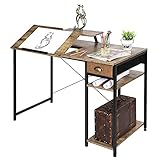
- Best Value: Lurinthal Drafting Table with Storage Cabinet & Drawers, Adjustable Drawing Desk with Open Shelves, Craft Table Painting Desk for Artists, Painters, Drawing, Crafting, Reading, Writing, Working
- Premium Choice: ZENY Adjustable Drafting Table with Stool Tilting Drawing Desk Artist Table | with Outlet, Storage Drawers, Art Craft Workstation for Home Office Reading, Writing, Crafting
A desk for digital art has to do two jobs that a standard office desk handles poorly. It needs to hold a computer, monitor and keyboard at a sane height, and it needs to let your drawing hand work at a comfortable angle, whether that means a pen display, a tablet or a sketchbook. A flat tabletop forces you to hunch over a tablet, while a tilting surface lets you lean back and keep your wrist neutral.
That is why this roundup focuses on adjustable drafting tables rather than gaming desks. Eight tilting, height-adjustable models are compared below, based on the features listed in each product title. Two other items from the original list, an art projector and a workspace lamp, are accessories rather than desks, so they have been left out. Read the guide as a way to match tabletop size, tilt range and storage to the tablet or pen display you actually own in 2026.
Quick Picks
As an Amazon Associate we earn from qualifying purchases at no extra cost to you.



| Product | Best for | Key spec from the title |
|---|---|---|
| VECELO Drafting Table | Stool included, rustic look | Tilted top, 2 drawers, stool |
| Lurinthal Drafting Table | Supply-heavy studios | Storage cabinet, drawers, open shelves |
| ZENY Adjustable Drafting Table | Charging while drawing | Outlet, storage drawers, stool |
| Fluted Walnut Drafting Table | Stylish home studio | Built-in power outlet, storage |
| Garvee Drafting Table | Wide tilt range | 0-75 degree tilt, 2 drawers, stool |
| JOY worker Electric Drafting Table | Motorized height changes | 40 by 20 inch top, 0-90 degree tilt |
| X-cosrack Drafting Table | Desktop computer setups | 43 inch length, monitor stand |
| MEEDEN Wood Drafting Table | Traditional sketching | 35.5 by 23.5 inches, pencil ledge |
How to Choose
Start with the tilt range
If you draw on a pen display, a surface that tilts somewhere in the range of 20 to 45 degrees is a common comfort zone, and a desk that also lies flat lets you switch to keyboard and mouse work. Titles listing 0-75 or 0-90 degree tilt cover both cases. A fixed-angle top may be fine for a sketchbook but limits you if you ever swap in a larger tablet.
Measure the tabletop against your gear
Add up the footprint of the pen display or tablet, your keyboard and the arm space on each side. A 24-inch pen display plus a keyboard needs well over 30 inches of width, so compact tops around 35 inches will feel tight. Tops near 40 or 43 inches give more elbow room, and a monitor stand shelf can lift a second screen above the work area.
Look at stability, storage and power
Drafting tables often tilt using a hinge or crank, so a sturdy frame matters more than extra features. Drawers and shelves keep styluses, cables and sketchbooks off the work surface. A built-in power outlet or cable management channel helps if you charge a tablet or run a pen display, since there are fewer loose cords to snag your hand.
Know where budget models cut corners
Lower-tier tables tend to use thinner board, lighter hardware and simple tilt locks. Ignore marketing terms for the finish, and focus on the load-bearing parts: the frame, the lock that holds the angle and the edge lip that stops pencils from rolling. If you plan to mount a heavy monitor or pen display, look for a model that clearly lists a monitor stand or a motorized frame.
The 8 Best Options
VECELO Drafting Table
The VECELO combines an adjustable, tilted tabletop with two storage drawers and a stool in a rustic brown finish. It suits a beginner digital artist who wants a single purchase covering the table and the seat for a small drawing corner.
- Strength: The stool is bundled, so the setup is nearly complete.
- Strength: Two drawers give a home to styluses, cables and pencils.
- Trade-off: The title gives no tilt range or dimensions, so check the product page before ordering for a large pen display.
Skip it if you want a motorized height setting or a wider desktop for a two-monitor arrangement. It is a better match for a student or hobbyist with a modest tablet than for a full production studio.
Lurinthal Drafting Table
This model leans on storage, with a cabinet, drawers and open shelves attached to an adjustable drawing desk. It suits artists who juggle traditional supplies alongside a digital workflow and want everything within arm’s reach.
- Strength: Cabinet, drawers and open shelves create multiple storage zones.
- Strength: Marketed for painting, crafting and reading as well as drawing.
- Trade-off: A storage-heavy body may leave less leg room than a simpler frame.
Skip it if your room is small or you prefer a minimalist desk with nothing underneath. Illustrators with paint, markers and sketchbooks competing for space will get the most from the extra shelving.
ZENY Adjustable Drafting Table
The ZENY lists a tilting drawing surface, storage drawers, a stool and an outlet, a useful mix for anyone who needs to plug in a tablet or lamp. It fits a bedroom studio where wall sockets sit far from the desk.
- Strength: The outlet reduces cable clutter for tablets and chargers.
- Strength: A stool and drawers arrive with the table.
- Trade-off: No dimensions or angles appear in the title, so confirm the size against your pen display.
Skip it if you need a monitor stand shelf or want a motor for changing height. It is a practical fit for a tablet-and-laptop setup rather than a tower with two large screens.
Fluted Walnut Drafting Table
This walnut-finish table pairs a fluted design with storage and a built-in power outlet. It is aimed at artists who care about how the desk looks in a shared living space as much as how it functions.
- Strength: Built-in power outlet keeps charging cables tidy.
- Strength: A distinctive walnut and fluted look blends into a living room.
- Trade-off: The title names no brand or tilt range, so verify specs before relying on it for a large display.
Skip it if you want a stool included or prefer a plain utilitarian finish. Shoppers furnishing a studio that doubles as a guest room or lounge will find the appearance an easier sell.
Garvee Drafting Table
The Garvee lists a 0-75 degree tilting top, height adjustment, two storage drawers and a stool. That tilt range makes it a flexible pick for artists who move between flat keyboard work and angled drawing sessions.
- Strength: The stated 0-75 degree range covers flat and steeply angled positions.
- Strength: Stool and two drawers are part of the package.
- Trade-off: Top dimensions are absent from the title, so measure carefully against your gear.
Skip it if you prefer an electric frame or need a monitor stand built in. Artists who bounce between laptop typing and angled pen work are the audience that benefits most from the wide range.
JOY worker Electric Drafting Table
The only motorized model here, this white table offers a 40 by 20 inch MDF top that tilts from 0 to 90 degrees, along with a long lip, a cup holder and cable management. It suits those who alternate between sitting and standing while working.
- Strength: Electric height adjustment makes changing positions simple.
- Strength: Cup holder and cable management are listed.
- Trade-off: A 20-inch depth is shallower than some drawing setups need.
Skip it if you want a large surface for a big pen display, or if you prefer a manual frame. Consider it for compact rooms where a smaller tablet and a laptop are the whole kit.
X-cosrack Drafting Table
This one is built with computer users in mind, listing a 43-inch length, a storage drawer and a monitor stand above the surface. It suits a digital artist who wants a tilting work area and a screen at eye level.
- Strength: The monitor stand raises a display above the drawing area.
- Strength: A 43-inch length gives space for a keyboard and tablet.
- Trade-off: The title lists one storage drawer only, which is modest for supply collections.
Skip it if you need a stool included or a motorized frame. It is the most computer-oriented listing here, so it fits someone planning a desktop tower and a separate monitor.
MEEDEN Wood Drafting Table
The MEEDEN lists a 35.5 by 23.5 inch top, adjustable height, tilt, a pencil ledge and a ruler. It leans traditional, which suits illustrators who still sketch on paper before scanning or tracing into software.
- Strength: Pencil ledge and ruler help paper-based work.
- Strength: Both height and tilt are adjustable.
- Trade-off: At 35.5 inches wide, it may feel tight with a large pen display and keyboard.
Skip it if your workflow is fully digital with a big screen, because the compact top leaves little spare room. It suits comic artists, inkers and students who sketch first and finish digitally.
Which One Fits Your Situation
You work on a pen display and need a wide surface
The X-cosrack at 43 inches long gives more horizontal room than the MEEDEN or the JOY worker, and the monitor stand keeps a second display in view.
You switch between sitting and standing
Choose the JOY worker Electric Drafting Table, the only listing with motorized height adjustment.
You need to charge devices while drawing
The ZENY and the Fluted Walnut table both list a power outlet, so cables stay off the floor. Pick the ZENY if a stool matters, or the walnut table for a more decorative finish.
You mix paper and digital work
The MEEDEN with its pencil ledge and ruler, or the Lurinthal with its cabinet and open shelves, suit artists who keep traditional supplies close.
Common Mistakes
- Buying a table with a compact top and then discovering a larger pen display does not fit.
- Ignoring depth: a shallow desk can leave little room for a keyboard plus tablet.
- Assuming every tilting desk lies completely flat, which matters for keyboard work.
- Skipping the stool or chair question and sitting at the wrong height for the angled surface.
- Forgetting cable routing, so cords tug at the display as the top tilts.
Related guides
- Aio Liquid Coolers For High Performance Gaming
- How To Lower Input Delay In Competitive Shooters
- Wireless Gaming Headsets Under 100 For Pc
Frequently Asked Questions
Can a drafting table work with a pen display?
Yes, as long as the top is wide and deep enough for the display and the tilt lock holds the angle firmly. Measure the display with its stand or arm before choosing a table.
Is a motorized frame necessary?
No. Manual height settings work fine for many artists. A motor mostly helps if you want to alternate sitting and standing, or if you share the desk with someone of a different height.
What tilt angle is best for digital drawing?
Many artists prefer a gentle slope, somewhere between flat and about 45 degrees, but the right angle depends on posture and screen glare. A wide range gives you room to adjust.
Do I need a monitor stand on the desk?
Not always. If you use a pen display, the display itself may be your screen. A monitor stand helps when you also run a separate screen for references or software panels.