

- Top Pick: HORI Fighting Commander OCTA (Street Fighter 6 Edition – Juri)
- Runner-up: HORI Fighting Stick Mini for PS5, PS4, and PC
- Also consider: 8BitDo Arcade Stick for Switch and Windows
Fighting games ask more of a controller than almost any other genre. Quarter-circle motions and rapid combos depend on clean, repeatable inputs, and a controller that fights you on every motion will hold back your progress. The right layout puts every attack button under a different finger and gives movement a clear, physical home.
There is no single controller that suits every fighting game player. Some want a full-size stick with a lever and eight large buttons, others prefer a compact fight pad with a precise D-pad, and a growing number use leverless controllers that replace the stick with four movement buttons. The five controllers below cover the main styles.
As an Amazon Associate, we earn from qualifying purchases.
Quick Answer
For most players, the best controller for fighting games is a full-size arcade stick with quality parts: the MAYFLASH F500 Elite for a premium feel, or the HORI Fighting Stick Mini for a compact start. Pad players should pick the HORI Fighting Commander OCTA, and Switch players should consider the wireless 8BitDo Arcade Stick.
1. HORI Fighting Commander OCTA (Street Fighter 6 Edition – Juri)

The Fighting Commander OCTA is the best fight pad on this list, and the Street Fighter 6 Juri edition adds a bold character design to a serious controller. Six microswitch face buttons actuate with a short, crisp press, making rapid sequences feel direct and consistent. A short-stroke analog stick with an octagonal gate sits below the D-pad, and a sliding pad acts as a right stick for menu navigation.
The six-button layout mirrors the arcade arrangement, and the D-pad offers adjustable sensitivity through the HORI Device Manager app. The app also handles button remapping, and the wired connection means no charging.
Specs
- Layout: six microswitch face buttons with short-stroke analog stick
- D-pad: adjustable sensitivity crosshead with octagonal restrictor gate
- Connectivity: wired USB-A with 3-meter cable
- Compatibility: Windows PC
- Software: HORI Device Manager app for button mapping and D-pad tuning
- Weight: 0.37 kilograms
- License: officially licensed by Capcom
2. HORI Fighting Stick Mini for PS5, PS4, and PC
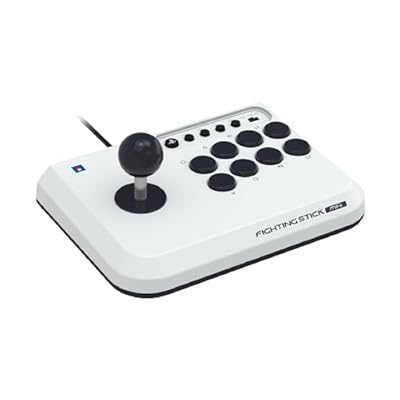
The Fighting Stick Mini is the most approachable arcade stick here, and the best starting point for anyone curious about stick play. Despite its small footprint, it keeps a full eight-button layout and a proper microswitch-activated joystick, so the core arcade experience is intact. It measures roughly eight inches by six inches and weighs just over one pound, making it easy to store or carry to a friend’s house.
Official Sony licensing means it works natively on PlayStation 5 and PlayStation 4 as well as PC, with a platform switch on the top panel. The trade-off is less wrist room than a full-size stick, and there is no touchpad, so PlayStation players will need another controller nearby for system navigation in some situations. The muscle memory you build here transfers directly if you later move up to a larger stick.
Specs
- Layout: full eight-button arcade layout with microswitch joystick
- Connectivity: wired USB-A with 8.2-foot cable
- Compatibility: PlayStation 5, PlayStation 4, and PC
- Dimensions: 8.27 x 5.91 x 3.43 inches
- Weight: 1.03 pounds
- Touchpad: not included
- License: officially licensed by Sony
3. 8BitDo Arcade Stick for Switch and Windows
The 8BitDo Arcade Stick is the only wireless option here. It connects over Bluetooth, a 2.4G wireless receiver, or wired USB-C, so you can move between a Switch session on the couch and a wired PC session at your desk without swapping hardware. The 2.4G receiver hides in a dedicated compartment, which saves a lot of lost-receiver frustration.
Modding is a genuine strength here. A universal mounting plate supports Sanwa arcade sticks, and the buttons use quick disconnects, so swapping parts is straightforward. The Ultimate Software lets you remap buttons and create macros. A thick metal plate inside the body adds weight and stability, keeping the stick planted during intense matches. Battery life is rated at up to 40 hours per charge, with around four hours needed for a full recharge. The main limitation is platform coverage: this version is built for Switch and Windows, so PlayStation players should look elsewhere.
Specs
- Connectivity: Bluetooth, 2.4G wireless receiver, and wired USB-C
- Compatibility: Nintendo Switch and Windows
- Battery: up to 40 hours of play per charge
- Charging time: around 4 hours for a full charge
- Software: 8BitDo Ultimate Software for button mapping and macros
- Modding: universal mounting plate supports Sanwa arcade sticks
- Buttons: quick-disconnect wiring for easy part swaps
4. MAYFLASH Arcade Stick F500 Elite

The MAYFLASH F500 Elite is the premium all-rounder of this roundup, built around genuine Sanwa parts. The Sanwa JLF joystick and Sanwa buttons deliver the light, responsive feel that serious players expect. An octagonal joystick gate is included, and the top acrylic panel removes easily for custom artwork.
Compatibility is the F500 Elite’s other major strength. It covers Xbox Series S and X, Xbox One, Xbox 360, PlayStation 4, PlayStation 3, Switch, PC, macOS, Android, and Raspberry Pi, making it the best choice for players with a large collection of systems. The metal case and rubber feet keep it stable on a desk or lap, and a headphone jack lets you plug in wired headphones during a set. PlayStation 5 owners should note that native PS5 support needs an adapter.
Specs
- Joystick: Sanwa JLF joystick with octagonal gate included
- Buttons: Sanwa buttons in an eight-button arcade layout
- Case: metal case with rubber feet and removable acrylic top panel
- Connectivity: wired USB
- Compatibility: Xbox Series S and X, Xbox One, Xbox 360, PS4, PS3, Switch, PC, macOS, Android, Raspberry Pi, NEOGEO mini, SEGA Mega Drive mini
- Audio: wired headphone jack
- Dimensions: 16.34 x 11.1 x 5.67 inches
5. MAYFLASH Arcade Stick F300

The MAYFLASH F300 is the budget entry point in this lineup, and it earns its place by covering an impressive range of systems at a friendly size. It works with Switch, PlayStation 4, PlayStation 3, Xbox Series S and X, Xbox One, Xbox 360, PC, macOS, and Steam Deck, so one stick can serve almost every console in a typical collection. The layout follows the classic arcade arrangement, with a joystick on the left and eight action buttons on the right.
Compared with the F500 Elite, the F300 uses standard MAYFLASH parts rather than Sanwa components, and the difference is noticeable in feel: the buttons and lever are perfectly usable, but they lack the light, refined touch of the Elite’s Sanwa hardware. That is a fair trade for the lower tier, and the stick remains a solid way to learn arcade controls without a large commitment. PlayStation 5 play needs a separate adapter.
Specs
- Layout: classic arcade layout with joystick and eight action buttons
- Connectivity: wired USB
- Compatibility: Switch, PS4, PS3, Xbox Series S and X, Xbox One, Xbox 360, PC, macOS, Steam Deck
- Model: F300
- Design: compact body for easy storage
- PlayStation 5: separate adapter needed for PS5 play
- Use case: beginners, casual play, and second-stick setups
How to Choose
Start with your platform, because it eliminates options fast. PlayStation 5 players should prioritize sticks with native PS5 support, such as the HORI Fighting Stick Mini, while Switch and PC players have the widest choice. Xbox players should check each listing carefully, since some sticks cover Xbox consoles and others do not.
Next, decide between a stick and a pad. A stick gives you the classic arcade feel and the most room for your hands, while a pad like the Fighting Commander OCTA keeps the familiar gamepad shape with fighting-specific buttons. If you have never used a stick, a compact model such as the Fighting Stick Mini is a low-risk way to find out whether the style suits you.
Parts quality matters more than looks. Sanwa components, as found in the F500 Elite, offer a consistent, durable feel, while standard parts are fine for learning. A heavy stick stays put during matches but is awkward to carry, while a compact or wireless stick travels well.
Who Should Skip
Players who are happy with a standard gamepad and only play fighting games occasionally can skip this entire category. A regular controller handles casual matches fine. If you play fighters once a month with friends, a dedicated stick will spend most of its life on a shelf.
Stick players who already own a full-size arcade stick with quality parts will gain little from the compact options here. The Fighting Stick Mini and the F300 are aimed at newcomers, and an experienced player will notice the smaller size and simpler parts immediately. In that case, the only meaningful step up is a premium stick such as the F500 Elite, or a custom build. Leverless players should also think twice before buying a traditional stick: if you have already adapted to movement buttons, going back to a lever means relearning your most basic inputs.
Frequently Asked Questions
Do I need an arcade stick to be good at fighting games?
No. Many strong players use standard gamepads, and execution comes from practice rather than hardware. A stick or fight pad can make certain motions more comfortable and consistent, but it will not replace time spent learning combos, spacing, and defense.
Are arcade sticks better than fight pads?
Neither style is objectively better, and the choice comes down to habit and comfort. Sticks offer large buttons and a lever that many players find precise for circular motions, while pads keep everything compact and familiar for players raised on consoles.
Can I use one arcade stick on PS5, Xbox, and PC?
Some sticks cover many platforms, but no stick here covers every current console natively. The MAYFLASH sticks cover a wide range, yet PlayStation 5 play needs an adapter, so check compatibility against the systems you own.
Is a wireless arcade stick good for competitive play?
Wireless sticks such as the 8BitDo Arcade Stick are fine for casual and online play, and modern wireless connections are responsive enough for most players. Competitive players often prefer wired connections for consistency and to meet tournament rules, so check the rules first if you plan to enter events.
Final Verdict
The best controller for fighting games depends on how you play, but the strongest overall choice is a quality arcade stick with parts that will last. The MAYFLASH F500 Elite leads this list for multi-platform players who want Sanwa hardware, while the HORI Fighting Stick Mini is the smartest first stick for PlayStation and PC players. Pad players should pick the HORI Fighting Commander OCTA, and Switch owners who want wireless freedom should go with the 8BitDo Arcade Stick. The MAYFLASH F300 rounds out the list as a budget-friendly way to try arcade controls. Pick the style that matches your hands, confirm it works on your platform, and then put your practice time into the games themselves.










