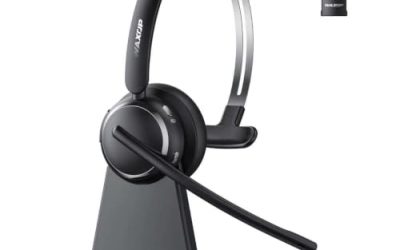
Updated November 2026 – Wired vs wireless gaming headsets, which is better? A wired headset such as the HyperX Cloud II wins on zero latency, no charging and value, while a 2.4GHz wireless model such as the SteelSeries Arctis Nova 7 Wireless Gen 2, Logitech G Pro X 2 Lightspeed or Razer BlackShark V2 Pro gives freedom with latency that most players cannot notice. Bluetooth is the compromise to avoid for fast games.
Wired vs Wireless Gaming Headsets: Which Is Better?
The decision comes down to three things: latency, battery and mic quality. Wired headsets send audio down a cable, so there is no delay from wireless encoding and no battery to run flat. Wireless headsets add a transmission step, but 2.4GHz dongle systems are built for low delay, and reviewers report that the lag is small enough to be ignored in games.
| Factor | Wired | 2.4GHz dongle | Bluetooth |
|---|---|---|---|
| Latency | Effectively none | Low, rarely noticeable | Higher, can desync with video |
| Battery | None | Rechargeable, maker lists hours | Rechargeable |
| Mic quality | Often decent, boom mic | Often decent, some compressed | Often limited bandwidth |
| Console support | Wide with 3.5mm | Depends on dongle | Often limited on consoles |
| PC compatibility | USB or 3.5mm | USB dongle | Built-in Bluetooth |
| Cost | Generally lower | Higher | Mixed |
| Best for | Value, long sessions | Gaming without cables | Phones, travel, casual |
2.4GHz Dongle vs Bluetooth vs Wired
2.4GHz dongle
A small USB transmitter pairs with the headset using the maker’s own protocol, designed for low latency and stable connections. It is the main reason wireless gaming headsets are practical. Range is typically around ten metres or more indoors, according to the makers. The dongle usually works on PC and often on PlayStation, and some models support Nintendo Switch or Xbox with a different dongle or a version. Check the platform list on the maker’s page.
Bluetooth
Bluetooth is convenient and works with phones, but the standard audio codecs add delay, and the mic profile often drops audio quality when the mic is active. Newer Bluetooth LE Audio and the LC3 codec can reduce delay, but support depends on both the headset and the device. Many gaming headsets include both Bluetooth and a dongle, so you can use the dongle for gaming and Bluetooth for a phone.
Wired
A 3.5mm or USB cable gives a consistent signal and the simplest compatibility, including consoles and controllers with a headphone jack. The cable can limit movement and get tangled, and USB headsets use a built-in sound card.
Battery Life
Makers list battery life per charge, which ranges from a modest number of hours to very long in the better models. Real life is lower with the volume turned up, active noise cancellation or RGB lighting. Some headsets, such as the SteelSeries Arctis Nova Pro Wireless, are marketed with a swappable battery, while the Arctis Nova 7 Wireless Gen 2 uses a built-in battery that SteelSeries lists at up to 54 hours on 2.4GHz. If you play long sessions, check whether the headset can be used with a charging cable, since some models continue to work while charging and others do not.
- Choose a model with a long maker-listed battery life if you play every day.
- Look for quick-charge features if you forget to charge.
- Consider a wired headset or a hybrid headset that supports a cable if you never want to think about charging.
Microphone Quality and Best Mic Headset Wireless
The best mic headset wireless or best gaming headset with mic wireless depends on how you use it. Gaming headset microphones are generally good enough for voice chat, but they are not equal to a dedicated desk microphone. Wireless mics are limited by transmission bandwidth, and reviewers at outlets such as RTINGS test mic recording quality and noise handling separately from audio.
| Headset | Connection | Notable features (maker) | Best for |
|---|---|---|---|
| Logitech G Pro X 2 Lightspeed | 2.4GHz, Bluetooth, wired | Detachable boom mic, graphene drivers | Competitive play and voice chat |
| SteelSeries Arctis Nova 7 Wireless Gen 2 | 2.4GHz, Bluetooth | Retractable mic, long battery life, separate Xbox version | All-round, cross-platform |
| Razer BlackShark V2 Pro (2023) | 2.4GHz, Bluetooth | Detachable mic, about 320 grams | FPS players, PC and console |
| HyperX Cloud II Wireless | 2.4GHz | Detachable mic, long battery life | Comfort and battery |
Look for a detachable or flip-to-mute boom mic, a sidetone option so you hear yourself and noise reduction in the software. If a mic is not working on PC, see the troubleshooting section below.
Fix: Headset Mic Not Working on PC
- Check that the mic is not muted by a physical switch or inline control.
- Open Windows Sound settings, then Input, and choose the headset as the input device.
- Check Privacy settings, since Windows has a setting that lets apps use the microphone.
- In the game or voice app, select the same input device.
- Try a different USB port or reinstall the dongle, and avoid unpowered hubs.
- Update the headset’s software and firmware from the maker’s site.
- For 3.5mm headsets with a single plug, check that the port supports a combined headset jack. Some PCs need a splitter for separate headphone and mic jacks.
If none of this works, test the headset on another device. If it also fails there, contact the maker, since the mic may be faulty.
Console Compatibility
Console support varies widely. A 3.5mm wired headset usually works on a controller. Wireless dongles can be tied to one platform, with variants for PlayStation, Xbox and Nintendo Switch. Xbox generally uses its own wireless protocol or a wired connection, so check the maker’s compatibility table before buying. A headset that lists several platforms and a USB-C dongle is more flexible if you move between PC and console.
Fit: Glasses Wearers and Big Heads
Best gaming headphones for glasses wearers
Glasses frames can press against the temples if the headset clamps tightly. Look for light clamping force, soft memory foam or fabric ear pads and thinner arms. Some makers advertise a glasses-friendly pad design. Soft pads with a cutout or softer cushion help prevent pressure.
Best gaming headphones for big heads
Choose a headset with a long headband range and a metal or flexible frame, and read the maker’s stated adjustment range. Over-ear designs with large cups and pivoting headbands usually fit better than small on-ear designs. User reviews are the best source for fit, because specifications rarely give head circumference.
Are gaming glasses worth it?
Gaming glasses are often sold with blue-light filtering. Evidence that blue-light filtering lenses reduce eye strain is mixed, according to reviews by eye health bodies such as the American Academy of Ophthalmology, which does not state that they are necessary. Taking breaks, adjusting brightness and talking to an optometrist are more reliable ways to deal with eye strain.
VR Headsets and Glasses
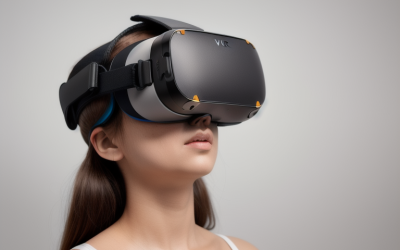
Do VR headsets work with glasses?
Generally yes. Most headsets have enough room for many glasses, though large frames can touch the lenses. Makers such as Meta supply a glasses spacer with the Quest 3, as the maker describes, and many headsets allow the lenses to move further from the face.
Best VR headset with glasses
Look for adjustable lens spacing, an adjustable eye relief and room for glasses. The Meta Quest 3 and similar standalone headsets are discussed by reviewers for glasses fit, but results vary by frame size. Prescription lens inserts offered by the maker or third parties are an option that avoids contact with the lens.
Sound Quality, Comfort and Extra Features
Sound quality depends on the drivers and tuning, not on whether the headset has a cable. A wired and a wireless model with the same drivers can sound alike, though wireless units compress the signal and may limit the highest quality. Weight matters for long sessions, because the battery adds mass. Makers list headset weight, and lighter designs under about three hundred grams are often easier to wear for hours.
Extra features worth comparing include active noise cancellation, which is more common on wireless models, spatial audio software, a mic mute indicator, sidetone, and the ability to pair with two devices at once. Software is also a factor. Some headsets need the maker’s app to adjust equalisation or mic settings, so check that it supports your operating system.
Pick Wired or Wireless If…
| You are | Pick | Why |
|---|---|---|
| On a budget | Wired | Better value for the same sound |
| A PC gamer who moves around | 2.4GHz wireless | Freedom with low delay |
| A console and PC player | Multi-platform wireless or wired | Check the platform list |
| A streamer | Wired or wireless plus a separate mic | Better voice quality |
| A glasses wearer | Light clamp, soft pads | Comfort over hours |
| A phone and PC user | Dongle plus Bluetooth | Switch between devices |
Frequently Asked Questions
Is there lag on wireless gaming headsets?
On 2.4GHz models the lag is small and rarely noticeable in games. Bluetooth is more likely to cause delay. Wired headsets have no wireless delay at all.
Are wireless gaming headset microphones worse than wired?
Not necessarily. Good 2.4GHz models have solid mics, though bandwidth limits can affect quality on Bluetooth. Reviews that include mic recordings are the best guide.
How long does a wireless gaming headset battery last?
Makers list tens of hours on many models, and real use varies with volume and features. Some headsets can also be used while charging, and a few have swappable batteries.
Can I use a wireless gaming headset on console?
Often yes, but it depends on the model and its dongle. Check the platform list on the maker’s page, since a PC dongle may not work on Xbox.
Why is my gaming headset mic not working on PC?
Check mute switches, set the headset as the input device in Windows Sound settings, and allow microphone access under privacy settings. Then try another USB port and update the headset software.
Do VR headsets work with glasses?
Generally yes, with some limits on frame size. Look for adjustable lens spacing and a glasses spacer where the maker supplies one, or consider prescription lens inserts.