

- Top Pick: Logitech G502 HERO
- Runner-up: Logitech G Pro Wireless
- Also consider: Logitech G305 Lightspeed
A gaming mouse works on Linux the moment it is plugged in, but the software that gives it a personality does not follow. Logitech G Hub, SteelSeries GG and the other vendor suites publish no Linux versions, so DPI stages, button assignments and lighting stay frozen at factory values, or at whatever a Windows machine last wrote to the mouse. For years that gap was the standard argument against taking Linux gaming hardware seriously.
Piper closes most of that gap. It is the graphical front end for libratbag, an open-source project that reverse-engineers the configuration protocols of gaming mice and exposes them through a system daemon called ratbagd. On a supported mouse, Piper makes Linux a place where the hardware is genuinely configured rather than merely tolerated — and this guide covers what it controls, which mice qualify, and where its limits sit.
As an Amazon Associate, we earn from qualifying purchases.
Quick answer
Piper is the graphical front end for ratbagd, the libratbag daemon that configures gaming mice on Linux. On a supported mouse it sets DPI stages, report rate, button assignments and LED colours, and saves profiles to onboard memory. Logitech G models are covered best, with SteelSeries, Glorious, Roccat and others listed per exact model.
Two programs, one job
The stack has two layers. At the bottom, ratbagd is a system daemon that owns the hardware connection: it matches a plugged-in mouse against libratbag’s device database, loads the matching driver, and speaks the vendor protocol — Logitech’s HID++ for most G-series mice, native protocols for the SteelSeries, Roccat and Glorious families. Above it, Piper talks to ratbagd over D-Bus and presents the settings as ordinary windows and sliders.
The split matters twice over. Configuration is not tied to one app: ratbagctl, a command-line tool shipped with libratbag, exposes the same settings for scripts and terminal users. And because a daemon does the writing, settings land on the device itself rather than in a per-user preferences file — a profile saved to onboard memory belongs to the hardware and travels with it to any other machine.
What Piper actually controls
For a supported mouse, Piper’s windows cover the settings players actually change. The resolutions page manages DPI stages — how many steps the DPI button cycles through, and the value of each. The buttons page reassigns side buttons, wheel clicks and extra keys to other buttons, keystrokes or simple macros. The LEDs page sets colours and effects on whatever lighting zones the device exposes.
Profiles tie those pages together: where the hardware offers slots, Piper edits each profile’s stages, buttons and lighting, and the mouse’s own profile button still switches between them. Report rate — the polling setting — is adjustable on models whose protocol exposes it. The honest caveat is granularity: support is implemented per device and per feature, so one listed mouse exposes every control while another offers only resolutions and buttons. The database entry tells the truth for each model; the brand name alone does not.
Which mice are supported, and how to check yours
libratbag’s documentation names its families: Logitech, Etekcity, G.Skill, Roccat and SteelSeries, with Glorious mice also present in the device files. Logitech’s G series is by far the deepest part of the database, covering wired and wireless models across several generations; SteelSeries contributes the Rival and Sensei lines, Roccat the Kone family, Glorious the Model O and Model D.
Support is matched by exact model, and the project’s rule is blunt: if a device is not in the database, libratbag will not support it. A near-match is not a match — a newer revision or a Plus variant is a separate entry that exists only if a contributor added it. The practical habit is simple: before buying a mouse for a Linux machine, find its exact model in the libratbag device list. Piper gives the same verdict after purchase — an unsupported mouse does not appear in its window, though it still works as a pointing device under the desktop’s generic settings.
Installing Piper: packages first, Flatpak with a caveat
Most distributions package both halves of the stack, so the normal route is installing Piper from the distribution’s repositories and letting the package manager pull in libratbag and ratbagd with it. After that, plugging in a supported mouse and opening Piper is the whole procedure — no account, no registration, no cloud component anywhere in the design.
Piper is also published on Flathub, which suits immutable and slower-moving distributions. One caveat applies: the Flatpak is only the front end. ratbagd is a system daemon and cannot live inside the application sandbox, so the host still needs libratbag installed and running for the Flatpak to find any hardware. Treat it as a newer interface on an older base, not a way to skip the system component.
What Piper cannot do
The limits are specific rather than mysterious. Firmware updates are the largest: Logitech, SteelSeries and Glorious all deliver mouse firmware through their Windows software, and libratbag does not flash firmware at all. A mouse that needs an update still needs a Windows machine or a dual boot for that one job.
Suite-level extras stay behind too. Piper’s button mapping handles keystrokes and simple macros, not the layered macro libraries of G Hub or GG. Automatic per-game profile switching has no equivalent; profiles change via the mouse’s own button or from Piper. Vendor cloud accounts and their synced settings do not transfer. The core settings are unaffected, but anyone depending on day-one firmware updates or elaborate macro stacks should know the boundary before switching.
Onboard memory versus software profiles
The distinction decides how portable a configuration is. Settings in onboard memory live in the mouse: DPI stages, button assignments and lighting keep working on another computer, at the login screen and on a Steam Deck, with no daemon running anywhere. That is why libratbag’s write-to-device model matters — the configuration survives the absence of the software that created it.
The trade-off is capacity. Onboard slots hold a few profiles containing only settings the hardware itself understands. Anything host-dependent — application detection, complex macro sequences, lighting synchronised across devices — cannot be stored in a mouse. Piper’s model is therefore deliberately hardware-first: it configures what the device can remember, and treats the rest as what it always was, a vendor-suite feature rather than a mouse feature.
Five mice with documented libratbag support
Logitech G502 HERO

The reference case for the whole stack: a libratbag-listed wired mouse whose DPI stages, eleven buttons, LIGHTSYNC zone and onboard profiles are all reachable from Piper. Its adjustable weight system suits players who like a heavier mouse.
- Sensor: HERO 25K optical, 200 to 25,600 DPI
- Buttons: 11 programmable
- Lighting: LIGHTSYNC RGB, one zone
- Weight: 121 g, plus five optional 3.6 g weights
- Extras: onboard memory, dual-mode scroll wheel
Logitech G Pro Wireless

The esports shape in the database: an ambidextrous LIGHTSPEED mouse with removable side buttons, listed by libratbag in its HERO 25K form. Piper covers its stages, buttons and profiles — the wireless pick that needs no Windows companion.
- Sensor: HERO 25K optical, up to 25,600 DPI
- Buttons: 4 to 8, with removable side buttons
- Connection: LIGHTSPEED wireless receiver
- Weight: 80 g
- Battery: maker-rated up to 60 hours with lighting off
Logitech G305 Lightspeed

The value wireless entry in the G-series database: six buttons, a compact shell, a single AA battery, and libratbag support that sets its DPI stages and assignments in Piper instead of leaving factory values in place.
- Sensor: HERO optical, 200 to 12,000 DPI
- Buttons: 6 programmable
- Connection: LIGHTSPEED wireless receiver
- Weight: 99 g
- Battery: maker-rated up to 250 hours on one AA cell
SteelSeries Rival 3

The SteelSeries representative: a wired, right-handed mouse in libratbag’s SteelSeries device set. Its onboard memory stores polling rate, keybinds and five CPI steps, all managed by Piper, alongside the three Prism lighting zones.
- Sensor: TrueMove Core optical, 100 to 8,500 CPI
- Buttons: 6
- Lighting: Prism RGB, 3 zones
- Weight: 77 g without cable
- Extras: onboard memory, 1,000 Hz polling
Glorious Model O
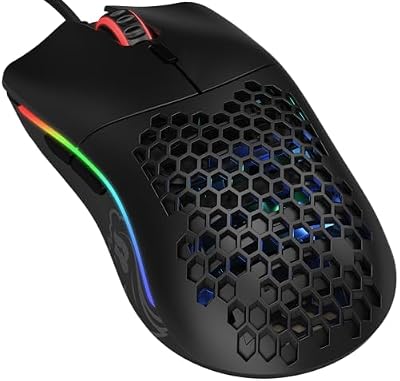
Proof the database extends beyond the big two brands: the 67-gram honeycomb Model O appears in libratbag’s device files, so its DPI stages, six buttons and RGB strips are configurable in Piper even though Glorious’s own software is Windows-only.
- Sensor: Pixart 3360 optical, up to 12,000 DPI
- Buttons: 6
- Lighting: RGB strips along both sides
- Weight: 67 g
- Switches: Omron mechanical, maker-rated for 20 million clicks
How to choose
Choose the mouse and the software together. Start with the libratbag device list and treat it as the shortlist: a model named there, in its exact form, is configurable on Linux, and a model absent from it is a pointing device with factory settings. Within the list, decide how much configuration depth you need — a G502 HERO exposes nearly everything, while simpler models may offer stages and buttons only, which is still everything most players change.
Then weigh the remaining variables as hardware questions. Wired models such as the G502 HERO, Rival 3 and Model O remove battery and receiver concerns entirely. On wireless models Piper configures the mouse itself, while receiver pairing on Logitech hardware belongs to Solaar, its companion tool. Finally, keep a realistic firmware plan: any mouse here may one day want a Windows session for an update, so a dual boot or a second machine remains part of a Linux peripheral toolkit.
Who should skip this
Skip Piper if your mouse is not in the libratbag database and its factory defaults already suit you — installing the stack changes nothing for unsupported hardware. Skip it if your setup depends on vendor-only features such as firmware updates delivered in software, deep macro libraries or automatic per-game profile switching. And skip the whole question if you game on Windows, where the vendor suites already do this job in one place.
FAQ
Does Piper work on a Steam Deck?
Piper can be installed in desktop mode, and a supported mouse connected through a dock configured there. Settings saved to onboard memory then apply in game mode too, because they live in the mouse; settings a mouse cannot store onboard cannot travel the same way.
My mouse is plugged in but Piper shows nothing. Why?
The usual cause is that the exact model is not in the libratbag device database, or the installed libratbag version predates its entry. Check the model against the project’s device list and consider a newer libratbag from the distribution’s updates or backports before assuming the hardware is at fault.
Can Piper damage or brick a mouse?
Piper writes ordinary configuration — stages, buttons, lighting, profiles — through the protocols the hardware exposes for that purpose, and settings can be reset to defaults. It does not flash firmware, which is where update risk normally lives.
Is ratbagctl a replacement for Piper?
ratbagctl is the command-line face of the same daemon and exposes the same settings, which suits scripts, dotfiles and remote sessions. Piper remains the easier way to explore what a particular mouse actually exposes, since its windows only show controls the device reports. Both write to the device identically.
Final verdict
Piper and libratbag do not replicate the vendor suites, and claim no more. What they provide is the core of mouse configuration — DPI stages, report rate, button assignments, lighting and onboard profiles — on Linux, for a documented list of real gaming mice, with settings stored in the hardware where they belong. Firmware updates and suite extras remain Windows errands, but occasional ones. Buy from the device list, configure once in Piper, and the mouse simply keeps its personality on any machine it visits.










