

On Windows, every racing wheel ships with a vendor control panel for rotation range, force feedback strength and profiles. On Linux those panels do not exist, and for years the settings lived in obscure system files. Oversteer fills that gap: a free, open-source graphical manager that puts the wheel settings your driver exposes into one window.
It is also widely misunderstood: Oversteer is a configuration layer, not a driver, and it cannot make an unsupported wheel work. This deep dive explains what it changes, which wheels it recognizes, which driver sits underneath each one, and the permissions step that decides whether it runs smoothly.
As an Amazon Associate, we earn from qualifying purchases.
Quick answer
Oversteer is a free manager that configures racing wheels on Linux: rotation range, force feedback gain, autocentering, pedal behaviour and per-game profiles. It adds no hardware support, so your wheel needs a working driver underneath it, in-kernel or from a community project. With the udev permissions installed, it replaces the vendor software Windows players use.
What Oversteer actually changes
When the device and the driver support it, Oversteer can change the rotation range, switch the emulation or working mode, combine the accelerator and brake pedals for games expecting a single axis, set autocentering strength, and adjust force feedback gain. Settings are stored as device configuration profiles, so a tight rally range and a wide truck-simulator range can live side by side.
An overlay window can display and adjust the range while you drive, and supported wheels can change range from their own buttons. The app also includes hardware performance tests and an FFB meter using the wheel’s LEDs or the overlay to show clipping.
Some features depend on the driver rather than the app. Combining the accelerator and clutch pedals, a global force feedback gain, per-effect-type gains and the FFB meter are documented as not supported with the in-kernel modules. Where a driver lacks hardware support for them, Oversteer falls back to the Linux input API, resets the values at each start, and games can override them. That is a driver limit surfaced honestly, not a bug in the manager.
A manager, not a driver
The project states its boundary plainly: Oversteer manages steering wheels using the features provided by the loaded modules, and it does not provide hardware support. A driver module still has to enable the wheel underneath it. Most wheels are at least recognized as input devices, but without a specific driver there is no force feedback to configure.
That split explains the whole Linux wheel landscape. The kernel ships a Logitech driver family covering the Driving Force line, the G25, G27, G29 and G920. The community new-lg4ff module, from the same maintainer as Oversteer, replaces it on PlayStation-side Logitech wheels and adds more effects. Thrustmaster force feedback comes from community modules: hid-tmff2 for the T300 RS, T248 and TS-XW Racer, and t150_driver for the T150 and TMX. Fanatec bases rely on hid-fanatecff. Oversteer sits above whichever is loaded and presents one consistent interface.
It also means Oversteer cannot update wheel firmware; vendor updaters remain Windows software.
Which wheels Oversteer recognizes
The recognized list falls into three groups. First, wheels on the default in-kernel Logitech module: the Wingman Formula GP and Formula Force GP, Driving Force and Formula EX, Driving Force Pro, Driving Force GT, Momo Force and Momo Racing Force, Speed Force Wireless, G25, G27, the G29 in its PS3 mode, the G920, and the G923 for Xbox, supported since Linux 6.3. The open-source OpenFFBoard controller is recognized too.
Second, wheels needing a custom module for force feedback: the G923 for PlayStation and PC with new-lg4ff, the Thrustmaster T150 and TMX with t150_driver, the T300 RS, T248 and TS-XW Racer with hid-tmff2, and the Fanatec CSL Elite, CSL Elite PS4, ClubSport V2 and V2.5, Podium DD1 and DD2, and CSL DD and GT DD Pro with hid-fanatecff.
Third, wheels recognized but without driver support, so force feedback will not work: the Thrustmaster TX, T500 RS, T80, Ferrari 458 and the older Thrustmaster Force Feedback Racing Wheel.
The project warns that a place on the recognized list does not imply good hardware support, and that buyers should not rely on it alone. The maintainer’s own testing covers a single Logitech G29. Treat recognition as a starting point and check the driver project’s page for the state of your exact model.
Installing Oversteer and the permissions step
Installation routes cover most distributions. An AppImage runs anywhere without installing. Arch users have an AUR package and Gentoo an ebuild, a Flatpak is published on Flathub, and source builds use meson and ninja with the listed Python and GTK dependencies.
The step that trips people up is permissions: writing wheel settings means writing to driver files that a normal user account cannot write by default. A source install places udev rules automatically, taking effect after a reboot, or immediately after reloading the rules and re-triggering device events. The rules ship as three files covering Fanatec, Logitech and Thrustmaster hardware.
Flatpak users get one extra manual step: the permission files are not installed by the Flatpak package, so the three rules files must be copied into the system’s udev rules directory by hand, followed by the same reload or reboot. Skip it and the app asks for an administrator password whenever it writes settings, and some driver features stay unavailable to games. Stale rules from older installs can also conflict, and the project advises removing them if permissions misbehave.
Profiles and companion mode
Profiles are where Oversteer earns its place. A profile holds the range, gain, autocenter and pedal settings for one game or car class, and can be switched from the window, the wheel’s buttons, or automatically at launch.
The companion mode handles the automatic part. A launcher can run Oversteer with a chosen profile, then start the game; when the game exits, Oversteer closes too. The project documents this pattern for Steam launch options, passing the profile name and the game’s launch command through Oversteer. It can also pause before the game starts, so you can adjust a setting manually instead of trusting the saved profile.
The wheels to use with it
Logitech G29 Driving Force Racing Wheel and Pedals
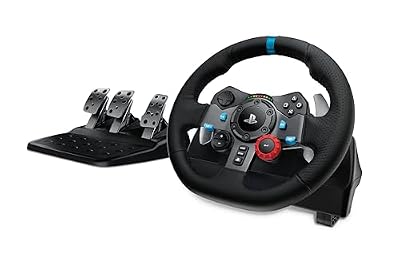
The G29 is the reference wheel for this ecosystem: the one model the Oversteer maintainer tests with, and its driver path is the simplest on this page. Dual-motor force feedback, a leather wheel cover and a separate floor pedal unit make it the default starting point for Linux sim racing.
- Platform: PlayStation 5, PlayStation 4, PC and Mac
- Force feedback: dual-motor, with helical gearing
- Rotation: up to 900 degrees
- Pedals: separate three-pedal floor unit
- Linux driver: in-kernel Logitech driver, with optional new-lg4ff for extra effects
- Tier: budget
Logitech G923 Racing Wheel and Pedals for Xbox and PC
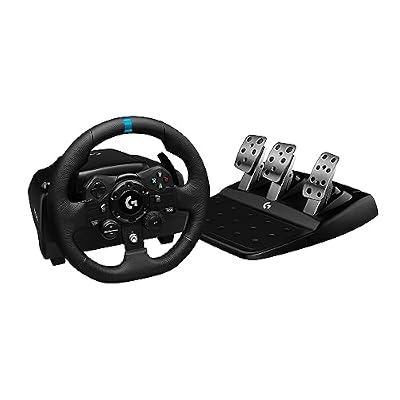
The Xbox edition of the G923 is the cleaner Linux buy of the two variants: the in-kernel driver has supported it since Linux 6.3, so no out-of-tree module is required. TRUEFORCE feedback and dual-clutch launch control carry over from the Windows feature set, while new-lg4ff does not cover this edition.
- Platform: Xbox Series X|S, Xbox One and PC
- Force feedback: TRUEFORCE, gear-driven dual motor
- Rotation: up to 900 degrees
- Pedals: three-pedal unit with progressive brake spring
- Linux driver: in-kernel Logitech driver since Linux 6.3
- Tier: mid-range
Logitech G920 Driving Force Racing Wheel and Pedals

The G920 is the Xbox-side twin of the G29 and sits in the in-kernel Logitech list, so Oversteer manages its range, gain and profiles with no extra modules. It suits a household splitting time between an Xbox and a Linux PC.
- Model number: 941-000121
- Platform: Xbox Series X|S, Xbox One, PC and Mac
- Force feedback: dual-motor, with helical gearing
- Rotation: up to 900 degrees
- Pedals: separate three-pedal floor unit
- Linux driver: in-kernel Logitech driver
- Tier: budget
Thrustmaster T300 RS GT Edition Racing Wheel

The T300 RS GT is the step up into belt-driven, brushless hardware, with a detachable rim and the three-pedal T3PA set in the box. On Linux it enumerates through the kernel’s Thrustmaster handling, but force feedback needs the community hid-tmff2 module, after which Oversteer exposes its range and gain settings.
- Platform: PlayStation 5, PlayStation 4 and PC
- Force feedback: brushless motor, belt-driven
- Rotation: up to 1080 degrees
- Pedals: T3PA three-pedal set
- Linux driver: hid-tmff2 community module for force feedback
- Tier: premium
Thrustmaster T248 X Racing Wheel and Pedal Set

The T248 X pairs a hybrid-drive base with a built-in dashboard display and the T3PM magnetic pedal set, whose brake offers four pressure modes. Like the T300, its Linux force feedback runs through hid-tmff2, with Oversteer managing range, modes and profiles above it.
- Platform: Xbox Series X|S, Xbox One and PC
- Force feedback: hybrid drive system
- Pedals: T3PM magnetic set, four brake pressure modes
- Extras: built-in display, magnetic paddle shifters
- Linux driver: hid-tmff2 community module for force feedback
- Tier: mid-range
How to choose
Start from the driver, not the badge. If you want zero module maintenance, stay with the in-kernel Logitech list, where updates arrive with your distribution’s kernel. If you will maintain a DKMS module through kernel updates, the Thrustmaster and Fanatec ranges open up, each documented by its driver project.
Next, check your model against both lists that matter: Oversteer’s recognized devices and the driver’s supported hardware. A wheel recognized by Oversteer but missing from its driver’s force feedback list will steer and shift but never push back.
Finally, decide how you will drive the settings. Players switching between sims with very different ranges benefit most from profiles and companion mode. If you race one title at one range, in-game settings may be enough and Oversteer becomes an occasional utility.
Who should skip this
Skip Oversteer if your wheel is on the recognized-but-unsupported list, such as a T500 RS or TX: no manager can add the missing driver. Skip it if vendor software is the point, for example firmware updates or proprietary tuning suites, because those remain Windows-only. And skip it if your one game already exposes every setting you change; its value is profiles and consistency across titles.
FAQ
Does Oversteer make an unsupported wheel work on Linux?
No. Oversteer configures wheels a driver already supports. It provides no hardware support of its own, and wheels without a force feedback driver stay without force feedback whichever manager is installed.
Why does Oversteer ask for an administrator password?
The udev permission rules are not installed, so the app cannot write to the driver files. Installing the three wheel permission rules and reloading udev, or rebooting, removes the prompt. Flatpak installs need that copy step done manually.
Do settings stay applied when Oversteer is closed?
Mostly, yes. The project notes it does not need to be running for changed settings to remain, although some features need it open. The exception is global gain and autocenter on drivers without hardware support for them, which Oversteer reapplies at startup.
Can Oversteer load a different profile for each game?
Yes. Profiles can be applied from the window, from wheel buttons, or automatically through companion mode: the launcher starts Oversteer with your profile before the game and closes it at exit.
Final verdict
Oversteer is the missing control panel for Linux sim racing: a small, honest tool that does configuration well and never pretends to be a driver. If your wheel is on the in-kernel Logitech list, install it, add the udev rules, and it simply works. If your wheel needs a community module, Oversteer is still the friendly face on top, but the driver underneath decides how good the force feedback can be. Check both lists before buying.










