

- Top Pick: Samsung 870 EVO 1TB SATA SSD
- Runner-up: Crucial MX500 1TB SATA SSD
- Also consider: Crucial 16GB DDR3L Memory Kit
An old laptop is not a small desktop, and picking a distro for one is a different job. The graphics chip is soldered down, the memory may be soldered too, the battery is tired, and the Wi-Fi card has to work. The good news is that a huge back catalogue asks very little of hardware, and a light install leaves more of a weak machine for the game than a decade of accumulated Windows cruft does. The honest news is that no distro changes what the silicon is: the ceiling is set by the chip, not the boot screen.
This site already has a guide to distros for older gaming PCs, a good map for desktops. This one is narrower: laptops only — thermal limits, hybrid graphics switching, soldered versus socketed memory, battery wear, and the two upgrades a laptop actually accepts. If your machine is a desktop, the older-PC guide is the right read. If it folds shut, start here.
As an Amazon Associate, we earn from qualifying purchases.
Quick answer
For most old gaming laptops, install Linux Mint Xfce or Xubuntu with a Vulkan-capable graphics chip and at least 8 GB of memory, and Lubuntu without one. Add a SATA SSD before anything else, treat modern big-budget games as out of reach, and expect the realistic library to be indie titles, older Proton releases, emulation, and lightweight esports games.
The honest ceiling, generation by generation
What an old laptop can play is decided by one question first: does its graphics chip have a working Vulkan driver? Proton, the layer that runs Windows games on Linux, translates DirectX into Vulkan, so Vulkan support is the gate for most of the Steam catalogue.
Intel integrated graphics before the Broadwell generation have no usable Vulkan path on Linux. A laptop built around Intel HD 4000 or older is an OpenGL machine: native indie games, older native ports, and emulation of 16-bit and 32-bit era consoles are its library, and most Proton titles are closed to it. Broadwell and Skylake-era Intel graphics gained a Vulkan driver, and the Kaby Lake and Coffee Lake chips sold as HD 620 and UHD 620 run a respectable range of Proton games at low settings: older big releases, indie hits, and lighter esports titles are realistic; current big-budget games are not.
AMD’s older APUs sit in a similar band: the integrated Radeon graphics in A-series and early Ryzen mobile chips have Vulkan support through the open driver stack, and a Ryzen 5 2500U or 3500U laptop remains a usable light gaming machine. Dedicated GCN mobile chips also keep Vulkan support, though the oldest parts need the amdgpu kernel driver enabled rather than the legacy radeon one. Old NVIDIA mobile chips are the awkward case, covered below: a GTX 850M or 950M laptop can still run a fair slice of the Proton catalogue on its legacy driver, while anything older is mostly an emulation and indie machine. Across every brand, two limits are fixed — raw speed, which no software changes, and heat.
Desktop weight is a laptop problem
On a desktop with memory to spare, the desktop is a matter of taste. On a laptop with 4 or 8 GB, it is a gaming decision: every background process competes with the game for the same small pool, and integrated graphics borrow from it too.
The light desktops — Xfce and LXQt — idle using the least memory and are the safe default for 4 GB machines. MATE sits a step heavier and still behaves well at 8 GB. KDE Plasma is leaner than its reputation but fits 8 GB and up better, and GNOME is the heaviest mainstream choice. Compositing effects also cost frame time on weak integrated graphics, so use your desktop’s setting to suspend compositing for fullscreen applications. Keep the browser closed while gaming, too: a browser with a few tabs can hold more memory than the game expects to get. And on a 4 GB machine, set up zram or a swap file at install time.
The old-driver reality
Driver support, not the distro’s release date, is where old laptops succeed or fail, and NVIDIA is the hard case. NVIDIA moves aging cards onto legacy branches that stop gaining features: the 470 series is the end of the line for Kepler-generation mobile chips like the GeForce GT 740M and GTX 660M, and Fermi-era cards sit on the even older 390 branch. Those legacy drivers do support Vulkan on the cards that have it, but they are frozen: fixes for new Proton versions arrive slowly or never, and some distros have stopped packaging the oldest branches entirely. The open-source nouveau driver is not a gaming fallback here, because it cannot control these chips’ clock speeds properly on most models.
AMD and Intel owners have the easier decade. Their drivers live in the kernel and the Mesa stack, so a current distro generally improves support for old Radeon and Intel hardware rather than dropping it. The one trap is the oldest Radeon parts defaulting to the legacy radeon kernel driver, which lacks the Vulkan path amdgpu provides; enabling amdgpu for those generations is a documented step, worth checking before you install. So: look up your chip, note which driver branch covers it today, and for NVIDIA pick a distro known to package that branch — the Ubuntu family has the longest track record here — and stay on a stable release.
The two upgrades that matter
A laptop accepts very few upgrades, and for gaming two of them do nearly all the work. The first is storage. If the machine still boots from a spinning hard drive, a 2.5-inch SATA SSD is the single largest improvement available: the system starts faster, games load without the hitches a slow disk causes, and shader stalls shrink. Almost every laptop of the era has a standard bay, and the swap is a few screws.
The second is memory, with a warning: check whether your model has sockets at all. Many thin machines solder the memory down, and no kit fixes that. If there are two SODIMM slots, filling both to reach 8 or 16 GB also gives integrated graphics dual-channel bandwidth, which it genuinely uses. Match the generation — DDR3L for the older machines, DDR4 for the later ones — and the voltage on the label of the stick you remove. Beyond those two, the rest is maintenance: a worn battery is a replacement part, not a distro problem, and dust in the fan plus dried paste are the usual causes of throttling, so clean the fan before blaming the software.
How to choose
Match the distro to the machine in front of you, not to a ranking. With a Vulkan-capable AMD or Intel chip and 8 GB of memory, Linux Mint Xfce or Xubuntu gives you the friendliest install and the widest pool of written help. With 4 GB of memory or a pre-Vulkan Intel chip, Lubuntu’s LXQt desktop leaves the most room for the games that chip can still run; MX Linux is a solid alternative in the same weight class.
If the laptop carries an older NVIDIA chip, stay in the Ubuntu family and on a stable release, for the packaging reasons above. Gaming-focused distros such as Bazzite are excellent on newer hardware, but legacy NVIDIA support is not their promise. Whichever you choose, boot the live USB first and confirm Wi-Fi, sound, brightness keys, and sleep work on your model — that check beats any comparison table.
Who should skip this
Skip the revival if your goal is current big-budget releases or competitive online titles whose anti-cheat blocks Linux entirely; an old laptop on any system will not get you there, and a newer machine is the honest answer. Skip it if the laptop has a failing battery or a rattling fan — fix the hardware or retire the machine. And skip it if the laptop is your only work computer with a deadline attached.
The revival kit
Samsung 870 EVO 1TB SATA SSD
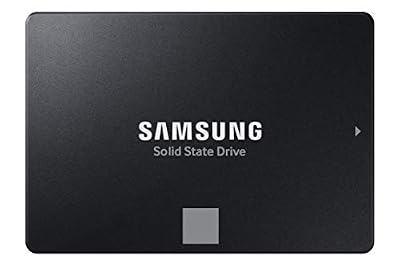
The default first upgrade, in the standard bay size nearly every laptop of the era uses.
Specs:
- Capacity: 1 TB
- Form factor: 2.5-inch, 7 mm
- Interface: SATA III 6 Gb/s
- Model: MZ-77E1T0B/AM
- Maker-stated speeds: up to 560 MB/s read, 530 MB/s write
- Maker-stated endurance: 600 TBW
Crucial MX500 1TB SATA SSD

The mid-range alternative in the same bay size; in an old laptop the experience is effectively the same as the Samsung.
Specs:
- Capacity: 1 TB
- Form factor: 2.5-inch, 7 mm
- Interface: SATA III 6 Gb/s
- Model: CT1000MX500SSD1
- Maker-stated read: up to 560 MB/s
- Maker-stated endurance: 360 TBW
Crucial 16GB DDR3L Memory Kit

For socketed DDR3-generation machines. Two matched sticks reach the 16 GB ceiling most of these laptops support, with dual-channel memory for the integrated graphics.
Specs:
- Capacity: 16 GB kit (2 x 8 GB)
- Type: DDR3/DDR3L 1600 MT/s, PC3-12800
- Form factor: 204-pin SODIMM, non-ECC
- Latency: CL11
- Voltage: 1.35 V
- Model: CT2KIT102464BF160B
Crucial 32GB DDR4 Memory Kit
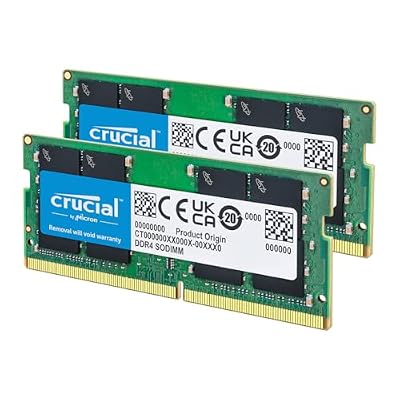
For later socketed machines on DDR4; it downclocks to the slower speeds older controllers require.
Specs:
- Capacity: 32 GB kit (2 x 16 GB)
- Type: DDR4 3200 MT/s, PC4-25600, downclockable to 2933 or 2666 MT/s
- Form factor: 260-pin SODIMM, non-ECC
- Latency: CL22
- Voltage: 1.2 V
- Model: CT2K16G4SFRA32A
KLIM Wind Laptop Cooling Pad
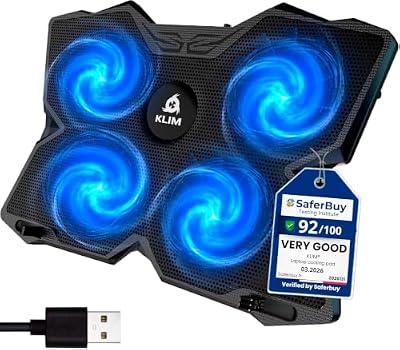
A four-fan pad for the laptop that throttles through long sessions. It will not fix dust or dried paste, so clean the machine first; on a clean machine it doubles as a stand.
Specs:
- Fans: 4, maker-stated up to 1200 RPM
- Fit: laptops up to 17 inches
- Power: USB, with pass-through port
- Maker: KLIM
FAQ
Will Linux make my old laptop faster for games than Windows?
A light desktop leaves more memory and processor time for the game, helping most on 4 and 8 GB laptops. It does not make the graphics chip faster, so treat any improvement as a bonus, not a promise.
My laptop has an old NVIDIA chip. Which distro is safest?
An Ubuntu-family stable release, such as Linux Mint Xfce or Xubuntu, which has the longest record of packaging NVIDIA’s legacy branches. Check which branch covers your card first, and keep the live USB test as your safety net.
Is 4 GB of memory enough?
For native indie games, older titles, and emulation, yes, with a light desktop such as LXQt and zram or swap enabled. For anything more demanding through Proton, 8 GB is the realistic floor — and if your laptop has free SODIMM slots, memory is the second upgrade after the SSD.
Can I keep Windows alongside Linux on the laptop?
Yes. Most installers offer to shrink the Windows partition and install alongside it, the usual arrangement on a single-bay laptop. Keep Windows for any anti-cheat title that refuses Linux, and give each system its own Steam library partition.
Final verdict
An old gaming laptop on Linux is a back-catalogue machine, and judged that way it is a good one: a light distro, a SATA SSD, and socketed memory where allowed will carry years of indie games, older releases, and emulation. Choose Mint Xfce or Xubuntu for Vulkan-capable hardware, Lubuntu for the weakest machines, stay in the Ubuntu family for old NVIDIA chips, and be honest about the ceiling.










