

- Top Pick: 8BitDo Ultimate Mobile Gaming Controller
- Runner-up: GameSir G8 Galileo Type-C Mobile Gaming Controller
- Also consider: Black Shark Magnetic Phone Cooler
An old phone sitting in a drawer can become a dedicated cloud gaming handheld. Cloud games run on remote servers and stream to the screen, so the phone needs a decent screen, steady Wi-Fi, and a battery that holds up, not a powerful graphics chip. The trick is treating the second phone as a single-purpose device, stripped back to gaming, while the main phone stays free for calls and messages.
This guide walks through choosing the phone, setting it up, sorting the network, and picking the five pieces of kit that make the biggest difference.
As an Amazon Associate, we earn from qualifying purchases.
Quick Answer
A second phone works well for cloud gaming when it has a bright screen, Wi-Fi 5 or better, a healthy battery, and a USB-C port. Wipe it, install only the cloud gaming apps you use, pair a controller, and keep it charged and cool. A telescopic controller, a cooler, a power bank, and a stand turn a spare handset into a proper handheld.
Pick the phone first, then the kit
Start with the screen, because it is the part you look at for every minute of play. A bright display with a clean panel matters more than a fast processor, since the heavy work happens on a remote server. Check for dead pixels, a cracked screen, or a dim panel before you commit. Next, check the battery health screen in the phone settings. A battery that drops quickly under video playback will drop faster during streaming. If it is badly worn, plan on playing plugged in or with a power bank nearby.
Wi-Fi is the third check. The phone should support Wi-Fi 5 at minimum, with Wi-Fi 6 a bonus, and connect on the 5 GHz band. A phone that only holds a 2.4 GHz connection will struggle with the video stream. Finally, check the port and the operating system. A USB-C port opens up wired controllers, and the phone must run a version of Android or iOS recent enough to install the cloud gaming apps you plan to use.
Step one: wipe it and make it gaming only
A dedicated gaming phone works best when it behaves like a console, not like a second daily phone. Start with a factory reset, which clears old accounts, leftover apps, and background services that drain the battery and compete for Wi-Fi. Back up anything you want to keep first, because a reset removes photos, messages, and saved logins from the device. After the reset, sign in with the account you use for gaming and install only what the setup needs: one or two cloud gaming apps and a controller companion app if your controller needs one. Skip social apps, email, and messaging. Turn off notifications for everything except the gaming apps, set a longer screen timeout, and set apps to update only on Wi-Fi when idle.
Step two: sort the network before you play
Cloud gaming lives or dies on the connection. Play on the 5 GHz Wi-Fi band at home, close to the router, and avoid the crowded 2.4 GHz band for gaming sessions. Before a long session, start a game and watch for stuttering, blurry video, or input delay. If the picture softens whenever someone else starts a video call or a download, the network is the bottleneck, not the phone. Move closer to the router, or ask others to pause heavy downloads. Mobile data is a backup, not a first choice, since streaming uses a large amount of data and a weak signal shows up as lag.
The kit: five pieces that earn their place
The phone is the screen and the decoder. Everything else solves a specific problem: controls, heat, power, and holding the phone still. Buy the controller first, because touch controls are the weakest part of phone gaming, then add cooling and power, and finish with a stand.
8BitDo Ultimate Mobile Gaming Controller

The 8BitDo Ultimate Mobile Gaming Controller turns an Android phone into a handheld with real sticks, triggers, and buttons. It is telescopic, so the phone sits in the middle and the grips sit on either side. Hall Effect joysticks and triggers use magnets rather than physical contacts that wear down over time. It connects over Bluetooth and carries its own battery. The fit range covers phones between 100 and 170 mm in length.
Specs
| Spec | Detail |
|---|---|
| Connection | Bluetooth |
| Compatibility | Android phones 100 to 170 mm in length |
| Joysticks and triggers | Hall Effect |
| Battery | 300 mAh |
| Weight | 236 grams |
GameSir G8 Galileo Type-C Mobile Gaming Controller

The GameSir G8 Galileo is the wired alternative, and it suits a second phone with a USB-C port, whether that phone runs Android or is an iPhone 15 series model. It connects through USB-C, so there is no Bluetooth pairing step and no controller battery to charge. Hall Effect joysticks and triggers are listed in the product description, along with a 3.5 mm audio jack and pass-through charging, so the phone can charge while it sits in the controller. The listed phone fit is 110 to 185 mm in length and 13 mm or less in depth.
Specs
| Spec | Detail |
|---|---|
| Connection | USB-C |
| Compatibility | Android and iPhone 15 series, phones 110 to 185 mm long |
| Joysticks and triggers | Hall Effect |
| Audio jack | 3.5 mm |
| Pass-through charging | Yes |
| Weight | 252 grams |
Black Shark Magnetic Phone Cooler
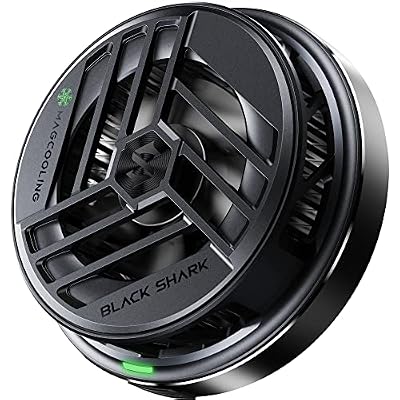
A second phone running a cloud stream for an hour or more will warm up, and a warm phone can dim its screen or slow down. The Black Shark Magnetic Phone Cooler attaches to the back of the phone and pulls heat away with a fan and a cooling plate. It uses magnets to hold itself in place, with a magnetic sticker in the box for phones without a magnetic back. The listed fan speed runs up to 7200 RPM, with 112 heat transfer fins and a listed power draw of 10 watts through USB-C. It weighs 73 grams and needs its own USB-C power source. Remove it before wireless charging, since the magnet can interfere with charging.
Specs
| Spec | Detail |
|---|---|
| Attachment | Magnetic, with sticker included |
| Fan speed | Up to 7200 RPM |
| Cooling fins | 112 heat transfer fins |
| Power | 10 watts through USB-C |
| Weight | 73 grams |
Anker Nano Power Bank

A dedicated gaming phone still needs power, and a power bank is the simplest way to keep it running through long sessions. The Anker Nano Power Bank carries 10000 mAh of capacity with a built-in USB-C cable, so there is no separate cable to lose. The built-in cable plugs straight into the second phone, and a second port is available for another device. The listed maximum output is 30 watts, and the power bank itself recharges at up to 30 watts, which is enough to charge a phone while it streams. Keep it charged between sessions and store it with the gaming phone.
Specs
| Spec | Detail |
|---|---|
| Capacity | 10000 mAh |
| Built-in cable | USB-C |
| Maximum output | 30 watts |
| Recharging | Up to 30 watts |
| Size | 10.4 by 5.2 by 2.6 cm |
UGREEN Magnetic Phone Stand

The last piece of the kit is for sessions when the second phone is not in a controller. The UGREEN Magnetic Phone Stand holds the phone upright on a desk or a table, which suits games played with a separate Bluetooth controller or touch controls. It is made from aluminum, with two metal arms and three rotating shafts that adjust the height and angle. A strong magnet holds a compatible phone in place, and a metal ring is included for phones and cases that are not magnetic on their own. The stand folds flat for travel and rotates through 360 degrees.
Specs
| Spec | Detail |
|---|---|
| Material | Aluminum |
| Mounting | Magnetic, with metal ring included |
| Adjustment | Two arms and three rotating shafts |
| Rotation | 360 degrees |
| Weight | 195 grams |
How to choose
Choose the controller by the phone, not by the brand. An Android-only Bluetooth controller is a poor pick for an iPhone, and a USB-C telescopic controller is a poor pick for a phone with a micro-USB port or a thick case that will not fit. Measure the phone, check the port, and confirm the operating system version before ordering. Choose the cooler by how the phone is held: a magnetic cooler suits a phone in a controller or on a stand, where the back is free. Choose the power bank by capacity and cable: a 10000 mAh bank with a built-in USB-C cable covers most evening sessions. Choose the stand by where the phone will sit: a desk stand suits home play, while a telescopic controller suits play on the sofa or on the move.
Who should skip
Skip this setup if the second phone cannot install the cloud gaming service you want. An old handset stuck on an outdated operating system will not improve with accessories, so check the app store first. Skip it if the battery is badly worn and a replacement is not practical: a phone that shuts down at a quarter charge will ruin sessions no matter how good the controller feels. Skip the cooler if the phone stays cool during normal streaming. Play a full session first, then add cooling only when heat is a real problem.
FAQ
Can any old phone work for cloud gaming?
Most phones from the last few years can work, provided they run a recent operating system, connect on 5 GHz Wi-Fi, and install the cloud gaming app you want. The screen, battery, and Wi-Fi matter more than the processor.
Does a second phone need a SIM card for cloud gaming?
No. A second phone can play cloud games over Wi-Fi with no SIM card installed. A SIM card is only useful away from Wi-Fi on mobile data, which is a weaker choice for streaming than home Wi-Fi.
Is a wired or Bluetooth controller better for a second phone?
A wired USB-C controller suits a phone with a USB-C port, since it needs no pairing and no separate charging. A Bluetooth controller suits a phone where a wired controller will not fit. Either type works well, so the phone decides.
How do I keep the second phone from overheating during long sessions?
Take the case off, keep the phone out of direct sunlight, and play in a cool room. A magnetic cooler helps when the phone still runs hot. If the screen dims, pause and let the phone cool before continuing.
Final verdict
A second phone is one of the cheapest ways into a dedicated cloud gaming setup, because the screen and the decoder are already in the drawer. The work is in the setup: wipe the phone, keep it gaming only, sort the Wi-Fi, and add a controller that fits. Cooling, power, and a stand then turn a spare handset into a handheld that is ready whenever the main phone is busy.










