

Cloud gaming family sharing sounds simple until a second person in the house tries to play. One service may share a subscription through a home console, another may tie everything to a single account, and a third may offer no family option.
This guide explains the account sharing rules service by service, covering Xbox Cloud Gaming, GeForce Now, PlayStation Plus cloud streaming, Amazon Luna, and Boosteroid, with the focus on accounts, subscriptions, and simultaneous play.
As an Amazon Associate, we earn from qualifying purchases.
Quick Answer
Cloud gaming family sharing has no single rule. Xbox and PlayStation share benefits through one designated home console, GeForce Now and Boosteroid tie a subscription to one person and one session at a time, and Luna has no family plan. In most households, each adult who wants to play at the same time needs a separate account.
Xbox Cloud Gaming and Game Pass
Xbox sharing works through a home console, not a family membership. When you designate a console as your Home Xbox, anyone who signs in there with their own profile can play your digital games and use your Game Pass benefits, even when you are not signed in. Microsoft allows one Home Xbox at a time, changeable up to five times in a year.
Away from the Home Xbox, the owning account must stay signed in and connected for other profiles on that console to use them. PC Game Pass is tied to the Microsoft account that pays for it, and Microsoft does not list a PC family sharing feature. Microsoft tested a Game Pass Friends and Family plan in Ireland and Colombia in 2022, but that test should not be treated as a current plan.
GeForce Now
GeForce Now is a personal service under its terms of use. NVIDIA grants a personal, non-exclusive, and non-transferable licence for one session at a time, and the terms state that you may not sell, rent, sublicense, transfer, or distribute any part of it. Sharing one account between different people is therefore against the terms.
The same person can use their own account on many of their own devices, because the licence follows the person rather than a single machine. Only one session can run at a time, so two people cannot stream different games at once from the same membership. GeForce Now also streams games you already own on stores such as Steam, so Steam Family Sharing can share a Steam library, but each player still needs their own GeForce Now account to stream.
PlayStation Plus
PlayStation sharing is a console setting called Console Sharing and Offline Play on PS5. When you enable it for the account that owns the games, anyone who signs in on that PS5 with their own account can play the games you bought and downloaded, even when the console is offline. You can enable it on only one PS5 at a time, plus one primary PS4.
Several PlayStation Plus benefits travel with that setting. Other accounts on the shared console can use online multiplayer, play downloaded monthly Plus games, play games bought with a Plus discount, and play games from the Game Catalog and Classics Catalog, depending on the plan. Other benefits stay with the subscriber alone: another account cannot buy products at a Plus discount, redeem monthly Plus games on its own account, or use the subscriber cloud storage or automatic patch downloads.
Amazon Luna
Amazon Luna has no family plan and no profiles feature inside Luna itself. An Amazon forum moderator reply states that creating additional profiles on a Luna account is not a feature currently available, so Luna does not give each family member a separate profile or save slot under one subscription.
Each person who wants to keep individual progress needs their own Amazon account to sign in to Luna. Amazon Household, now also called Amazon Family, links the accounts of people who live together so they can share select Prime benefits. That link does not turn one Luna subscription into a shared family subscription.
Boosteroid
Boosteroid is the strictest service in this guide. Its help centre states that an account belongs to the account holder alone, that sharing or selling an account is prohibited, and that creating an account for someone else is also prohibited. More than one active account for one person is not allowed either.
Boosteroid does not list a family plan, a second seat, or a household option. Each person who wants to play needs their own account and subscription. The help centre does not publish a simultaneous-use allowance for shared accounts, because shared accounts are not allowed.
How Cloud Gaming Family Sharing Compares
| Service | Sharing model | Simultaneous use | Family plan |
|---|---|---|---|
| Xbox Cloud Gaming | One Home Xbox shares Game Pass | One shared console, plus owner signed in elsewhere | Not stated |
| GeForce Now | Personal, non-transferable account | One session at a time per account | Not stated |
| PlayStation Plus | One PS5 with Console Sharing, plus one PS4 | Shared console only | Not stated |
| Amazon Luna | No profiles, each person needs an Amazon account | One account at a time per subscription | Not stated |
| Boosteroid | One person, one account, no account sharing | Not stated for shared accounts | Not stated |
Devices That Make Sharing Practical
Sharing rules decide who can play. Hardware decides how easily a household switches between accounts.
Logitech G Cloud Gaming Handheld

The Logitech G Cloud Gaming Handheld suits a household where one person wants to play without taking over the main television. It runs Android, connects over Wi-Fi, and gives direct access to Xbox Cloud Gaming and GeForce Now, with each person signing in to their own cloud account.
Specs
| Feature | Detail |
|---|---|
| Display | 7-inch 1080p touchscreen |
| Storage | 64 GB |
| Connectivity | Wi-Fi and Bluetooth |
Amazon Luna Controller
The Amazon Luna Controller is the official controller for Luna, and it fits a household that plays Luna on a shared television. It connects through Cloud Direct over Wi-Fi to Amazon game servers, so a player can pause on one screen and pick up on another without repairing the controller. It also works over Bluetooth and USB.
Specs
| Feature | Detail |
|---|---|
| Connection | Wi-Fi Cloud Direct, Bluetooth, and USB-C |
| Power | 2 AA batteries included |
| Weight | 281.5 grams with batteries |
Backbone One Mobile Gaming Controller USB-C
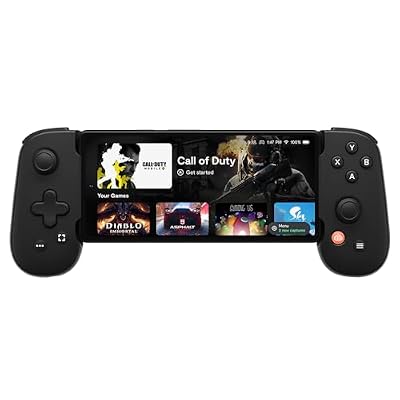
The Backbone One Mobile Gaming Controller turns a phone into a private cloud gaming screen, which helps when two people want to play at different times. It clips around a USB-C phone, connects through the USB-C port for low-latency play, and needs no battery of its own. It works with Xbox Cloud Gaming, PlayStation Remote Play, GeForce Now, and Luna.
Specs
| Feature | Detail |
|---|---|
| Connection | USB-C |
| Compatibility | USB-C Android phones and iPhone 15 series |
| Battery | None, powered by the phone |
| Pass-through charging | Yes, through USB-C |
Google TV Streamer 4K

The Google TV Streamer 4K puts cloud gaming apps on a shared television, with separate Google accounts and profiles on the television itself. It supports up to 4K HDR with Dolby Vision, includes 32 GB of storage, and connects over Ethernet or Wi-Fi. It does not override the sharing rules of any cloud service.
Specs
| Feature | Detail |
|---|---|
| Resolution | Up to 4K HDR with Dolby Vision |
| Storage | 32 GB |
| Memory | 4 GB |
| Connectivity | Ethernet and Wi-Fi |
Amazon Fire TV Stick 4K Max

The Amazon Fire TV Stick 4K Max brings Xbox Cloud Gaming to a television without a console, which makes it useful for a second television. It supports Wi-Fi 6E, includes 16 GB of storage, and plays in 4K Ultra HD with Dolby Vision and Dolby Atmos on compatible apps and televisions. A compatible controller is required, and each family member signs in to their own account.
Specs
| Feature | Detail |
|---|---|
| Resolution | 4K Ultra HD |
| Storage | 16 GB |
| Wi-Fi | Wi-Fi 6E |
| Processor | Quad-core 2.0 GHz |
How to Choose
Start with where your household plays. If everyone gathers around one television and one console, Xbox and PlayStation sharing through a home console gives the most value from a single subscription. If everyone plays on separate phones, laptops, and handhelds, GeForce Now and Luna work well with separate accounts. Next, count simultaneous players: a home console covers one shared screen, not two people streaming different games at once from two rooms.
Who Should Skip
Skip a shared-account plan if two people expect to stream at the same time from one GeForce Now or Boosteroid membership, because those services allow one session at a time and prohibit sharing an account. Skip Luna as a family bundle if you expect built-in profiles, because Luna does not offer them. Skip the home console model if two consoles in different rooms both need full access without the owner signed in.
FAQ
Can two people play cloud games at the same time on one Xbox Game Pass subscription?
Two people can play on the shared Home Xbox while the owner plays elsewhere only if the owner is signed in on the other console. A single subscription does not give two consoles the same unrestricted access at the same time.
Can I share my GeForce Now account with a family member?
No, sharing a GeForce Now account between different people is against the terms, which grant a personal and non-transferable licence for one session at a time. Each player still needs their own GeForce Now account to stream.
Does PlayStation Plus sharing work on two PS5 consoles?
No, Console Sharing and Offline Play can be enabled on only one PS5 at a time, plus one primary PS4. Other accounts on that one PS5 can use shared benefits, but other accounts on a second PS5 cannot without their own subscription.
Does Amazon Luna have a family plan?
Amazon has not published a Luna family plan, and Luna does not offer multiple profiles under one account. Each person needs their own Amazon account to keep individual progress, and Amazon Household links accounts for select Prime benefits without turning one Luna subscription into a family one.
Final Verdict
Cloud gaming family sharing rewards households that match the service to the way they play. Xbox and PlayStation are the strongest choices for one shared console, because one designated console unlocks games and benefits for everyone who signs in there. GeForce Now, Luna, and Boosteroid are stricter: one person, one account, and one session at a time. Before buying a second controller, decide how many people will play at once.







