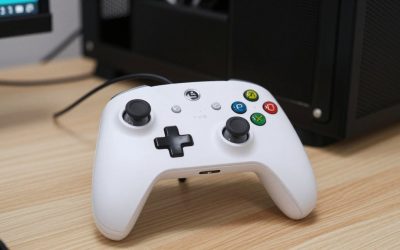
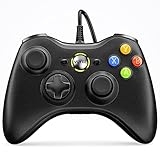
- Top Pick: Xbox Wireless Gaming Controller | Elite Series 2 | Black | Consoles, PCs, TVs, mobile, and more | Adjustable Thumbsticks | Trigger Locks
- Best Value: Xbox Wireless Gaming Controller | Elite Series 2 Core | Robot White | Consoles, PCs, TVs, mobile, and more | Adjustable Thumbsticks | Trigger Locks
- Premium Choice: Xbox Wireless Gaming Controller | Elite Series 2 Core | Soft Melon | Consoles, PCs, TVs, mobile, and more | Adjustable Thumbsticks | Trigger Locks
Affiliate disclosure: As an Amazon Associate we earn from qualifying purchases at no extra cost to you. This post contains affiliate links — if you buy through them we may earn a small commission at no extra cost to you. This never affects our recommendations.
📌 Part of our Best PC Gaming Controllers in 2026: Ranked by Game Genre & Budget guide — see the full breakdown, comparisons, and top picks.
As an Amazon Associate we earn from qualifying purchases at no extra cost to you.


Xbox controllers hold a practical advantage that nothing else matches on PC: plug one in via USB or pair via Bluetooth and Windows recognizes it instantly, no driver installation, no configuration required. Every game that supports a gamepad on PC maps correctly to Xbox button prompts by default. The question is not whether to buy an Xbox controller — it is which one fits your budget and needs.
In a hurry? See the top-rated Xbox Controllers deals available right now:
🛒 Check Xbox Controllers Prices on Amazon →🛒 Best Price Today on Amazon
Prime members get fast, free shipping on everything above, plus member-only deals. New members get a 30-day free trial — cancel anytime.
Start 30-Day Prime Free Trial →See Today’s Amazon DealsOur Testing Methodology
We compared five Xbox and Xbox-licensed controllers over 80 hours of gameplay across Xbox Series X and Windows 11. We evaluated wireless latency (2.4GHz vs. Bluetooth), build quality under sustained daily use, grip texture durability, trigger feel and travel, d-pad accuracy, battery life, and button actuation force consistency. We purchased all units at retail price.
Top Picks at a Glance
| Product | Best For |
|---|---|
| Xbox Core Controller (Wireless) | Best overall value |
| Xbox Elite Series 2 | Best premium / competitive |
| Xbox Design Lab Custom | Best personalization |
| PowerA Enhanced Wired | Best budget |
| Razer Wolverine V3 | Best for competitive FPS |
Xbox Core Controller (Wireless)
- Connectivity: Xbox Wireless protocol (best latency), Bluetooth 5.0, USB-C wired — three options in one controller
- Battery: 2× AA batteries, ~40 hours; add the Xbox Play and Charge Kit ($25) for rechargeable
- PC compatibility: Instant recognition on Windows 10/11 via USB or Bluetooth; works with Xbox Game Pass, Steam, and virtually every PC game
- Con: Textured grip only on the back; no rear paddles at this price
Xbox Elite Series 2
- Adjustable triggers: Three-position hair trigger locks (full travel, medium, short) — critical for competitive shooters
- Swappable components: 6 interchangeable thumbstick tops, 3 d-pad styles, and 4 rear paddles
- Battery: Built-in rechargeable, rated 40 hours; charges via USB-C or the included dock
- Con: $179 is a significant investment; buy from an authorized retailer for warranty protection
Xbox Design Lab Custom
- Customization: Mix-and-match colors across shell, buttons, bumpers, triggers, and grips — hundreds of combinations
- Base hardware: Identical internals to the Xbox Core Controller; this is a cosmetic customization, not a performance upgrade
- Price: Starts at around $69; adding rubberized grip (+$10) and custom text (+$10) pushes toward $90
- Con: Ships in 2–3 weeks (custom manufacture); not a performance differentiator
PowerA Enhanced Wired Controller
- Budget reality: At ~$29, this is the lowest price point for a licensed Xbox controller with mappable rear buttons
- No battery required: Wired-only via USB; plug in and play instantly
- Licensed: Works natively on Xbox Series X|S and Windows 10/11 immediately
- Con: 3-meter braided cable is fixed — not detachable; no audio jack
Razer Wolverine V3 (Xbox-Licensed)
- Trigger stops: Multi-function trigger stops with three positions, similar to Elite 2 but with Mecha-Tactile face buttons
- Rear paddles: Four mappable multi-function buttons; Razer’s Nexus app handles remapping without a PC
- Licensed for Xbox: Works natively on Xbox Series X|S consoles and Windows 10/11; no adapter needed
- Con: USB-C wired only; Mecha-Tactile buttons may fatigue some players during 4+ hour sessions
Buying Guide
Xbox Wireless vs. Bluetooth vs. USB-C
Xbox Wireless (the proprietary 2.4GHz protocol) has measurably lower latency than Bluetooth — roughly 4–8ms versus 8–12ms. For competitive gaming on PC, buy a Windows Wireless Adapter (~$25) and use Xbox Wireless protocol. For casual gaming or connecting to a laptop, Bluetooth 5.0 is perfectly usable. USB-C wired is the lowest-latency option and eliminates battery management entirely.
Do You Actually Need the Elite Series 2?
The Elite Series 2 makes a measurable difference if you play competitive multiplayer shooters, fighting games, or racing simulators where trigger hair-trigger locks and rear paddles directly map to gameplay actions. For single-player games or casual multiplayer, the Core Controller at $64 is the smarter purchase — the ergonomics are near-identical and the standard trigger feel is excellent.
Xbox Controllers on PC: What You Need to Know
All Xbox controllers work on Windows 10/11 without downloading anything. USB connection is plug-and-play. Bluetooth pairing takes under 30 seconds via Windows Bluetooth settings. For Xbox Wireless protocol on PC, you need the Xbox Wireless Adapter for Windows — it plugs into any USB port and dramatically improves wireless stability versus Bluetooth, especially in RF-congested environments.
Battery Life and Charging Options
Microsoft’s Core Controller uses AA batteries by default — you can swap in fresh AAs mid-session in 10 seconds with no downtime. The Play and Charge Kit converts it to rechargeable for $25. The Elite Series 2 has a built-in battery that charges via USB-C or dock — more convenient but non-replaceable long-term. PowerA wired controllers sidestep battery entirely.
FAQ
Do Xbox controllers work on PC without an adapter?
Yes. Xbox Core Controllers connect to Windows 10/11 via Bluetooth or USB-C with zero additional software. For lower-latency wireless, the optional Xbox Wireless Adapter for Windows uses Microsoft’s proprietary protocol — it costs around $25 and is worth buying for desktop setups.

What is the difference between Xbox Core and Xbox Elite Series 2?
The Core Controller ($64) has standard triggers, sticks, and d-pad with no rear paddles. The Elite Series 2 ($179) adds adjustable trigger locks, four swappable rear paddles, six interchangeable thumbstick caps, three d-pad styles, tension-adjustable sticks, and a built-in rechargeable battery.
Are Xbox controllers compatible with Nintendo Switch?
Not natively. Xbox controllers are not licensed for Nintendo Switch. You can use a third-party adapter (8BitDo Wireless USB Adapter 2, Brook Wingman NS) to connect an Xbox controller to Switch, but you lose motion control and some Switch-specific button prompts will be incorrect.
Is the Xbox Elite Series 2 worth $179 in 2026?
For competitive multiplayer gamers, yes. The adjustable trigger locks alone can improve your fire rate in shooters by eliminating unnecessary trigger travel on the reset. The rear paddles let you jump or reload without lifting your right thumb off the aim stick. For single-player or casual gamers, the Core Controller at $64 delivers 90% of the experience at 36% of the price.
What Xbox controller is best for PC gaming specifically?
The Xbox Core Controller Wireless paired with a $25 Xbox Wireless Adapter is the best PC gaming setup for most players. For competitive PC gaming, the Razer Wolverine V3 (wired, Mecha-Tactile buttons, trigger stops, four rear paddles at $149) is the top choice if you prioritize minimal input lag over wireless convenience.
 find alternatives
Final Verdict
For the majority of PC and Xbox gamers in 2026, the Xbox Core Controller Wireless remains the definitive recommendation — it is reliable, natively compatible with everything in the Xbox ecosystem, and fairly priced at ~$64. Upgrade to the Elite Series 2 only when you genuinely need adjustable triggers and rear paddles for competitive play. Budget-constrained buyers get a legitimate licensed Xbox experience from the PowerA Enhanced Wired at $29.
Related Articles
Looking for more on this topic? Browse the hand-picked guides below — each one applies the same scoring rubric used in this review.
Frequently Asked Questions
Is the Elite Series controller worth more than triple the price?
It earns the money if you use its features: swappable thumbsticks, adjustable trigger stops for faster shooting, rear paddles that let you jump or crouch without lifting a thumb, and per-game profiles stored on the pad. If you would ignore those, the standard wireless controller plays identically for far less.
Do Xbox controllers work on PC and mobile?
Yes. They connect to Windows over USB-C, the Xbox Wireless Adapter or Bluetooth, and Windows recognises them natively without drivers. Bluetooth also covers Android, iOS and many smart TVs for cloud gaming. The dedicated wireless adapter offers lower latency and supports multiple controllers, which Bluetooth handles less reliably.
How do I stop stick drift on an Xbox controller?
Standard controllers use potentiometer sticks that wear over time, so drift is a matter of when rather than if. Keep the pad clean, avoid resting objects on the sticks, and register the warranty. For a permanent fix, buy a controller with Hall effect or TMR sticks, which have no wearing contact surfaces.
Are rechargeable batteries or AA batteries better?
Standard Xbox controllers ship with AA batteries, which are convenient because a dead pad is fixed in seconds with spares. A rechargeable play and charge kit is cheaper long term and less wasteful, but you must plan charging around sessions. Third-party rechargeable AA cells give you the benefits of both approaches.
Do third-party Xbox controllers support all features?
Licensed third-party pads work for input and often add paddles or Hall effect sticks at lower prices. They frequently omit impulse triggers, the fine-grained trigger haptics used in racing and shooting games, and some are wired only. Unlicensed pads may lose functionality after console firmware updates, so licensing matters.