Most gaming headsets are built around convenience: a fixed boom mic, a wireless dongle, and a sound signature tuned to flatter explosions. Studio gear takes the opposite approach. Studio headphones are designed for accurate, repeatable sound, replaceable parts, and long sessions, and when you add the right microphone they make a gaming setup that is easier to live with and easier to upgrade one piece at a time.

This guide covers the two honest routes into studio audio for gaming. The first is a true broadcast-style headset with a studio microphone built in. The second is a pair of studio headphones matched with a separate microphone, which gives you more choice at the cost of one extra cable. For wider gaming-focused options beyond the studio approach, see our roundup of the best headsets for gaming.
As an Amazon Associate we earn from qualifying purchases
How to Choose a Studio Headset for Gaming
Open back vs closed back
This is the first decision, and it shapes everything else. Open-back headphones let air move through the ear cups, which generally produces a wider, more natural sense of space — useful for judging distance and direction in games. The trade-off is that they leak sound in both directions: people nearby hear your game, and you hear the room. Closed-back headphones seal the cups, isolating you from household noise and keeping your audio private, but the soundstage is usually narrower and your ears warm up faster. If you game in a quiet room alone, open back is often the more spacious choice. If you share a space or play late at night, closed back is the practical one.
Microphone options: boom, inline, or separate
A headset with an integrated boom microphone is the simplest path: one device, one cable, and a mic capsule positioned close to your mouth, which is the single biggest factor in sounding clear. Inline microphones on a cable are the weakest option for voice chat, because the capsule sits far from your mouth and picks up clothing noise. A separate attachable boom mic, such as the ModMic below, magnetically mounts to almost any headphone and performs like a proper headset mic while staying removable. A desktop USB microphone is the fourth option, and it suits streamers, but it ties you to one desk position.
Impedance and amplification
Impedance, measured in ohms, tells you how hard a headphone is to drive. Models around 32 to 80 ohms run happily from controllers, laptops, and most motherboard audio. Models at 120 ohms and above are usually fine on desktop PCs but may sound quiet on low-power devices, and a 250-ohm model genuinely benefits from a dedicated headphone amplifier or a strong audio interface. Check the impedance before you buy, and budget for an amp only when the headphone actually needs one.
Platform and connection
Everything in this guide is wired, which means zero latency and no batteries. A standard 3.5 mm plug works with PC, PlayStation, Xbox controllers, and Switch. An XLR headset like the Audio-Technica below needs an audio interface with a microphone input and headphone output, which is extra hardware but also the most flexible and upgradeable chain. USB microphones occupy their own port and appear as a separate audio device in Windows, which is easy to manage but worth knowing before you buy.
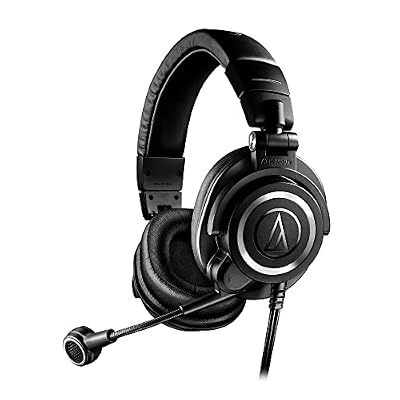
Audio-Technica ATH-M50xSTS StreamSet (XLR)
The ATH-M50xSTS is the closest thing in this guide to a broadcast headset: it takes the long-running ATH-M50x studio headphone and adds a permanently attached cardioid condenser boom microphone based on Audio-Technica’s AT2020 studio mic. For gamers who stream or record commentary, that microphone is the headline feature, because a condenser capsule near your mouth captures a fuller, more produced voice than the small dynamic mics on most gaming headsets.
Specs
- Driver: 45 mm dynamic, closed back
- Frequency response: 15 to 28,000 Hz (manufacturer published)
- Impedance: 38 ohms
- Microphone: cardioid condenser boom, based on the AT2020 capsule
- Connection: XLR version reviewed here; a USB version also exists
- Cable: detachable headphone cable; the mic requires an XLR input with phantom power via an audio interface
Because the headphone side is only 38 ohms, any interface headphone output drives it easily. The real requirement is the interface itself: the XLR version needs a microphone input that supplies phantom power. If you already own an interface for streaming, this headset drops straight into your chain. If you do not, the USB sibling removes that requirement at the cost of less flexibility.
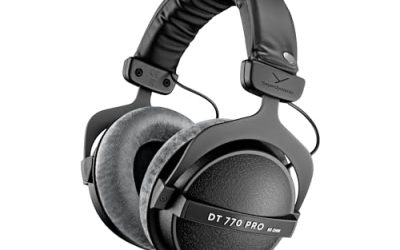
beyerdynamic DT 770 Pro (80 Ohm)
The DT 770 Pro is the classic closed-back studio headphone, and the 80-ohm version is the one to pick for gaming: it runs well from controllers and PC audio without an amplifier, while still sounding like a proper studio monitor. The closed design isolates you from room noise and keeps game audio from leaking to anyone nearby, which makes it a strong choice for shared rooms and late sessions.
Specs
- Driver: dynamic, closed back
- Frequency response: 5 to 35,000 Hz (manufacturer published)
- Impedance: 80 ohms (32-ohm and 250-ohm versions also exist)
- Connection: 3.5 mm with screw-on quarter-inch adapter
- Microphone: none — pair with a separate mic such as the ModMic below
- Build: replaceable ear pads and headband pad, serviceable design
There is no microphone, so treat this as the headphone half of a two-part headset. Combined with an attachable boom mic, you get closed-back isolation and a voice chain that can be upgraded independently. The velour pads and modest clamp make it one of the easier studio headphones to wear for long sessions.
Sennheiser HD 560S
The HD 560S is the open-back reference point in this guide. Sennheiser publishes a notably flat, neutral tuning for it, and the open design gives a wide presentation that many players prefer for positional cues in shooters and for general listening between matches. It is a headphone only, so a separate microphone is part of the plan from the start.
Specs
- Driver: dynamic, open back
- Frequency response: 6 to 38,000 Hz (manufacturer published)
- Impedance: 120 ohms
- Connection: detachable cable with 6.3 mm plug and 3.5 mm adapter
- Microphone: none — pair with a separate mic such as the ModMic below
- Fit: angled drivers aimed at the ear, lightweight open frame
At 120 ohms it is happiest on a desktop PC, a decent motherboard output, or a small amplifier; phones and some controllers may leave it quieter than you would like. Remember that open back leaks sound both ways, so this is a pick for a private, reasonably quiet room rather than a busy living room.
beyerdynamic DT 990 Pro (250 Ohm)

The DT 990 Pro is the open-back counterpart to the DT 770 Pro, built for critical listening with a spacious presentation and strong treble detail. For gaming, that openness translates into an airy soundstage, and it is a long-standing favorite for players who value imaging. The catch is in the name: at 250 ohms, this is the one headphone in the guide that really wants an amplifier.
Specs
- Driver: dynamic, open back
- Frequency response: 5 to 35,000 Hz (manufacturer published)
- Impedance: 250 ohms
- Connection: 3.5 mm with screw-on quarter-inch adapter, coiled cable
- Microphone: none — pair with a separate mic such as the ModMic below
- Build: replaceable velour ear pads, serviceable design
Plan on a dedicated headphone amp or a capable interface to hear it at full level, especially in quieter game scenes. Like the HD 560S, it leaks sound, so it belongs in a private room. If you already own an amp for music, the DT 990 Pro turns that investment into a very capable gaming headphone.
Antlion Audio ModMic USB
The ModMic USB is the piece that turns the three headphones above into true headsets. It is an attachable boom microphone that mounts to almost any headphone with a small magnetic clasp, so it can move between headphones or come off entirely when you only want to listen. Antlion publishes two switchable capsules in one unit: a noise-canceling uni-directional mode for busy rooms and an omnidirectional mode for fuller voice recording.
Specs
- Type: attachable boom microphone, magnetic clasp mount
- Capsules: switchable uni-directional (100 Hz to 10 kHz) and omnidirectional (50 Hz to 20 kHz), manufacturer published
- Connection: USB-A, with its own analog-to-digital conversion at up to 48 kHz and 16-bit
- Controls: inline mute switch
- Compatibility: Windows, Mac, Linux, and PlayStation via USB
- Cable length: 2 meters (manufacturer published)
Because it is a separate USB device, your headphone connects to your normal audio output while the ModMic handles voice independently — a flexible arrangement that also means managing two cables. For the headphones in this guide, it is the simplest way to add clear voice chat without giving up studio sound.
Frequently Asked Questions
Do studio headphones work on consoles?
Yes, with the right connection. Any model here with a 3.5 mm plug works through a PlayStation or Xbox controller, although high-impedance models like the 250-ohm DT 990 Pro will be quiet without an amplifier. The XLR version of the ATH-M50xSTS needs an audio interface, so it is a PC-focused pick.
Is open back or closed back better for gaming?
Neither is universally better. Open-back models give a wider, more natural soundstage and suit quiet private rooms. Closed-back models isolate you from noise and keep your audio private, which suits shared spaces. Pick based on your room first and sound preference second.
Do I need an amplifier for studio headphones?
Only for higher-impedance models. Headphones around 38 to 80 ohms run well from almost any source. A 120-ohm model benefits from a strong output, and a 250-ohm model should be paired with a dedicated amplifier or capable interface to reach full volume.
Can I add a microphone to any studio headphone?
In most cases, yes. An attachable boom microphone like the ModMic USB mounts magnetically to the ear cup of almost any headphone and connects separately over USB. A desktop USB microphone is the other common option if you stream from a fixed desk.
Final Verdict
If you want one device with a genuinely good microphone, the Audio-Technica ATH-M50xSTS is the standout, provided you own or plan to buy an audio interface for the XLR version. For a modular setup, the DT 770 Pro plus a ModMic USB is the most versatile closed-back combination, while the HD 560S is the open-back pick for a quiet room and the DT 990 Pro rewards anyone who already owns an amplifier. Whichever route you take, choosing the headphone and the microphone separately is what makes a studio setup easy to upgrade for years.
Product and ASIN Reference
| Product | ASIN |
|---|---|
| Audio-Technica ATH-M50xSTS StreamSet (XLR) | B0BRQR55FK |
| beyerdynamic DT 770 Pro (80 Ohm) | B0016MNAAI |
| Sennheiser HD 560S | B08J9MVB6W |
| beyerdynamic DT 990 Pro (250 Ohm) | B0011UB9CQ |
| Antlion Audio ModMic USB | B07YN26PBT |