

A high end gaming PC pairs a powerful graphics card and a fast processor with memory that can keep both fed. Choose the wrong kit and the rated speed may not hold, or a second kit added later may refuse to run at its printed profile. This guide to the best RAM for high end gaming PC builds focuses on kits currently sold on Amazon US and on the checks that decide compatibility: generation, platform profile, capacity, speed, latency, and module count. Every kit below is DDR5, because current high end AMD and Intel platforms are DDR5 platforms. If your motherboard takes DDR4, none of these kits will fit.

As an Amazon Associate we earn from qualifying purchases.
How to Choose RAM for a High End Gaming PC
Start With the Platform, Not the Speed
DDR4 and DDR5 are not interchangeable: a DDR5 module will not seat in a DDR4 slot. AMD’s AM5 socket, used by Ryzen 7000 and 9000 processors, is DDR5 only. Recent Intel platforms split by motherboard — the same processor family can sit in a DDR4 or a DDR5 board — so the motherboard model, not the CPU name, decides which generation you buy.
Profile support is the second check. AMD boards use EXPO, Intel boards use XMP 3.0, and many kits carry both. A kit listing only XMP is aimed at Intel boards, and one listing only EXPO is aimed at AM5. Builders planning a complete system can see how memory fits alongside the processor and graphics card in our guide to the best high end gaming desktop PC for 2026.
Capacity: 32GB Is the Floor, 64GB Is the Comfortable Ceiling
32GB in two 16GB modules is the sensible starting point, covering modern games alongside voice chat, a browser, and recording software. Step up to 64GB in two 32GB modules if you stream and edit video on the same machine, run heavily modified games, or keep many applications open while playing. Larger capacities suit workstations more than gaming rigs and can be harder to run at full rated speed.
Speed and Latency, Read Together
Speed and CAS latency only make sense as a pair. A DDR5-6000 CL30 kit and a DDR5-6400 CL32 kit deliver very similar first-word latency, around ten nanoseconds. On AMD AM5, DDR5-6000 is widely treated as the practical sweet spot because the memory controller tends to run in a favourable ratio there. Intel platforms generally tolerate higher speeds more easily, which is why faster kits are usually marketed with XMP profiles. Chasing the highest speed number without checking latency and platform can buy instability rather than performance.
Module Count Matters More Than Most Builders Expect
Buy one matched kit, install two modules, and leave the other slots empty. Four DDR5 modules load the memory controller more heavily, and many boards will only run four sticks at reduced speeds. Kits are matched sets designed to run together, and mixing separate kits can cause stability problems even when part numbers look identical. If you may want 64GB later, buy it now as two 32GB modules. Finally, check your motherboard’s qualified vendor list for the kit’s exact model number, and check clearance: tall RGB heatspreaders can clash with large tower air coolers.
The Kits at a Glance
| Kit | Capacity | Speed | Timings | Profile | Best suited to |
|---|---|---|---|---|---|
| Corsair Vengeance RGB | 32GB (2x16GB) | DDR5-6000 | CL30-36-36-76 | AMD EXPO and Intel XMP | Dual-platform 32GB gaming builds |
| G.Skill Trident Z5 Neo RGB | 64GB (2x32GB) | DDR5-6000 | CL30-40-40-96 | AMD EXPO | AMD AM5 builds wanting 64GB |
| Corsair Dominator Titanium RGB | 64GB (2x32GB) | DDR5-6000 | CL30 | AMD EXPO and Intel XMP | Premium 64GB builds on either platform |
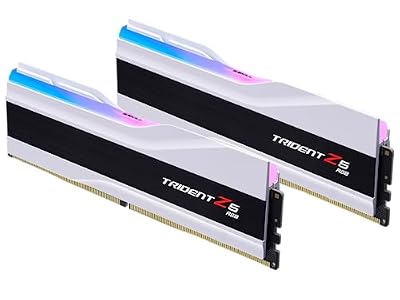
| G.Skill Trident Z5 RGB | 64GB (2x32GB) | DDR5-6400 | CL32-39-39-102 | Intel XMP 3.0 | Intel builds wanting extra speed |
| Corsair Vengeance | 32GB (2x16GB) | DDR5-6000 | CL30 | AMD EXPO and Intel XMP | Unlit 32GB builds and tight clearances |
Best RAM for High End Gaming PC: The Picks
1. Corsair Vengeance RGB DDR5 32GB 6000MHz CL30 — Best All-Round Pick
Shortlist this kit first if you have not locked yourself to one platform. The listing describes 32GB as two 16GB DDR5 modules rated at 6000MHz with CL30-36-36-76 timings at 1.40V, naming both AMD EXPO and Intel XMP support — an unusually flexible combination.
The ten-zone RGB lighting runs through Corsair iCUE, suiting builders already using Corsair fans or coolers. The trade-off is height, so confirm clearance under a large air cooler. As a two-module kit it keeps the memory controller in its easiest configuration.
View the Corsair Vengeance RGB kit on Amazon
2. G.Skill Trident Z5 Neo RGB DDR5 64GB 6000MT/s CL30 — Best for AMD AM5 at 64GB
G.Skill’s Neo line is its AMD-focused range: a 64GB kit of two 32GB modules rated for up to DDR5-6000 at CL30-40-40-96 and 1.40V, with an AMD EXPO profile. Related Neo listings name AMD X870, X670, and B650 platforms.
For an AM5 PC that also handles streaming, editing, or heavy multitasking, this is a clean specification: the platform’s favoured speed and latency, with double capacity delivered in two modules rather than four — far easier on an AM5 memory controller. The listing warns not to mix memory kits, so treat this as a complete purchase. Intel builders should choose an XMP kit instead.
View the G.Skill Trident Z5 Neo RGB kit on Amazon
3. Corsair Dominator Titanium RGB DDR5 64GB 6000MHz CL30 — Best Premium 64GB Kit
Dominator Titanium is Corsair’s flagship line. This 64GB kit pairs two 32GB modules at 6000MHz with CL30 latency and 1.4 volts, and the listing names both AMD EXPO and Intel XMP support, so it suits a premium build on either platform.
What the extra money buys is construction and presentation: forged aluminium styling, a refined light bar, and iCUE control. It does not buy extra gaming performance over another DDR5-6000 CL30 kit. Choose it for a showcase build where the memory is visible, or when you want 64GB with both platforms’ profiles in one kit, and check cooler clearance first.
View the Corsair Dominator Titanium kit on Amazon
4. G.Skill Trident Z5 RGB DDR5 64GB 6400MT/s CL32 — Best for Intel Builds Chasing Speed
Intel platforms are the natural home for speeds above DDR5-6000. The listing describes 64GB as two 32GB modules rated for up to DDR5-6400 at CL32-39-39-102 and 1.40V, with an Intel XMP 3.0 profile, naming Intel Z890, Z790, and B760 platforms. The non-ECC, 288-pin U-DIMM format is standard desktop DDR5.
CL32 at 6400MT/s keeps first-word latency close to the DDR5-6000 CL30 kits, so this adds bandwidth without giving back responsiveness. It suits an Intel build for high-refresh gaming plus content work. It is not the pick for AMD, since its documented profile is XMP. Confirm your board in G.Skill’s compatibility information, as higher speeds depend more on the motherboard and processor sample.
View the G.Skill Trident Z5 RGB kit on Amazon
5. Corsair Vengeance DDR5 32GB 6000MHz CL30 — Best Unlit, Lower-Profile Option
Not every high end build wants lighting. This non-RGB kit is listed as 32GB of two 16GB modules at 6000MHz with CL30 latency and 1.4 volts, supporting both AMD EXPO and Intel XMP, in a grey finish. Electrically it matches the RGB kit above: the performance-relevant numbers are speed, timings, and profiles, not the light bar.
The plainer heatspreader is the easier fit under large tower coolers and in cases without a window, and its dual profiles keep it usable if you move platforms later. If you know you will want 64GB, step up to a 64GB kit above rather than planning to add a second set later.
View the Corsair Vengeance kit on Amazon
Which Configuration Should You Choose?
Match the kit to the machine, not the headline speed. An AM5 build is best served by DDR5-6000 CL30 with EXPO: 32GB for gaming alone, 64GB if the PC also edits or streams. An Intel build can use the same kits when they carry XMP, or step to DDR5-6400 CL32 on a board documented to support it. Prefer two modules over four, one matched kit over two purchases, and a model number on your motherboard’s QVL.
Frequently Asked Questions
Is 32GB or 64GB better for a high end gaming PC?
32GB is enough for gaming on its own and leaves headroom for chat, recording, and background apps. 64GB suits the same gaming load plus streaming, video editing, or heavily modified games. Both are best bought as two modules, so decide the capacity up front rather than filling all four slots later.
Is DDR5-6000 or DDR5-6400 better for gaming?
For AMD AM5, DDR5-6000 at CL30 is the safer and usually sufficient choice, because it matches how the platform’s memory controller likes to run. For Intel, DDR5-6400 at CL32 adds bandwidth with similar latency, provided the motherboard and processor support the XMP profile stably. The gap in games is small either way, so platform fit should decide.
Will DDR5 RAM work in my DDR4 motherboard?
No. The generations use different slots and are not interchangeable in either direction, so a DDR4 board needs a DDR4 kit. The motherboard specification is the deciding document.
Do I need to enable anything after installing the kit?
Yes. Without enabling EXPO on an AMD board or XMP on an Intel board in the BIOS, the kit runs at its slower default JEDEC speed instead of its rated profile. Enable the profile, save, and confirm the reported speed and timings afterwards.
Conclusion
The best RAM for a high end gaming PC is rarely the fastest kit on the page. It is the kit whose generation, profile, capacity, and module count match your platform: DDR5-6000 CL30 in two modules for most AMD and Intel builds, 64GB when the machine does more than game, and a documented XMP kit at 6400MT/s when an Intel board is ready for it. Run through the platform, QVL, and clearance checks above, buy one matched kit, and memory becomes the part of the build you never have to think about again.

















