

- Top Pick: HORI Racing Wheel Apex
- Runner-up: Logitech G29 Driving Force
- Also consider: Thrustmaster T248
A steering wheel is the one controller that can make an emulated racing game feel wrong when it is missing. Arcade racers from the nineties were designed around analogue wheels with short, quick steering racks, and console racers like Gran Turismo assumed a wheel long before they assumed a gamepad. Playing them on a stick works, but the steering passes through layers of smoothing the original cabinets never had.
As an Amazon Associate, we earn from qualifying purchases.
The good news is that almost any modern USB wheel works with emulators on a PC, because MAME, Dolphin and PCSX2 simply read standard controller axes. The catch is matching the wheel to the games: an arcade title built for 270 degrees of rotation feels twitchy on a 900-degree sim wheel unless you limit the range, and a wheel with no force feedback gives up the self-centering cues many emulated racers rely on. This guide picks five wheels across the tiers and explains the setup each needs.
This article contains affiliate links, and we may earn a commission if you buy through them, at no extra cost to you.
Quick Answer
The best racing wheel for emulators for most people is the Logitech G29: real force feedback, a rotation range you can limit to 270 degrees in software, and a proper three-pedal set. Arcade purists on a budget should look at the HORI Racing Wheel Apex, a native 270-degree wheel. Players who also sim race should step up to the Thrustmaster T248 or the direct-drive MOZA R5.
Where Wheels Earn Their Keep in Emulation
MAME is the headline case. Driving cabinets from Out Run through Daytona USA and Sega Rally used analogue steering, and MAME exposes that steering as a standard analogue axis. A wheel restores the continuous, small-correction driving they were tuned for. The Model 2 and Model 3 emulators cover the same Sega catalogue and likewise expect a wheel axis.
On the console side, Dolphin handles Mario Kart Wii and the GameCube racers well with a wheel, and PCSX2 covers the Gran Turismo games and Ridge Racer V. Many shipped with official wheel support on real hardware, so emulators pass the axes through cleanly. Even games without native support usually accept a wheel once you map the axes in the controller settings.
The Specs That Matter for Older Games
Rotation range and limiting it. Most arcade racers expect around 270 degrees lock to lock. Sim wheels default to 900 degrees or more, which spreads that steering across three times the travel and makes arcade games feel numb. Every wheel here can be limited: Logitech and MOZA do it in PC software, the T248 does it on the wheel itself, and the HORI Apex is a 270-degree wheel by design.
Force feedback type. Gear-driven wheels (G29, G923) are a little notchy but strong and affordable. Belt-and-gear hybrids like the T248 feel smoother. Direct drive, as in the MOZA R5, mounts the rim straight on the motor shaft and is smoothest of all. Many emulated games send only simple centering and rumble-style effects, so a strong centering spring matters more than feedback fidelity.
Pedals. Two pedals are enough for nearly every arcade racer; a clutch only matters for the handful of console sims that model one. Brake feel matters more: a progressive brake makes threshold braking in Gran Turismo far easier.
Shifter. Treat it as optional. Paddle shifters cover sequential boxes, which is what most arcade and console racers use. An H-pattern shifter is a nice extra, never a requirement.
Setup Reality: Calibration, Deadzones and Mapping
Expect to configure each emulator separately. In MAME, enable joystick input, map the wheel axis to the game’s steering under the analogue controls menu, and set a small deadzone so the car tracks straight at rest; save the result per game. In Dolphin and PCSX2, bind the wheel as a standard controller, assign steering and pedals to their axes, then calibrate the range so full pedal travel registers.
Two habits prevent most frustration. First, set the rotation limit in the wheel’s software before launching the emulator, because several emulators read the axis range at startup. Second, if a game steers in steps or pulls to one side, the cause is almost always a deadzone or saturation setting, not the wheel. Feedback ranges from full support to simple centering depending on the emulator, so treat anything beyond centering as a bonus.
Desk Clamp or Wheel Stand
Every wheel here clamps to a desk, and for arcade sessions that is genuinely enough: the forces in emulated racers are modest, and a sturdy desk edge holds fine. A stand earns its space for long sessions, thick desk edges, or a pedal base that slides under braking. Direct-drive wheels like the R5 produce the strongest forces here, so a stand suits them best, though the included clamp works at lighter settings.
The Five Wheels
HORI Racing Wheel Apex

The Apex is the arcade-first pick. It is a native 270-degree wheel, switchable down to 180 degrees on the fly: exactly the range Out Run-era games expect, with no software setup. There is no force feedback motor; a vibration motor provides rumble cues, and a return spring handles centering. HORI’s Device Manager app lets you adjust deadzone and pedal sensitivity and store profiles. It clamps to a desk and includes paddle shifters and a full PlayStation button layout alongside PC support.
- Rotation: 270 degrees, switchable to 180 degrees
- Force feedback: none; vibration motor only
- Pedals: 2 (accelerator and brake)
- Shifters: paddle shifters
- Mounting: desk clamp
- Compatibility: PC, PlayStation 5, PlayStation 4
- Model: SPF-004U
See the HORI Racing Wheel Apex on Amazon
Logitech G29 Driving Force
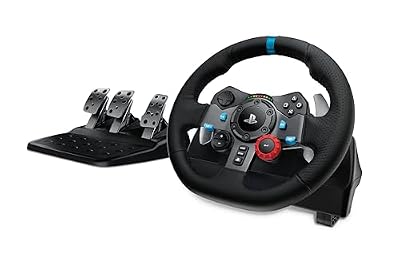
The G29 is the default recommendation because it does everything emulation asks for at a sensible tier. Its dual-motor, gear-driven force feedback gives real centering and road feel in PCSX2 and MAME, and G HUB lets you cut rotation to 270 degrees for arcade games or open it to the full 900 for console sims. The three-pedal set includes a clutch and a nonlinear brake that resists more as you press it, which helps in Gran Turismo.
- Rotation: 900 degrees, adjustable in Logitech software
- Force feedback: dual-motor gear drive
- Peak torque: not stated
- Pedals: 3 (accelerator, brake, clutch)
- Shifters: paddle shifters
- Mounting: desk clamp
- Compatibility: PC, Mac, PlayStation 5, PlayStation 4
- Model: 941-000110
See the Logitech G29 on Amazon
Thrustmaster T248

The T248 sits a step above the G29 in feel. Its hybrid belt-and-gear drive is smoother than a pure gear system, and the built-in display is more useful for emulation than it sounds: you can change the rotation angle directly on the rim, making swaps between a 270-degree arcade setup and a longer console setup painless. The T3PM pedal set uses magnetic sensors, includes a clutch, and has an adjustable brake spring. This is the Xbox and PC version; a PlayStation version exists under the same name.
- Rotation: up to 900 degrees, adjustable on the wheel display
- Force feedback: hybrid belt and gear drive
- Peak torque: not stated
- Pedals: 3 (T3PM magnetic pedal set)
- Shifters: magnetic paddle shifters
- Mounting: desk clamp
- Compatibility: PC, Xbox Series X|S, Xbox One
- Model: 4469026
See the Thrustmaster T248 on Amazon
Logitech G923
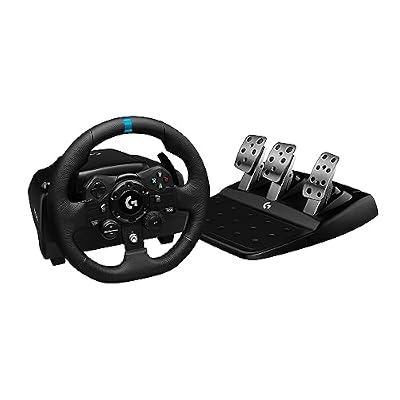
The G923 refines the G29 formula. It keeps the 900-degree rotation, gear-driven feedback and three pedals, then adds TRUEFORCE, a high-frequency feedback layer that reads extra detail from supported modern games. Emulators do not use that layer, so for classic racing the G923 behaves like a slightly polished G29, with a progressive brake spring and dual-clutch launch control. Choose it over the G29 if you split time between emulated racers and current releases, where its extras actually apply. This listing is the Xbox and PC version; a PlayStation version is also sold.
- Rotation: 900 degrees, adjustable in Logitech software
- Force feedback: gear drive with TRUEFORCE (supported games only)
- Peak torque: not stated
- Pedals: 3 (accelerator, brake, clutch)
- Shifters: paddle shifters
- Mounting: desk clamp
- Compatibility: PC, Xbox Series X|S, Xbox One
- Model: 941-000156
See the Logitech G923 on Amazon
MOZA R5 Bundle

The R5 is the direct-drive option and the ceiling of this list. The rim bolts straight onto a 5.5 Nm motor shaft, so steering is smooth, fast and free of gear notchiness, and MOZA’s Pit House software gives deep control over rotation limits, centering and feedback curves, ideal when one wheel serves twitchy arcade games and heavier console sims alike. The bundle includes the 11-inch ES wheel, SR-P Lite two-pedal set and a desk clamp. It is PC only, and it needs a solid desk or stand.
- Rotation: software-defined, adjustable in MOZA Pit House
- Force feedback: direct drive
- Peak torque: 5.5 Nm
- Pedals: 2 (SR-P Lite accelerator and brake)
- Shifters: paddle shifters
- Mounting: desk clamp included
- Compatibility: PC only
- Model: RS20
See the MOZA R5 Bundle on Amazon
How to Choose
Start with the games. If your library is mostly MAME and Sega arcade racers, rotation limiting matters more than feedback power, and the HORI Apex or a G29 locked to 270 degrees will feel right. If you live in Gran Turismo and other console sims, prioritise pedal quality and smooth feedback, which points to the T248 or G923. If emulation is part of a broader sim racing habit, the MOZA R5 justifies the step up.
Then check the practicalities: confirm console compatibility matches any non-PC use, measure your desk edge against the clamp, and decide whether a clutch matters to you. Buy the wheel you will actually set up; a clamped G29 on your desk beats a direct-drive base in its box.
Who Should Skip
Skip a wheel entirely if your racing is mostly kart racers played in short couch bursts; a good gamepad with analogue triggers covers those comfortably. Skip the budget tier if you know force feedback matters to you, because a vibration-only wheel cannot be upgraded later. And skip direct drive if your desk is flimsy or shared, since a strong base needs a rigid mount and a permanent home.
FAQ
Do emulators support force feedback?
Some do, to a degree. Support varies by emulator and plugin, from basic centering spring and rumble-style effects to fuller feedback in specific driving games. Set the wheel up to work well with centering alone, and treat anything beyond that as a bonus.
What rotation should I set for arcade games?
Around 270 degrees suits most arcade racers, because the original cabinets used short steering racks. Set the limit in the wheel’s software before launching the emulator, and raise it toward 900 degrees for console sims.
Can I use one wheel for both MAME and console emulators?
Yes. A PC wheel presents standard axes that MAME, Dolphin, PCSX2 and others all read. Save per-game profiles where the software allows it, since rotation and deadzone preferences differ between arcade and console games.
Is a shifter worth buying for emulated racing?
Usually not at first. Paddle shifters handle the sequential gearboxes most arcade and console racers use. Add an H-pattern shifter later only if games you play model one.
Final Verdict
For most emulation setups, the Logitech G29 remains the safest buy: honest force feedback, software rotation limiting and a proper clutch pedal set. The HORI Apex is the smart budget route for pure arcade play, the T248 and G923 add polish for mixed libraries, and the MOZA R5 is the pick when steering feel is the whole point. Spend ten minutes on rotation limits and deadzones per emulator; that setup work matters more than the badge.










