

Affiliate disclosure: As an Amazon Associate we earn from qualifying purchases. This post contains affiliate links — if you buy through them we may earn a small commission at no extra cost to you. This never affects our recommendations.
The RTX 5070 Ti represents NVIDIA’s Blackwell architecture at its most accessible enthusiast tier — positioned below the RTX 5080 in performance, but dramatically ahead of last-generation RTX 4070 Ti Super configurations. With Multi-Frame Generation under DLSS 4, the RTX 5070 Ti can render games at framerates that were previously impossible on consumer hardware, making it the first card to make 4K 144Hz gaming truly practical across a wide range of titles in 2025.
Prebuilt systems with the RTX 5070 Ti are clustered in the $2299–$2800 range, with Alienware, iBUYPOWER, and Skytech all offering compelling configurations. The choice between them largely comes down to thermal design, CPU pairing, chassis quality, and support preferences rather than raw GPU performance — which is uniformly excellent across all five picks in this roundup.
If you’re ready to invest in a flagship prebuilt gaming desktop, here are the five best RTX 5070 Ti systems available in 2025.
In a hurry? See the top-rated Prebuilt Gaming Desktops with RTX 5070 Ti deals available right now:
🛒 Check Prebuilt Gaming Desktops With Rtx 5070 Ti Prices on Amazon →🛒 Best Price Today on Amazon
Prime members get fast, free shipping on everything above, plus member-only deals. New members get a 30-day free trial — cancel anytime.
Start 30-Day Prime Free Trial →See Today’s Amazon DealsTop Picks at a Glance
| Product | Best For |
|---|---|
| Alienware Aurora Core Ultra 9 RTX 5070 Ti | Best overall flagship |
| Alienware Aurora Core Ultra 7 RTX 5070 Ti | Best value Alienware |
| iBUYPOWER Y40 PRO Ryzen 9 RTX 5080 | Best GPU performance |
| iBUYPOWER Slate i7 RTX 5070 Ti | Best price-to-performance |
| Skytech King 95 i7 RTX 5070 Ti | Best AMD-adjacent alternative |
As an Amazon Associate we earn from qualifying purchases at no extra cost to you.


1. Alienware Aurora Core Ultra 9 RTX 5070 Ti
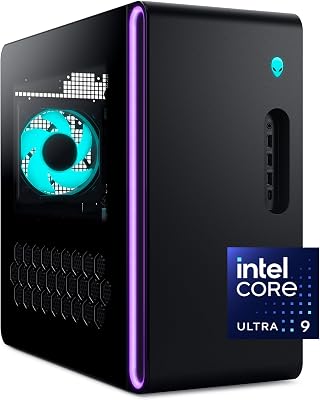
The Alienware Aurora R16 with Intel Core Ultra 9 and RTX 5070 Ti is the definitive flagship prebuilt gaming desktop of 2025. Intel’s Core Ultra 9 (Series 2) brings exceptional multi-threaded performance with improved power efficiency over 14th-gen counterparts, while the RTX 5070 Ti handles 4K gaming at 120+ fps in most titles with DLSS 4 active. Alienware’s Cryo-Tech V3 cooling keeps temperatures in check even under extended gaming sessions. ProSupport and onsite service warranty options make this the safest long-term investment.
- Pros: Core Ultra 9 + RTX 5070 Ti, Cryo-Tech cooling, Alienware ProSupport, 32GB DDR5
- Cons: Proprietary chassis limits GPU upgrade path, premium brand pricing
2. Alienware Aurora Core Ultra 7 RTX 5070 Ti
For buyers who want the Alienware experience without the Core Ultra 9 premium, the Core Ultra 7 variant saves $300 with minimal real-world gaming performance difference. The Core Ultra 7 handles all current gaming workloads without bottlenecking the RTX 5070 Ti, and the identical Cryo-Tech cooling system keeps both processor and GPU running optimally. At $2489, this is the sweet spot Alienware configuration — most of the flagship’s performance at a more approachable price. Alienware’s build quality and aesthetic consistency remain intact.
- Pros: Core Ultra 7 sufficient for gaming, same Cryo-Tech as flagship, $300 savings
- Cons: Core Ultra 7 shows difference in streaming-while-gaming vs. Ultra 9
3. iBUYPOWER Y40 PRO Ryzen 9 RTX 5080
If GPU performance is your primary metric, the iBUYPOWER Y40 PRO with RTX 5080 surpasses all other picks in this roundup’s raw frame rate output. The RTX 5080 is a class above the RTX 5070 Ti — approximately 20–25% faster and equipped with 16GB GDDR7 versus the 5070 Ti’s 12GB. Paired with a Ryzen 9 processor, this is arguably the best performance-per-dollar system here for pure gaming benchmarks. The Y40 PRO chassis features dual-chamber cooling architecture and the same impressive aesthetics as iBUYPOWER’s Y-series lineup.
- Pros: RTX 5080 outperforms 5070 Ti, Ryzen 9 + 16GB GDDR7, dual-chamber cooling
- Cons: Technically outside the 5070 Ti tier — buyers must decide if the premium is worth it
4. iBUYPOWER Slate i7 RTX 5070 Ti
The iBUYPOWER Slate is the most price-efficient RTX 5070 Ti system in this roundup at $2299.99. The Slate chassis is a compact mid-tower with excellent airflow, RGB fans, and a minimalist aesthetic that differs from iBUYPOWER’s more elaborate Y-series designs. The Core i7 CPU pairing is sufficient for all gaming use cases and matches well with the RTX 5070 Ti’s performance envelope. 32GB DDR5 and 1TB NVMe storage provide a solid foundation. For buyers prioritizing GPU performance over CPU horsepower, this is the best entry to the RTX 5070 Ti tier.
- Pros: Lowest price RTX 5070 Ti prebuilt, clean Slate chassis, 32GB DDR5, solid i7 pairing
- Cons: Core i7 limits streaming performance vs. i9 or Ryzen 9 systems
5. Skytech King 95 i7 RTX 5070 Ti
Skytech’s King 95 matches the iBUYPOWER Slate on price while offering a different chassis design and slightly varied configuration. The King 95 is a large full-tower case with exceptional internal airflow and space for future upgrades — particularly notable for RTX 5070 Ti builds where sustained GPU boost clocks benefit from excellent ventilation. Skytech includes a 360mm AIO liquid cooler for the CPU, which keeps the Core i7 running cooler than air-cooled alternatives. A strong option for buyers who value thermal headroom and upgrade space.
- Pros: 360mm AIO cooler, spacious full-tower, excellent thermals, same price as Slate
- Cons: Skytech support less robust than Alienware or iBUYPOWER, large footprint
Buying Guide
RTX 5070 Ti vs. RTX 5080 — Is the Step Up Worth It?
The RTX 5070 Ti and RTX 5080 are separated by roughly $200–$300 in prebuilt pricing. In gaming benchmarks, the RTX 5080 delivers approximately 20–25% better performance — a meaningful but not dramatic difference for most game titles. Where the 5080 truly separates itself is in GPU-compute tasks (AI workloads, video transcoding), 4K ray tracing with full quality settings, and in titles that saturate the 5070 Ti’s 12GB VRAM at maximum texture settings. If your primary use is gaming at 4K with DLSS 4 enabled, the 5070 Ti is sufficient and the 5080 premium isn’t necessary. If you run content creation workloads alongside gaming, the 5080 is a more compelling dual-purpose upgrade.

DLSS 4 Multi-Frame Generation Explained
DLSS 4 is NVIDIA’s most significant AI upscaling advancement to date. On Blackwell GPUs like the RTX 5070 Ti, Multi-Frame Generation allows the GPU to generate up to three AI-synthesized frames for every real rendered frame, effectively multiplying the displayed frame rate by 4x in supported titles. At 4K with native rendering at 30fps, DLSS 4 MFG can display 120fps+ to the monitor. The AI frames are not identical to natively rendered frames — input latency increases with each additional generated frame — but NVIDIA Reflex counteracts this with latency reduction. The practical result is dramatically smoother gameplay in GPU-limited scenarios, particularly at 4K and 8K.
Intel Core Ultra vs. Intel Core i7/i9 14th Gen
Alienware’s Aurora systems use Intel Core Ultra Series 2 (Arrow Lake) processors, while iBUYPOWER and Skytech use Intel Core i7/i9 14th Gen or AMD Ryzen alternatives. Arrow Lake brings improved efficiency and better AI processing via the integrated NPU, but gaming performance is comparable to 14th-gen Core i9 in most titles. The Core Ultra 9 does excel in heavily multi-threaded workloads. For gaming-only users, Core i7-14700K and Ryzen 9 7900X are equally good CPU choices — the Alienware premium for Arrow Lake is primarily about platform modernity rather than gaming performance gains.

Thermal Considerations for RTX 5070 Ti Systems
The RTX 5070 Ti has a rated TDP of approximately 300W — significantly higher than the RTX 4070 Ti Super’s 285W. At sustained gaming loads, a 5070 Ti system without adequate cooling will thermal-throttle, reducing performance to protect components. Prioritize systems with: a 360mm AIO or robust dual-fan tower cooler for the CPU, at least three case fans (two intake, one exhaust), and a high-quality 850W or greater 80+ Gold PSU. The Skytech King 95 (360mm AIO) and Alienware Aurora (Cryo-Tech V3) both excel here. Avoid any RTX 5070 Ti prebuilt using a 650W PSU — it’s insufficient for sustained boost clock operation.
Display Pairing for RTX 5070 Ti Systems
An RTX 5070 Ti deserves a display that matches its output capability. The two ideal pairings in 2025 are: a 27″ or 32″ 4K 144Hz OLED monitor (LG 27GR95QE-B, Samsung Odyssey OLED G8) for visually stunning 4K HDR gaming, or a 27″ 1440p 240–360Hz display (ASUS ROG Swift PG27AQN, LG 27GP850-B) for competitive high-refresh gaming. At 1440p, the RTX 5070 Ti with DLSS 4 can push above 300fps in competitive titles with Multi-Frame Generation — a monitor refresh rate above 240Hz becomes directly useful. Match your monitor purchase to your primary game genre before committing.
Frequently Asked Questions
What games benefit most from DLSS 4 Multi-Frame Generation?
DLSS 4 Multi-Frame Generation delivers the largest gains in GPU-limited scenarios — typically single-player AAA titles at high resolutions with ray tracing enabled. Games like Cyberpunk 2077, Alan Wake 2, Black Myth: Wukong, and Indiana Jones and the Great Circle have confirmed DLSS 4 support and show dramatic frame rate improvements. Competitive multiplayer games benefit less because they are often CPU-limited and the added input latency from frame generation — even with Reflex — is noticeable at very high frame rates. For competitive play, disable MFG and use standard DLSS upscaling instead.
How does the RTX 5070 Ti compare to the RTX 4090?
With DLSS 4 Multi-Frame Generation active, the RTX 5070 Ti can display more frames per second than the RTX 4090 in MFG-supported titles — though those frames are AI-synthesized, not natively rendered. In native rendering without upscaling, the RTX 4090 remains approximately 15–25% faster than the RTX 5070 Ti. For most gamers in 2025, the distinction is academic — DLSS 4-enabled gaming on the RTX 5070 Ti delivers a better subjective experience in most titles than the RTX 4090 without DLSS 4, at a fraction of the price. The RTX 4090 retains an advantage in AI/compute workloads due to its larger VRAM (24GB vs. 12GB).
Is 12GB VRAM enough for 4K gaming in 2026?
For the majority of 4K gaming in 2025, 12GB VRAM is sufficient. Most current titles — even demanding ones like Star Wars Outlaws and Avatar: Frontiers of Pandora — stay within 12GB at 4K high settings. The edge cases are games with ultra-high-resolution texture mods (like Skyrim modded or modded Cyberpunk 2077) or professional creative applications. NVIDIA’s architecture uses system RAM as overflow VRAM through a compression technique, which partially mitigates 12GB limits — though with some performance cost when VRAM is exceeded. For the 2025–2027 gaming window, 12GB on RTX 5070 Ti will remain adequate.
Which RTX 5070 Ti prebuilt has the best warranty?
Alienware offers the most comprehensive warranty in this roundup. The standard package includes a 1-year limited warranty with optional upgrade to 3-year Complete Coverage or 3-year ProSupport Plus with onsite service. CyberpowerPC and iBUYPOWER offer 1-year labor, 3-year parts warranties — good, but without the onsite repair option. Skytech provides a 1-year labor and limited hardware warranty. For buyers who value peace of mind over the 3–5 year ownership cycle of a $2500+ system, Alienware’s ProSupport upgrade is worth the cost.
Verdict
For uncompromising 4K gaming performance and long-term reliability, the Alienware Aurora Core Ultra 9 RTX 5070 Ti at $2790 is the benchmark flagship prebuilt of 2025. Buyers seeking better GPU performance at a similar price should consider the iBUYPOWER Y40 PRO Ryzen 9 RTX 5080 at $2669.99. And for the best entry-level RTX 5070 Ti experience, both the iBUYPOWER Slate and Skytech King 95 at $2299.99 deliver excellent value — the Skytech edges ahead slightly for thermal headroom thanks to its 360mm AIO cooling setup.
Related Articles
Looking for more on this topic? Browse the hand-picked guides below — each one applies the same scoring rubric used in this review.
Ready to decide? Our #1 pick for 2026 is the Alienware Aurora Core Ultra 9 RTX 5070 Ti.
Live price & availability on Amazon.





