- Top Pick: Logitech G502 X Plus Wireless Gaming Mouse
- Runner-up: Pulsar X2H Mini Wireless Gaming Mouse
- Also consider: Logitech G Pro X Superlight 2 Wireless Gaming Mouse
PUBG asks a mouse to do three different jobs in one match. Early on, you loot fast and clear buildings, where a flick to a doorway can decide a fight. Later, you rotate across open ground, hold angles, and take long-range shots as the circle shrinks. A single match can last half an hour, so comfort matters as much as speed.
That mix makes PUBG different from a fast arena shooter. You need a sensor that tracks cleanly at low sensitivity, a wireless link that adds no noticeable delay, a shape that stays comfortable, and buttons you can reach without shifting your grip.
As an Amazon Associate, we earn from qualifying purchases.
Quick Answer
For most PUBG players, the Logitech G502 X Plus is the best mouse for PUBG because it pairs a precise HERO 25K sensor with a comfortable right-handed shape, 13 programmable controls, and LIGHTSPEED wireless. Small-handed claw players should look at the Pulsar X2H Mini instead, while players who want an ergonomic shape with a scroll wheel that switches modes should consider the Razer Basilisk V3 Pro.
What PUBG Actually Demands From a Mouse
PUBG is a low-sensitivity game for many players. You use a low dots-per-inch setting for hip-fire and an even lower effective sensitivity when aiming down sights, so the mouse travels a long way across the pad for a small movement on screen. A sensor with poor tracking will show up first in those slow, deliberate movements, not in fast flicks. Look for a modern flagship sensor and clean tracking at the sensitivity you use every day.
Latency and comfort matter just as much. PUBG fights are often decided by who reacts first around a corner, and a modern 2.4 GHz wireless connection with a 1,000 Hz polling rate is already fast enough for most players. Higher polling can feel smoother, but it is a bonus, not the main reason to buy. Palm players need length and rear support, claw players need a defined hump, and fingertip players need a short, light shell.
1. Logitech G502 X Plus — Best Overall for PUBG
The Logitech G502 X Plus is the strongest all-round pick here because it combines precise tracking with a shape that fits medium and large hands. At 106 grams, it is heavier than the ultralight mice here, yet its sculpted right-handed shell and thumb rest stay comfortable through long matches. The HERO 25K sensor tracks cleanly at low sensitivity, which helps when you hold a long angle with a scoped rifle. Thirteen programmable controls give room to bind lean, healing, and fire-mode changes, and battery life is rated at up to 120 hours with RGB off.
Specs
- Sensor: Logitech HERO 25K optical sensor
- Maximum DPI: 25,600
- Polling rate: 1,000 Hz
- Weight: 106 grams
- Buttons: 13 programmable controls
- Switches: LIGHTFORCE hybrid optical-mechanical switches
- Connectivity: LIGHTSPEED 2.4 GHz wireless and USB-C wired
- Battery life: Up to 120 hours with RGB off, 37 hours with RGB on
- Shape: Right-handed ergonomic with thumb rest
2. Pulsar X2H Mini — Best for Claw Grip and Small Hands
The Pulsar X2H Mini is built for players who claw the mouse and want more palm support than a flat shell provides. Its higher rear hump fills the palm, while its narrower waist gives the thumb and ring finger a secure hold. That shape makes it easy to lift, reset, and re-aim during a building clear. At 52 grams, long sessions feel less tiring, and the PAW3395 sensor is a proven performer for low-sensitivity play, tracking at up to 26,000 DPI with 650 inches per second of tracking speed and 50 G acceleration.
Specs
- Sensor: PixArt PAW3395
- Maximum DPI: 26,000
- Tracking speed: 650 inches per second
- Acceleration: 50 G
- Polling rate: 1,000 Hz, 4K ready with a separate dongle
- Weight: 52 grams
- Switches: Optical switches
- Connectivity: 2.4 GHz wireless and wired
- Battery life: Up to 70 hours
- Shape: Symmetrical with a high rear hump
3. Logitech G Pro X Superlight 2 — Best Ultralight Mouse for PUBG
The Logitech G Pro X Superlight 2 is one of the lightest mice here, and that low weight shows in PUBG. At 60 grams, it moves with little effort, which helps when you flick to a doorway or track a moving target at low sensitivity. Its HERO 2 sensor reaches 44,000 DPI, far above the sensitivity most PUBG players use. Battery life is rated at up to 95 hours.
Specs
- Sensor: Logitech HERO 2 optical sensor
- Maximum DPI: 44,000
- Polling rate: Up to 8,000 Hz
- Weight: 60 grams
- Buttons: 5 programmable buttons
- Switches: LIGHTFORCE hybrid switches
- Connectivity: LIGHTSPEED 2.4 GHz wireless and USB-C wired
- Battery life: Up to 95 hours
4. Corsair M75 Wireless — Best Ambidextrous Mouse for PUBG
The Corsair M75 Wireless is the best ambidextrous option here, especially useful for left-handed players or for right-handed players who want a symmetrical shape with more substance. At 89 grams, it sits between the lighter esports mice and the heavier ergonomic picks here, but that weight comes with a solid feel and swappable magnetic side buttons. The MARKSMAN 26K sensor reaches 26,000 DPI with 650 inches per second of tracking and 50 G acceleration, so slow scoped movements and fast flicks both track cleanly. Battery life reaches up to 105 hours on 2.4 GHz and up to 210 hours on Bluetooth.
Specs
- Sensor: Corsair MARKSMAN 26K optical sensor
- Maximum DPI: 26,000
- Tracking speed: 650 inches per second
- Acceleration: 50 G
- Polling rate: Up to 1,000 Hz
- Weight: 89 grams
- Dimensions: 128 x 64.6 x 42 mm
- Switches: Optical switches, rated for 100 million clicks
- Connectivity: SLIPSTREAM 2.4 GHz wireless, Bluetooth, and wired
- Battery life: Up to 105 hours on 2.4 GHz, up to 210 hours on Bluetooth
- Shape: Ambidextrous with swappable magnetic side buttons
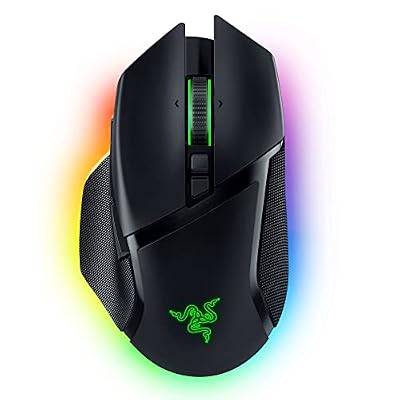
5. Razer Basilisk V3 Pro — Best Button-Heavy Ergonomic Mouse
The Razer Basilisk V3 Pro is the best button-heavy ergonomic mouse here, built for players who want extra controls without giving up comfort. Its sculpted right-handed shell with a thumb rest suits palm and claw grips, and at 112 grams it feels solid without being slow. The Focus Pro 30K sensor tracks cleanly at low sensitivity, with up to 30,000 DPI, 750 inches per second of tracking, and 70 G acceleration. Thirteen programmable controls and a HyperScroll tilt wheel cover lean, healing, and fire-mode binds, and battery life is rated at up to 90 hours.
Specs
- Sensor: Razer Focus Pro 30K optical sensor
- Maximum DPI: 30,000
- Tracking speed: 750 inches per second
- Acceleration: 70 G
- Polling rate: 1,000 Hz
- Weight: 112 grams
- Buttons: 13 programmable controls
- Switches: Razer Optical Switches Gen-3
- Connectivity: Razer HyperSpeed 2.4 GHz wireless, Bluetooth, and USB-C wired
- Battery life: Up to 90 hours
- Shape: Right-handed ergonomic with thumb rest
How to Choose a Mouse for PUBG
Start with grip and hand size
Grip comes first because it decides comfort over a long match. Palm players usually need a longer mouse with rear support. Claw players need a defined hump and a shape they can lift easily. Fingertip players need a short, light shell. If you are between sizes, the larger option is often more comfortable for PUBG.
Pick a sensor you can trust at low sensitivity
Do not chase the highest DPI number. Set your DPI to a level that feels natural, use the in-game sensitivity to fine-tune it, and keep the same setting long enough to build muscle memory. A modern flagship sensor such as the Logitech HERO 25K, the Razer Focus Pro 30K, or the PixArt PAW3395 is a safe choice.
Decide how much polling rate you need
A 1,000 Hz polling rate is enough for most players and keeps battery life reasonable. Higher polling rates can feel smoother, but they drain the battery faster and the benefit is subtle in PUBG. Some mice support higher polling with a separate dongle, but treat that as a bonus.
Count the buttons you will actually use
Five buttons cover the basics: left click, right click, scroll, and two side buttons. That is enough if you keep healing, leaning, and scope changes on the keyboard. Nine buttons suit players who want lean, healing, and fire-mode controls under the thumb. Only choose a button-heavy mouse if you will bind those extras and use them in real matches.
Who Should Skip These Mice
Players who want a heavy, ergonomic mouse with a deep thumb rest have two options here: the G502 X Plus and the Basilisk V3 Pro both offer sculpted right-handed shapes. If you have wrist pain and need a vertical or heavily sculpted shape, look at ergonomic mice designed for that purpose instead. Players who only play PUBG casually may not need a flagship sensor or a high polling rate. Players with very large hands should skip the smallest mouse here, the X2H Mini.
Frequently Asked Questions
What DPI should I use for PUBG?
There is no single best DPI for PUBG, because the right setting depends on your hand, your pad, and your grip. Many players use 400 or 800 DPI with a low in-game sensitivity, which gives precise control for scoped shots. Start at 800 DPI and adjust in small steps until aiming feels natural.
Is wireless good enough for PUBG?
Yes. A modern 2.4 GHz wireless mouse with a 1,000 Hz polling rate has latency low enough for competitive PUBG play, and all five mice in this roundup use that kind of connection. Keep the receiver close to the mouse and the battery charged.
Do I need a high polling rate for PUBG?
No. Higher polling can make cursor movement smoother on a high-refresh display, but it is not required to aim well in PUBG. A stable 1,000 Hz connection, a clean sensor, and a comfortable shape matter more.
Which grip style works best for PUBG?
Claw and palm grips both work well for PUBG. Claw gives good control for flicks and quick adjustments, while palm gives stability for long scoped holds. Fingertip works for players who lift the mouse often and prefer a light shell. Choose the grip that feels natural to you, then pick a mouse shape that supports it.
Final Verdict
The best mouse for PUBG lets you aim slowly and precisely when you need to, flick quickly when a fight starts, and stay comfortable through a long match. The Logitech G502 X Plus does that best for most players, with a precise sensor, 13 programmable controls, and a shape that fits medium and large hands. Small-handed claw players will be happier with the Pulsar X2H Mini, while players who want an ultralight mouse should choose the Superlight 2, button-heavy players should choose the Basilisk V3 Pro, and players who want an ambidextrous shape should choose the M75 Wireless.