

- Top Pick: Logitech G PRO X 60
- Runner-up: Logitech G515 Lightspeed TKL
- Also consider: SteelSeries Apex Pro Mini
Starfield is a game of long sessions and many small inputs. You spend hours on foot exploring outposts and ruins, then switch to ship controls, menus, and the hotbar without ever leaving your desk. A keyboard that stays comfortable after the first hour matters as much as one that responds well in a firefight.
This roundup looks at keyboards only, for Starfield on PC. Every pick below is judged on comfort across long exploration sessions, quick access to hotbar and menu keys, and how well the layout fits ship controls and on-foot movement.
As an Amazon Associate, we earn from qualifying purchases.
In This Guide
- Quick Answer
- 1. Logitech G PRO X 60
- 2. Logitech G515 Lightspeed TKL
- 3. SteelSeries Apex Pro Mini
- 4. Royal Kludge RK61
- 5. Razer Huntsman Mini
- How to Choose the Best Keyboard for Starfield
- Who Should Skip These Keyboards
- Frequently Asked Questions
- Final Verdict
- Product and ASIN Reference
Quick Answer
The Logitech G PRO X 60 is the best keyboard for Starfield for most PC players, with a compact 60 percent layout, tactile optical switches, and remapping for hotbar and ship controls. The SteelSeries Apex Pro Mini is the best choice for adjustable actuation, while the Logitech G515 Lightspeed TKL suits players who want a full function row and a low-profile feel.
1. Logitech G PRO X 60

The Logitech G PRO X 60 leads this roundup because it does the most useful things for Starfield in the smallest footprint. Its 60 percent layout leaves generous room for mouse movement, which matters when you are aiming on foot and working through menus, and its tactile GX optical switches give each press a clear, deliberate feel, so hotbar selections and menu confirmations register with confidence.
Where this board really earns its place is software. Logitech G HUB with KEYCONTROL lets you remap keys, build layers, and assign macros, which is ideal for a game with as many menus and ship systems as Starfield. You can put boost, landing, and scanner functions on a second layer and keep your main layer clean for walking, sprinting, and combat.
Battery life is rated up to 65 hours, which covers many evenings of exploration before a recharge. The main trade-off is the missing function row and arrow keys, which live on a function layer instead.
Specs
- Layout: 60 percent, ultra-compact tenkeyless design
- Switches: GX Optical Tactile switches
- Connectivity: LIGHTSPEED wireless, Bluetooth, wired USB-C
- Keycaps: Dual-shot PBT
- Lighting: LIGHTSYNC RGB
- Battery life: Up to 65 hours
- Software: Logitech G HUB with KEYCONTROL remapping and layers
- Price tier: Premium
2. Logitech G515 Lightspeed TKL

The Logitech G515 Lightspeed TKL is the comfortable middle ground in this roundup. Its tenkeyless layout keeps the function row, arrow keys, and navigation cluster, so every Starfield menu shortcut sits where your fingers expect it. At the same time, the low-profile design, just 22 mm high, keeps your wrists flatter and more relaxed than a tall full-height board, which pays off over a three-hour survey mission.
The low-profile GL tactile switches actuate at 1.3 mm, so movement and hotbar presses feel quick without feeling twitchy. That short travel suits Starfield well: walking, sprinting, and jumping are constant inputs, and a shallow press means less finger fatigue by the end of a session. Tri-mode connectivity covers LIGHTSPEED wireless, Bluetooth, and wired play, and battery life is rated up to 36 hours.
This is the pick for players who want a conventional layout without a number pad. It gives up nothing in menus, and it is easier on the wrists than a tall board.
Specs
- Layout: Tenkeyless, low-profile design
- Switches: GL mechanical tactile switches, 1.3 mm actuation distance
- Height: 22 mm ultra-slim profile
- Connectivity: LIGHTSPEED wireless, Bluetooth, wired USB-C
- Keycaps: Double-shot PBT
- Lighting: LIGHTSYNC RGB
- Battery life: Up to 36 hours
- Software: Logitech G HUB customization
- Price tier: Mid-range
3. SteelSeries Apex Pro Mini

The SteelSeries Apex Pro Mini is the most adjustable keyboard in this roundup, and that adjustability maps neatly onto Starfield. Its OmniPoint 2.0 switches let you set actuation anywhere from 0.1 mm to 4.0 mm per key, so you can make movement keys trigger with a feather touch while keeping interact and menu keys deeper to avoid accidental presses. Rapid Trigger resets keys the moment you release them, which keeps strafing and repeated inputs feeling crisp.
The 2-in-1 action keys add another layer of control: a single key can trigger one action on a light press and a second action on a deeper press. That is a natural fit for Starfield, where a key might walk on a tap and sprint on a full press. The aluminum top plate gives the board a solid feel, and the double-shot PBT keycaps hold up to long sessions.
The trade-off is the same as any 60 percent board: no dedicated function row or arrow keys. The Apex Pro Mini handles this with side-printed secondary functions, and once the layout is learned, the board feels complete.
Specs
- Layout: 60 percent, 61 keys
- Switches: OmniPoint 2.0 adjustable HyperMagnetic switches, 0.1 to 4.0 mm actuation
- Features: Rapid Trigger, 2-in-1 action keys, 40 actuation levels per key
- Connectivity: Wired USB-C, detachable cable
- Keycaps: Double-shot PBT
- Construction: Aluminum top plate
- Lighting: RGB
- Compatibility: Windows, Xbox, PlayStation, and Mac
- Price tier: Premium
4. Royal Kludge RK61

The Royal Kludge RK61 is the budget pick, and it covers the Starfield essentials without asking much in return. This 60 percent board has 61 keys, RGB backlighting, and hot-swappable switches, so you can change the feel later without buying a new keyboard. Tri-mode connectivity covers Bluetooth, 2.4 GHz wireless, and wired USB-C, which is rare at this tier.
For Starfield, the RK61 does the job quietly. The compact layout frees mouse space, the brown switch variant gives a soft tactile bump that suits long sessions, and the small footprint fits crowded desks. Battery life with the backlight on its lightest setting is rated around 13 hours of continuous use, with a long standby time.
This is the right pick if you want a capable Starfield keyboard while keeping the rest of your budget for the game itself, a better mouse, or a headset.
Specs
- Layout: 60 percent, 61 keys
- Switches: Hot-swappable RK switches, brown switch variant
- Connectivity: Bluetooth, 2.4 GHz wireless, wired USB-C
- Keycaps: Double-shot keycaps
- Lighting: RGB backlighting
- Features: Hot-swappable PCB, programmable software, coiled cable included
- Battery: Up to 13 hours continuous use with lightest backlight, up to 360 hours standby
- Price tier: Budget
5. Razer Huntsman Mini
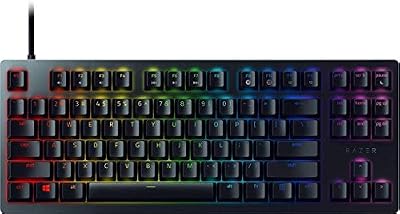
The Razer Huntsman Mini is a proven compact keyboard that brings fast optical switches to Starfield. Its Razer Optical Purple switches actuate with light-based sensing, which removes the metal contact bounce of traditional mechanical switches and keeps inputs consistent over time. The clicky feedback suits players who like a clear confirmation for every press, whether that is a hotbar swap, a dialogue choice, or a ship system toggle.
The 60 percent layout is built around an aluminum top plate, with doubleshot PBT keycaps that carry side-printed secondary functions so the missing keys stay reachable. Onboard memory stores up to five profiles, so your Starfield layout travels with the keyboard rather than living only in software.
This board is a good fit for players who already use Razer Synapse or who want a compact wired keyboard with a premium feel at a mid-range tier. The clicky switches are louder than linear or tactile options, so they suit a private gaming room better than a shared space.
Specs
- Layout: 60 percent, compact chassis
- Switches: Razer Optical Purple clicky switches
- Connectivity: Wired, detachable USB-C cable
- Keycaps: Doubleshot PBT with side-printed secondary functions
- Construction: Aluminum top plate
- Lighting: Razer Chroma RGB
- Memory: Onboard storage for up to five profiles
- Software: Razer Synapse 3
- Price tier: Mid-range
How to Choose the Best Keyboard for Starfield
Start with layout. Starfield uses a lot of keys, but most of them are movement, hotbar, and menu inputs that sit comfortably on a 60 percent or tenkeyless board. A 60 percent board gives your mouse the most room, while a TKL board like the G515 keeps the function row and arrow keys within easy reach for menus.
Next, think about switches. Tactile and clicky switches give clear feedback for menu and hotbar presses, while adjustable switches like the OmniPoint 2.0 let you fine-tune movement keys separately from everything else. Low-profile switches reduce wrist strain over long sessions, which matters in a game built around exploration.
Finally, consider remapping. Starfield has ship controls, scanner functions, and menu shortcuts that benefit from layers and macros. Boards with strong software, such as the G PRO X 60 and the Apex Pro Mini, let you shape the layout around the game.
Who Should Skip These Keyboards
Players who rely on a number pad for other games or daily work should skip the compact boards here and look at a full-size keyboard instead, since none of these five include a numpad. The same applies if you use dedicated media keys constantly and dislike function layers.
If you play in a shared room or late at night, skip the clicky Razer Huntsman Mini and choose a quieter tactile or linear option.
Frequently Asked Questions
Do I need a 60 percent keyboard to play Starfield on PC?
No. Starfield plays well on any standard layout. A 60 percent board frees mouse space, while a TKL board keeps the function row handy for menus. Choose the layout that feels natural to you.
Are adjustable actuation switches worth it for Starfield?
They help if you like to fine-tune controls. Adjustable switches let you set movement keys to trigger lightly while keeping menu keys deeper, which reduces accidental presses. They are a welcome extra rather than a requirement.
Is a wireless keyboard good for Starfield?
Yes. Starfield is not a twitch shooter, so the latency difference between a quality wireless connection and a wired one is not noticeable in normal play. If you prefer zero battery worry, a wired or tri-mode board covers both cases.
Can I use these keyboards for other games too?
Yes. Every board here is a general-purpose gaming keyboard. The compact layouts suit shooters and action games, the TKL layout suits strategy and simulation games, and the adjustable boards adapt well to typing between sessions.
Final Verdict
The best keyboard for Starfield is the Logitech G PRO X 60. Its compact wireless layout, tactile optical switches, and deep remapping fit the way Starfield actually plays: long exploration sessions, frequent menu use, and a hotbar that rewards quick, confident presses. The SteelSeries Apex Pro Mini is the best alternative for players who want adjustable actuation, and the Logitech G515 Lightspeed TKL is the best choice if you want a function row and a low-profile feel. On a tighter budget, the Royal Kludge RK61 covers the essentials, while the Razer Huntsman Mini offers fast optical switches in a proven compact design.










