Labeling cables sounds like a five-minute job until you are tracing one unmarked HDMI lead through a rack of identical black cords. Cable work has its own rules: the label has to wrap a round jacket, survive being pulled through a bundle, and stay readable after years of dust, heat and handling. The handheld label makers built for that job come from the electrical and datacom trades, and they differ from office models in the media they accept, the label formats programmed into them, and how they are powered in the field.
As an Amazon Associate, we earn from qualifying purchases.
The Short Answer
If you label cables most weeks, buy a machine that prints heat-shrink tubing and self-laminating wraps, not just flat tape. The DYMO Rhino 4200 is the sensible starting point for keyboard-driven cable wraps and flags, the Brother PT-E310BTVP adds Bluetooth app control and the widest heat-shrink support in this group, and the Brady M211 is the premium pick if you would rather design labels on a phone. The Brady M210 and DYMO Rhino 5200 suit installers who want a standalone keypad machine with deeper preset label types and job-site durability.
What Makes a Label Maker Good for Cables
Three label formats do nearly all cable work. Self-laminating wraps have a printable white area and a clear tail that wraps over the text, sealing it against abrasion and moisture; they are the standard choice for patch cords and network runs. Heat-shrink tubing is printed flat, slipped over the cable end before termination, and shrunk with a heat gun into a permanent sleeve that cannot peel or slide. Flag labels stick out sideways from the cable like a tiny sign, which makes them easy to read inside a dense bundle where a wrap would be hidden.
Tape width matters because it sets the smallest cable a wrap can grip and the largest text you can print. Most cable machines top out at 19 mm (three-quarter inch) tape, with narrower widths down to 6 mm for thin cords. Print resolution on these tools sits at 180 to 203 dpi, which is enough for crisp small text and simple barcodes. Finally, decide how you want to type: a built-in keyboard works with gloves on and never needs a phone, while Bluetooth app models give you label templates, saved lists and spreadsheet imports at the cost of depending on your handset battery and signal.
DYMO Rhino 4200
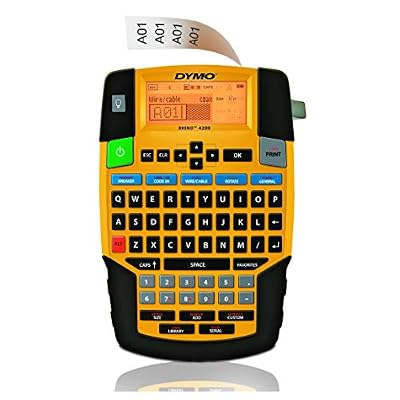
The Rhino 4200 is the entry point to DYMO’s industrial line and the machine most home-lab and small-crew installers start with. Its QWERTY keyboard and one-touch hot keys are programmed for exactly this work: wire and cable wraps, flags, breaker panels and fixed-length labels, plus Code 39 and Code 128 barcodes. A library of more than 150 symbols and terms covering electrical, pro AV, security and facilities work is built in, so common legends do not have to be typed out in full.
It prints on the full Rhino industrial media range in widths from 6 mm to 19 mm, including heat-shrink tubes with a published 3 to 1 shrink ratio, flexible nylon for curved surfaces, permanent polyester, all-weather vinyl and self-laminating labels. DYMO rates its industrial tapes for resistance to moisture, UV light and common job-site chemicals, and the printed image is thermal transfer, so it does not smear the way ink would. Power comes from six AA batteries, with an optional rechargeable lithium-ion pack and AC adapter available for bench use.
Specs
- Tier: budget
- Media widths: 6, 9, 12 and 19 mm Rhino industrial labels
- Cable formats: wire and cable wraps, flags, heat-shrink tubes, self-laminating labels
- Input: QWERTY keyboard with dedicated hot keys
- Power: six AA batteries; optional rechargeable pack or AC adapter
- Extras: Code 39 and Code 128 barcode printing, 150-plus symbol and term library
Brady M210

The M210 is Brady’s keypad workhorse, replacing the long-running BMP21-PLUS. It auto-formats labels around preset types that include wire markers, flags, patch panels, terminal blocks and breaker layouts, and it accepts the broad M21 cartridge family in continuous and pre-sized forms up to 0.75 inches wide. For cables, the relevant media are the all-weather vinyl wraps, the nylon cloth labels that flex around bends, and Brady’s PermaSleeve heat-shrink markers, which Brady publishes with a 3 to 1 shrink ratio and ratings for abrasion and solvent resistance.
Print resolution is 203 dpi, the sharpest in this roundup alongside its M211 sibling, and the housing is built for site abuse: Brady rates it for drops from six feet and builds it to military shock standards. It runs on six AA batteries or an optional rechargeable lithium-ion pack, and the ABC keypad, while slower than a QWERTY layout, is simple to drive one-handed while you hold a cable in the other.
Specs
- Tier: mid-range
- Media widths: M21 cartridges up to 0.75 in (19 mm), continuous and pre-sized
- Cable formats: wire markers, flags, self-laminating vinyl, PermaSleeve heat-shrink
- Print resolution: 203 dpi
- Input: ABC keypad with preset label types
- Power: six AA batteries; optional rechargeable lithium-ion pack
- Durability: six-foot drop rating, rubber bumpers
Brother P-touch PT-E310BTVP

The PT-E310BTVP sits in Brother’s P-touch EDGE industrial range and is the most connected keyboard machine here. It keeps a full QWERTY keyboard for standalone work, then adds Bluetooth pairing with Brother’s Pro Label Tool app and a USB-C connection for P-touch Editor on a computer, so a cable schedule built in a spreadsheet can be sent to the printer instead of typed at the rack. Dedicated application keys cover cable wrap, cable flag, patch panel, faceplate and serialised numbering.
It prints up to 18 mm wide at 180 dpi and 20 mm per second, and it takes three Brother tape families: laminated TZe tapes, which Brother publishes as resistant to water, abrasion, chemicals and temperature extremes; HGe high-grade tapes; and HSe heat-shrink tubes for permanent cable sleeves. The VP kit bundles the printer with a rechargeable lithium-ion battery, a hard carry case and a starter tape, which makes it the easiest of these five to put straight to work.
Specs
- Tier: mid-range
- Media widths: TZe, HGe and HSe tapes up to 18 mm
- Cable formats: cable wrap, cable flag, heat-shrink tubes, patch panel and faceplate labels
- Print resolution: 180 dpi; print speed 20 mm per second
- Input: QWERTY keyboard, Bluetooth app control, USB-C PC connection
- Power: rechargeable lithium-ion battery (kit), hard case included
- Cutter: built-in manual cutter
Brady M211

The M211 takes the opposite approach to the M210: there is no keypad and no screen worth the name, because every label is designed in Brady’s Express Labels app on your phone and sent over Bluetooth. That makes it the fastest machine here for long, structured jobs such as a full patch-panel schedule, where the app can hold templates and sequences that would be painful to type on a handheld. It shares the M21 cartridge family with the M210, including self-laminating vinyl wraps and PermaSleeve heat-shrink markers, and prints at 203 dpi up to 0.75 inches wide.
Brady publishes a battery figure of up to 300 labels on a single charge from the internal lithium-ion pack, which recharges over USB, and the printer itself is rated for six-foot drops and 250 pounds of crush resistance. A belt clip keeps it on your person while both hands are busy dressing a bundle. The trade-off is total dependence on the app: with a flat phone, the M211 is a paperweight, which is why it suits planned installation work better than emergency call-outs.
Specs
- Tier: premium
- Media widths: M21 cartridges up to 0.75 in (19 mm), continuous and pre-sized
- Cable formats: wire wraps, flags, self-laminating vinyl, PermaSleeve heat-shrink
- Print resolution: 203 dpi
- Input: Bluetooth only, Brady Express Labels app on phone or tablet
- Power: internal rechargeable lithium-ion battery, up to 300 labels per charge, USB charging
- Durability: six-foot drop rating, 250 lb crush resistance, belt clip
DYMO Rhino 5200

The Rhino 5200 is the step up from the 4200 for crews who label all day. It prints the same Rhino industrial media in 6 mm to 19 mm widths, including heat-shrink tubes, flexible nylon, vinyl and self-laminating labels, and it meets the ANSI and TIA/EIA-606-A labeling standards that structured-cabling work is specified against. DYMO’s published claim for the model is that its hot keys and label memory let it produce labels markedly faster than rival machines, and it prints Code 39 and Code 128 barcodes on 19 mm labels for asset tracking.
The practical upgrades over the 4200 are a larger backlit display that stays readable in dark ceiling voids and racks, room to store a large library of saved label formats for repeat jobs, and a slip-resistant rubberised housing with an integrated lanyard. Power is six AA batteries as standard, with the same optional rechargeable lithium-ion pack and AC adapter as its smaller sibling. If your labeling is mostly at a desk rather than in the field, the desktop machines in our guide to the best label printers are the better-shaped tool; the Rhino pair earn their keep where the cables actually are.
Specs
- Tier: premium
- Media widths: 6, 9, 12 and 19 mm Rhino industrial labels
- Cable formats: wire and cable wraps, flags, heat-shrink tubes, self-laminating labels
- Standards: meets ANSI and TIA/EIA-606-A labeling standards
- Input: QWERTY keyboard with hot keys, large backlit display
- Power: six AA batteries; optional rechargeable pack or AC adapter
- Extras: Code 39 and Code 128 barcodes, saved label library, lanyard and rubber bumpers
How to Choose
Start with the media, not the machine. If your cables are already terminated, heat-shrink is off the table and self-laminating wraps are your format, which every pick here supports. If you can label before connectors go on, heat-shrink gives the most permanent result, and the Brother’s HSe tubes, Brady’s PermaSleeve markers and DYMO’s Rhino tubes all do the job. Next, pick your input style: keyboard machines like the Rhino 4200, M210 and PT-E310BTVP work anywhere, while the M211 rewards organised, app-driven jobs. Finally, think about power. AA-fed machines are easy to keep running with spare cells, while the rechargeable Brother and Brady models need a charging routine.
Frequently Asked Questions
Can these label makers print on heat-shrink tubing?
Yes. All five print heat-shrink media made for their own cartridge systems: DYMO Rhino heat-shrink tubes, Brady PermaSleeve markers for the M210 and M211, and Brother HSe tubes for the PT-E310BTVP. The tube must be loaded and printed before it is slipped over the cable and shrunk with a heat gun, and each brand’s tubes only fit its own printers.
What is the difference between a cable wrap and a flag label?
A wrap label winds around the cable jacket, with self-laminating versions sealing the printed area under a clear protective tail. A flag label folds around the cable so the printed faces stick out sideways, back to back. Flags are easier to read in a crowded bundle, while wraps sit flatter and survive pulling through conduit and cable management better.
Are the printed labels resistant to water and chemicals?
That depends on the media rather than the printer. Laminated Brother TZe tapes are published by Brother as resistant to water, abrasion, chemicals and temperature extremes, DYMO rates its industrial vinyl and polyester tapes for moisture, UV and common solvents, and Brady publishes abrasion and solvent resistance figures for its vinyl and PermaSleeve materials. Plain paper-style tapes from any brand are not suited to cables in damp or oily locations.
Can I use third-party tapes in these machines?
Each printer is built around its own cartridge system, and the manufacturers only guarantee fit and print quality with their own media. Third-party cartridges exist for some of these platforms, but heat-shrink and self-laminating cable media are the areas where off-brand stock varies most in adhesive and shrink behaviour, so branded media is the safer choice for permanent cable identification.
Final Verdict
For most people labeling a home network, a gaming setup’s worth of power and display cables, or a small office rack, the DYMO Rhino 4200 covers every cable format that matters at the lowest commitment. The Brother PT-E310BTVP is the better buy if you want one machine that works standalone today and from an app or PC tomorrow, and the Brady M210 remains the rugged keypad alternative with the sharpest print. Choose the Brady M211 for app-driven installation schedules and the DYMO Rhino 5200 for standards-based cabling work at volume.
Product and ASIN Reference
| Product | ASIN |
|---|---|
| DYMO Rhino 4200 Industrial Label Maker | B005MR516Y |
| Brady M210 Portable Label Printer | B09WZBQWN1 |
| Brother P-touch PT-E310BTVP P-touch EDGE Label Printer Kit | B0D2Z42BW2 |
| Brady M211 Portable Bluetooth Label Printer | B09WZCY772 |
| DYMO Rhino 5200 Industrial Label Maker | B002M1DEM6 |