

- Top Pick: Best for 1440p: HP OMEN 45L (GT22-3060)
- Runner-up: Best for Creation: MSI Aegis R2 AI (Ultra 7 265)
- Also consider: Lenovo Legion Tower 5 Gaming Desktop
This budget tier is where a prebuilt stops being a gaming-only box and becomes a genuine hybrid machine. Every pick here runs an RTX 5070 Ti-class graphics card with 16GB of VRAM, the headroom that makes 4K play at high settings realistic, and each pairs it with a processor chosen for more than frame rates alone. The result is a tower that drives a 4K monitor at night and cuts video or renders 3D scenes during the day.
The three systems below come from Lenovo, HP and MSI, and they are split by use case rather than ranked in a single line. One is built around AMD’s cache-stacked gaming chip, one is the balanced tower with the strongest cooling on paper, and one leads with storage and core count for creative work. All three usually sell inside this budget tier, chosen conservatively.
As an Amazon Associate, we earn from qualifying purchases.
Quick Answer
For most buyers at this tier, pick the HP OMEN 45L. Its Core Ultra 7 265K, RTX 5070 Ti and Cryo Chamber liquid cooling make it the strongest all-rounder for 4K and 1440p play. The Lenovo Legion Tower 5 is the high-refresh pick, and the MSI Aegis R2 AI is the creator hybrid with 2TB of storage.
Table of Contents
- Best for 1080p High-Refresh: Lenovo Legion Tower 5
- Best for 1440p: HP OMEN 45L
- Best for Creation: MSI Aegis R2 AI
- How to Choose
- When to Move Up or Down a Tier
- Who Should Skip
- FAQ
- Final Verdict
Best for 1080p High-Refresh: Lenovo Legion Tower 5 (90YJ00A9US)
Specs
- Processor: AMD Ryzen 7 9800X3D, 8 cores, up to 5.2 GHz boost, 3D V-Cache
- Graphics: NVIDIA GeForce RTX 5070 Ti, 16GB GDDR7
- Memory: 32GB DDR5
- Storage: 1TB SSD
- Operating system: Windows 11 Home
- Case: Legion Tower 5, Eclipse Black
At 1080p with a high-refresh monitor, the processor sets the ceiling, and the 9800X3D is the gaming-first chip in this roundup. Its stacked cache holds high, stable frame rates in competitive titles where lesser processors dip. The RTX 5070 Ti is heavily underworked at this resolution, which leaves enormous headroom for a move to 1440p or 4K later, and 32GB of memory keeps a game, voice chat and capture software running together. If you play fast games now and plan a monitor upgrade before a PC upgrade, this is the pick.
Best for 1440p: HP OMEN 45L (GT22-3060)
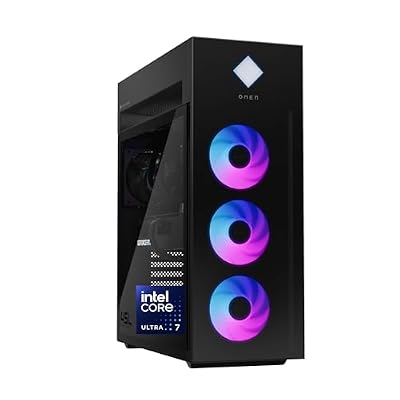
Specs
- Processor: Intel Core Ultra 7 265K, 20 cores, up to 5.5 GHz boost
- Graphics: NVIDIA GeForce RTX 5070 Ti, 16GB GDDR7
- Memory: 32GB DDR5-5600 RGB (Kingston FURY), 4 DIMM slots
- Storage: 1TB PCIe Gen4 NVMe M.2 SSD
- Cooling: OMEN Cryo Chamber liquid cooling
- Power supply: 850W 80 Plus Gold, modular
- Connectivity: Wi-Fi 6E, Bluetooth
- Operating system: Windows 11 Pro
The OMEN 45L is the balanced tower of the three, and its supporting hardware is the most complete on paper. The Cryo Chamber moves the liquid-cooling radiator into its own compartment atop the case, an 850W Gold modular power supply backs the RTX 5070 Ti, and the Z890 board leaves four memory slots for expansion. The 265K’s twenty cores split the difference between gaming and work: strong clocks for 1440p ultra settings, and enough threads to edit or stream on the side. For a single machine that has to do a bit of everything well, it is the most straightforward recommendation here.
Best for Creation: MSI Aegis R2 AI (Ultra 7 265)

Specs
- Processor: Intel Core Ultra 7 265, 20 cores, up to 5.3 GHz boost
- Graphics: NVIDIA GeForce RTX 5070 Ti, 16GB GDDR7
- Memory: 32GB DDR5
- Storage: 2TB SSD
- Cooling: 360mm liquid cooler
- Power supply: 750W 80 Plus Gold
- Connectivity: Wi-Fi 7, 5Gb Ethernet
- Operating system: Windows 11 Pro
This is the pick that justifies the tier for creators. Storage leads the spec sheet: 2TB is double what the other two picks ship with, so active projects, footage and a game library share one fast drive instead of competing for space. The twenty-core Ultra 7 265 brings multicore throughput to timeline exports, CPU renders and compiling, the RTX 5070 Ti adds hardware encoding and AI acceleration for creative applications, and Windows 11 Pro suits a machine that doubles as a work tool. It still plays at 4K high settings; it simply trades the last slice of esports frame rate for the configuration a creator actually uses.
How to Choose
Start with the graphics card, because it defines the tier: insist on the RTX 5070 Ti class and its 16GB of VRAM if 4K textures and ray tracing matter to you. Next, choose the processor by workload, not habit. A cache-heavy gaming chip wins at 1080p high-refresh, a balanced twenty-core suits 1440p plus side work, and storage decides it once projects enter the picture. Treat 32GB of DDR5 as the floor, and prefer 2TB of NVMe storage if you keep both a game library and project files on one machine. Finally, check the unglamorous parts: a clearly rated power supply and real liquid cooling protect performance in long sessions. Prices at this tier move often, so check the current price on the Amazon product page before you order.
When to Move Up or Down a Tier
Drop a tier if your monitor tops out at 1440p and you never edit video or touch 3D work; put the difference toward a better display or peripherals instead. Our gaming PC guide for the tier below covers that gaming-first 4K entry point, and our build guide at that lower budget suits buyers who would rather assemble their own. Move up a tier if you stream gameplay and create on the same machine every day, render long projects where core count directly shortens your wait, or want more graphics headroom for 4K high-refresh monitors; the next tier up pushes that streaming and creation side further. Stay here if you want one tower that games at 4K and works as a part-time workstation without paying for flagship parts you will not use.
Who Should Skip
Skip this tier if you only play esports titles at 1080p and have no creative workload; a lower tier already covers that use case for less. Skip it if you need portability, since all three picks are full towers. And skip it if your target is native 4K at the highest refresh rates in the most demanding titles with every setting maxed; that job belongs to the higher tiers built around the next graphics class up, not to RTX 5070 Ti systems.
FAQ
Is an RTX 5070 Ti enough for 4K gaming?
For most current titles at high settings, yes, especially with upscaling enabled. The 16GB of VRAM is the important part at 4K, since high-resolution textures are what push lesser cards past their limits. Expect to tune a few settings in the most demanding releases rather than maxing everything.
Is 32GB of memory enough for video editing on these PCs?
For 1080p and typical 4K timelines, 32GB is a workable starting point, and all three picks ship with it. If you regularly work with many layers, effects or several applications at once, choose a system with free slots and room to grow, like the HP pick, so you can expand later.
Should I buy a prebuilt or build my own at this tier?
A prebuilt gets you a single warranty, a tested configuration and no assembly time, which matters when the machine is also your work tool. Building your own can fine-tune part choices, such as a specific power supply or case, but you handle compatibility and troubleshooting yourself.
Can these PCs handle streaming while gaming?
Yes for a single-machine setup at 1440p or 1080p output, using the graphics card’s hardware encoder so the processor stays free for the game. If streaming is your main job rather than a side activity, the tier above is the more comfortable long-term home.
Final Verdict
This tier buys you the RTX 5070 Ti’s 16GB of VRAM plus processors and storage that turn a gaming tower into a part-time workstation. Take the Lenovo Legion Tower 5 for the highest frame rates, the HP OMEN 45L for the most complete all-round spec sheet, and the MSI Aegis R2 AI if creation work and storage capacity share the desk with gaming. Match the processor to your workload and any of the three will serve both roles well.










