

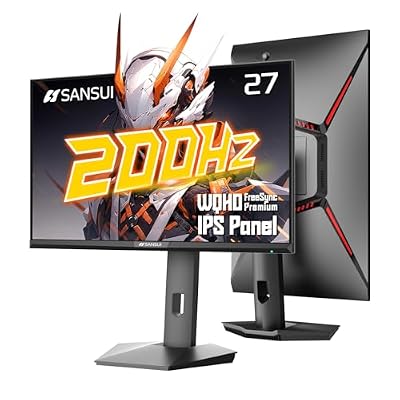
27 inches at 1440p is the sweet spot most gamers land on eventually, and for good reason. You get 109 pixels per inch, which is sharp enough that you stop noticing individual pixels at normal desk distance, without the GPU demands of 4K. A mid-range card like an RTX 4070 or RX 7800 XT can push high frame rates at this resolution in most games, where it would choke trying to do the same at 4K. If you’re upgrading from 1080p or just picking your first “real” gaming monitor, this is where to spend your money.
As an Amazon Associate we earn from qualifying purchases at no extra cost to you.


Panel types: IPS, VA, and OLED
Panel type matters more than almost any spec sheet number. IPS panels dominate this size and resolution for good reason: strong color accuracy, wide viewing angles, and response times fast enough for competitive play. The trade-off is black levels. IPS panels typically sit around 1000:1 contrast, so dark scenes look more gray than black, and IPS glow is visible in dark rooms.
VA panels push contrast to 3000:1 or higher, so blacks look genuinely black, which matters a lot in horror games or anything with a lot of night scenes. The cost is slower pixel response, which can cause smearing in fast motion, sometimes called “black smearing” specifically because it shows up worst in dark-to-dark transitions.
OLED has entered this size and resolution segment and it’s genuinely the best image quality you can buy right now. Instant pixel response, true blacks, and no backlight bleed. The catches are real ones: burn-in risk with static UI elements (health bars, minimaps) over hundreds of hours, lower peak brightness in SDR content than you’d expect, and prices that run $600-900 versus $200-350 for a good IPS panel. If you’re not sure you’ll replace the monitor in 3-4 years, that burn-in risk is worth taking seriously rather than dismissing.
Refresh rate: how high do you actually need to go
At 1440p, 144Hz is the baseline worth buying today. The jump from 60Hz to 144Hz is dramatic and you’ll feel it in any genre. Going from 144Hz to 165Hz or 240Hz is a much smaller, more marginal gain, and only matters if you’re playing competitive shooters where you can consistently hit those frame rates. If your GPU can’t push past 100-120fps in the games you actually play, paying extra for a 240Hz or 360Hz panel is wasted money sitting unused.
Be honest with yourself about what you play. A 165Hz IPS panel is plenty for most single-player and casual multiplayer gaming. Competitive Valorant or CS2 players chasing every frame advantage are the ones who benefit from going higher, and even then, the jump from 165Hz to 240Hz has diminishing returns unless you’re already playing at a high level.
Quick comparison
| Panel type | Typical price (27in 1440p, 144Hz+) | Best for | Watch out for |
|---|---|---|---|
| IPS | $200-350 | Most gamers, color-accurate work | Weaker blacks, IPS glow in dark rooms |
| VA | $180-280 | Budget buyers wanting deeper contrast | Dark scene smearing in fast motion |
| OLED | $600-900 | Image quality as the top priority | Burn-in risk, higher cost, lower SDR brightness |
What to actually buy
For most people, a 27in 1440p IPS panel at 144Hz or 165Hz is the right call. It’s the configuration with the fewest compromises and the widest selection, so you’re not stuck picking from a short list. Browsing 27in 1440p IPS gaming monitors will turn up a lot of solid options in the $220-300 range from brands that have been reliable for years.
If budget is the main constraint and you don’t mind slightly softer motion in dark scenes, VA panels are a legitimate way to save $30-50 without giving up much. They’re not a downgrade so much as a different trade-off, and plenty of people never notice the smearing unless they’re specifically looking for it. Check 27in 1440p VA monitors if that’s you.
If you’ve got the budget and care more about picture quality than squeezing out max frame rate, OLED is worth the jump, but go in knowing the burn-in trade-off and consider turning on screen savers and auto-brightness features rather than ignoring them. There are now a handful of 27in 1440p OLED gaming monitors at this size that didn’t exist a couple years ago, and the segment is maturing fast.
Specs that get overhyped
HDR support on a monitor without local dimming zones or at least 600 nits of peak brightness is mostly marketing. A lot of budget monitors list “HDR400” and the HDR mode actually looks worse than SDR because the panel can’t get bright enough to make it worthwhile. Don’t pay a premium for HDR branding unless the monitor also has real brightness and contrast to back it up.
Response time numbers like “1ms GtG” are also measured under ideal conditions that don’t reflect real gameplay. They’re useful for comparing within a panel type, but a 1ms VA panel will still show more motion blur than a 1ms OLED panel. Trust reviews with actual motion photography over the spec sheet number.
Don’t skip the ports
Make sure the monitor has DisplayPort 1.4 at minimum if you want to run 144Hz or higher at 1440p; some cheaper HDMI 2.0 ports cap out lower than you’d expect. If you’re also using the monitor for a laptop or secondary device, check for a second DisplayPort or at least HDMI 2.1, since some monitors ship with just one of each and that becomes annoying fast once you add a console or a second PC into the mix.

















