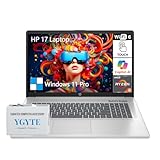
- Top Pick: HP 17 Inch Touchscreen Laptop – AMD Ryzen 5 7430U 32GB RAM 1TB SSD W11 Pro | 17.3" HD+ Anti-Glare Display, Wi-Fi 6, Bluetooth 5.4, Fast Charge, AI Copilot – Laptop Windows 11 Pro for Business & Student
- Best Value: HP Touchscreen Laptop, 17.3" HD+ 17 Inch Touch Display, AMD Ryzen 5 6-Core (Outperforms Intel i7-1255U), 16GB RAM 1TB SSD, Windows 11 Pro for Business, School & Home, Numpad, USB-C, HDMI
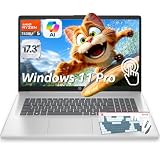
- Premium Choice: HP 17 Inch Touchscreen Laptop, AMD Ryzen 5 7430U, 32GB RAM DDR4 1TB SSD | 17.3" HD IPS Display, Windows 11 Pro, Copilot AI, Numeric Keypad, WiFi 6, BT 5.4, for Business & Student
A 17-inch touchscreen laptop answers a narrow question: you want a big canvas that you can also tap, swipe, and sign on. Every model in this 2026 roundup comes from the same brand, so the decision has less to do with logos and more to do with processor family, memory, storage, and what else ships in the box.
This guide is for buyers who split the day between spreadsheets, video calls, document markup, and couch streaming, and who would rather have a 17.3-inch panel than a 15.6-inch one. It is not a gaming list. Use the table to shortlist, the buying section to set your minimums, and the write-ups to see where each configuration gives something up.
Quick Picks
As an Amazon Associate we earn from qualifying purchases at no extra cost to you.



| Product | Best for | Key spec from the title |
|---|---|---|
| HP 17 Ryzen 5 7430U, 32GB / 1TB, anti-glare | Heavy multitasking in bright rooms | 32GB RAM, 1TB SSD, Windows 11 Pro |
| HP 17.3 Ryzen 5 6-core, 16GB / 1TB | Buyers who need USB-C and HDMI | Numpad, USB-C, HDMI listed |
| HP 17 Ryzen 5 7430U, 32GB DDR4 IPS | Shared screens, wide viewing angles | IPS display, Wi-Fi 6, Bluetooth 5.4 |
| HP 17 Core Ultra 7, 32GB DDR5 / 2TB | Power users and large libraries | 12-core CPU plus NPU, 2TB SSD |
| HP 17.3 Blue, Microsoft 365, 16GB | Privacy features | Webcam shutter, fingerprint reader |
| HP 17 Ryzen 5 7430U, 16GB / 1TB, anti-glare | Everyday work with roomy storage | 16GB RAM, 1TB SSD |
| HP 17.3 Core Ultra 7, 16GB, dock set | Desk setups needing extra storage | 512GB SSD plus 512GB external |
| HP 17 Core 5 120U, 16GB / 512GB | Balanced home use | Backlit keyboard, Office for the web |
| HP 17.3 Lavender, 8GB / 128GB | Light browsing and email | 8GB RAM, 128GB SSD |
How to Choose
Processor family and memory
Three chip families appear here: Ryzen 5 7430U, Intel Core Ultra 7, and Intel Core 5 120U, plus an unnamed Intel quad-core on the entry models. For a browser with dozens of tabs plus office apps, 16GB of RAM is a sensible floor and 32GB leaves headroom. 8GB is workable for light browsing but tight on Windows 11. Ignore listing lines claiming a chip outperforms a rival; compare core counts and memory instead.
Storage you will not outgrow
A 17-inch body has room for large drives, and 512GB is the practical minimum once documents, photos, and downloads pile up. 1TB is comfortable and 2TB suits a media library. Be wary of 128GB, which Windows updates and apps fill quickly. A small internal drive paired with an external drive or UFS module is not the same as one large internal SSD.
Screen and touch
HD+ at 17.3 inches normally means 1600 by 900 pixels: readable at arm’s length, but not razor sharp. Check whether the listing says IPS, which widens viewing angles, or anti-glare, which tames reflections near windows. Glossy touch glass can act like a mirror in a sunny room, so the finish matters as much as the resolution.
Ports, keyboard, and security
A body this size should carry a numeric keypad; confirm it if you key in figures all day. Look for USB-C and HDMI in the title, Wi-Fi 6 for newer routers, a backlit keyboard for dim rooms, and a fingerprint reader or webcam shutter if privacy matters. Skip accessory sweeteners such as earphones; they do not change the laptop.
The 9 Best Options
HP 17 Ryzen 5 7430U, 32GB and 1TB (anti-glare)
This is the configuration for people who keep many windows open and want the screen to resist reflections. The title lists a Ryzen 5 7430U, 32GB of RAM, a 1TB SSD, Windows 11 Pro, Wi-Fi 6, Bluetooth 5.4, and fast charging on a 17.3-inch HD+ anti-glare display.
- Strength: 32GB of memory and 1TB of storage are the top of this processor family’s options.
- Strength: Windows 11 Pro and an anti-glare finish suit office and student work.
- Trade-off: HD+ resolution is modest for a screen this large.
Skip it if you edit high-resolution photos all day and want a sharper panel.
HP 17.3 Ryzen 5 6-core, 16GB and 1TB
Aimed at business, school, and home, this listing names the connections many 17-inch buyers ask about: a numeric keypad, USB-C, and HDMI. A six-core Ryzen 5 is paired with 16GB of RAM and a 1TB SSD under Windows 11 Pro.
- Strength: USB-C and HDMI in the title make monitor and dock hookups straightforward.
- Strength: 16GB with 1TB covers ordinary multitasking.
- Trade-off: the exact Ryzen model is not stated, and the line about beating an Intel i7-1255U is marketing, not a spec.
Skip it if you need the processor model confirmed before you buy.
HP 17 Ryzen 5 7430U, 32GB DDR4 IPS
Same Ryzen 5 7430U and 32GB class as the first model, but this one spells out an IPS display and DDR4 memory. It adds a numeric keypad, Wi-Fi 6, Bluetooth 5.4, Windows 11 Pro, and a Copilot feature set on a 17.3-inch screen.
- Strength: the IPS panel is a good match for sharing a screen with someone beside you.
- Strength: 32GB and a 1TB SSD give long-term headroom for a laptop you plan to keep for years.
- Trade-off: the title says HD rather than HD+, so confirm the resolution before ordering.
Skip it if you want DDR5 memory, or if you would rather have the anti-glare finish named in the first model.
HP 17 Core Ultra 7, 32GB DDR5 and 2TB
The most heavily equipped model in the group pairs a 12-core Core Ultra 7 and NPU with 32GB of DDR5 and a 2TB SSD. It runs Windows 11 Pro on a 17.3-inch HD+ IPS touch panel, with a 10-key pad, backlit keyboard, and fingerprint reader.
- Strength: the largest storage and newest memory type here, which suits big photo and video folders.
- Strength: an NPU for the on-device AI features Windows is adding.
- Trade-off: it sits in the premium tier, which is more than email and streaming need.
Skip it if your workload is light, or if you want a sharper-than-HD+ panel, since the title lists no higher resolution.
HP 17.3 Blue with Microsoft 365, 16GB
Privacy is the hook here: a webcam shutter and a fingerprint reader sit alongside a backlit keyboard and a Copilot key. The listing names Microsoft 365, 16GB of RAM, and a 512GB SSD plus a 128GB UFS module, driven by an Intel quad-core CPU.
- Strength: webcam shutter and fingerprint reader for shared or public spaces such as libraries and cafes.
- Strength: Microsoft 365 is mentioned in the title, and the extra UFS module adds storage beyond the SSD.
- Trade-off: the Intel quad-core is not named, so you cannot compare its generation.
Skip it if you need Windows 11 Pro features, which the title does not list, or a single large drive.
HP 17 Ryzen 5 7430U, 16GB and 1TB (anti-glare)
Think of this as the sibling of the first model with half the memory. It keeps the Ryzen 5 7430U, 1TB SSD, anti-glare HD+ display, Wi-Fi 6, Bluetooth 5.4, and Windows 11 Pro, while dropping to 16GB of RAM.
- Strength: a 1TB drive leaves room for years of files.
- Strength: the anti-glare screen helps in bright rooms, which suits a kitchen table or a desk beside a window.
- Trade-off: 16GB may feel limited if workloads grow.
Skip it if you run virtual machines or large spreadsheets. Put it on your shortlist when the 32GB sibling feels like more memory than your daily routine calls for.
HP 17.3 Core Ultra 7, 16GB with dock set
This bundle pairs a Core Ultra 7 laptop with 16GB of RAM, Windows 11 Pro, a fingerprint reader, and a backlit keyboard. The 1TB figure is split: a 512GB SSD plus a 512GB external docking set, with earphones added.
- Strength: Core Ultra 7 with Windows 11 Pro for a capable desk machine, and the fingerprint reader speeds up sign-in.
- Strength: extra external storage arrives in the box, handy for backups and large downloads.
- Trade-off: only half the storage lives inside the laptop, and the external piece has to travel with you.
Skip it if you want a single internal drive and no accessories. The earphones in the bundle do not affect the laptop itself.
HP 17 Core 5 120U, 16GB and 512GB
A balanced mid-range configuration: Intel Core 5 120U, 16GB of RAM, a 512GB SSD, and a backlit keyboard on a large screen. It ships with Windows 11 and Office 365 for the web.
- Strength: 16GB with 512GB meets the minimums for a family computer where several people share one login or switch between accounts.
- Strength: a backlit keyboard helps with evening use, and the title promotes the large screen.
- Trade-off: Office for the web means browser-based apps, not full desktop programs.
Skip it if you need desktop Office installed for offline work or want a dedicated fingerprint reader, which this title does not list.
HP 17.3 Lavender, 8GB and 128GB
The entry configuration keeps the features that matter for casual use: webcam shutter, fingerprint reader, backlit keyboard, Copilot key, and Microsoft 365, powered by an Intel quad-core chip. It carries 8GB of RAM and a 128GB SSD.
- Strength: privacy hardware and a backlit keyboard at the lightest spec level in the group.
- Strength: suited to email, browsing, and video calls, where the screen size is the main attraction.
- Trade-off: 8GB and 128GB fill up fast, and updates alone can use a large share of the drive.
Skip it if you store photos, install many apps, or keep dozens of tabs open. Choose the 16GB Blue sibling instead if you want the same features with more breathing room.
Which One Fits Your Situation
A remote worker with many windows open
Choose the HP 17 Ryzen 5 7430U with 32GB and 1TB for steady multitasking, or the Core Ultra 7 with 32GB DDR5 and 2TB if files are large.
A family computer for homework and streaming
The Core 5 120U with 16GB and 512GB covers school work, and its backlit keyboard helps at night.
A student who shares spaces and cares about privacy
The Blue model with a webcam shutter and fingerprint reader is the better fit; the Lavender version works only if storage needs stay small.
A home office that already owns a monitor and dock
The HP 17.3 Ryzen 5 6-core lists USB-C and HDMI, so it connects to an external display without adapters. Pick the Core Ultra 7 dock bundle only if the extra external drive appeals to you.
Common Mistakes
- Treating a 17.3-inch panel as a sign of high resolution when HD+ is common.
- Buying 8GB of RAM and expecting smooth multitasking.
- Counting external drives as internal storage.
- Believing comparison lines such as outperforming a rival chip instead of reading core counts.
- Ignoring the screen finish and then fighting reflections near a window.
Related guides
- Battery Operated Smoke And Carbon Monoxide Detectors
- Combination Smoke And Carbon Monoxide Detectors
- Aio Liquid Coolers For High Performance Gaming
Frequently Asked Questions
Is a touchscreen useful on a 17-inch laptop?
It helps with markup, signing documents, annotating PDFs, and scrolling long pages with a fingertip. If you only type and click, the feature adds little, and a glossy touch panel can reflect more light than a matte one.
How much RAM should I pick?
16GB suits most people. Choose 32GB for large spreadsheets, many browser tabs, or longer ownership; 8GB suits only light tasks.
Does Office 365 for the web mean Word is installed?
No. The wording points to browser-based Office apps, which need an internet connection. Listings that name Microsoft 365 may differ in what they include, so confirm the license type and its length before you rely on it.
Are these good for gaming?
Nothing in these titles lists a dedicated graphics card, so treat them as work and entertainment machines rather than gaming laptops.