

- Top Pick: 8BitDo M30 Bluetooth Gamepad
- Runner-up: Valve Steam Deck OLED 512GB
- Also consider: Samsung T9 Portable SSD 2TB
The Sega Saturn has a reputation as the console emulators fear, and on Linux that reputation is only half deserved. The hardware really is awkward, but the software side has matured into a clear split. One route chases accuracy above everything, the other chases convenience and prettier pictures, and both run natively on Linux.
Which route suits you depends on your PC and your patience. Mednafen and its RetroArch core, Beetle Saturn, ask for a strong CPU and a BIOS file dumped from your own console, then reward you with the most faithful Saturn emulation available. Kronos and Yaba Sanshiro trade some fidelity for GPU rendering, upscaling and gentler hardware demands. This guide covers how each project works, the BIOS and RAM cartridge questions, and how to check a game before blaming the emulator.
As an Amazon Associate, we earn from qualifying purchases.
Quick answer
For accuracy, use Mednafen or its Beetle Saturn core in RetroArch: both need a BIOS dumped from your own Saturn and a strong CPU, and render at native resolution. For upscaling and weaker hardware, use the Kronos core, which renders through OpenGL, or Yaba Sanshiro. Every route needs your own disc images in cue and bin or CHD format.
Why the Saturn fights back
Most consoles of the Saturn’s era had one CPU and one graphics chip. The Saturn has two Hitachi SH-2 processors in a master-and-slave arrangement, a VDP1 that draws sprites and polygons as quadrilaterals rather than the triangles modern GPUs expect, and a VDP2 dedicated to scrolling backgrounds, plus separate chips for the CD drive and sound. Sega counted eight processors in total, and games exploited all of them in parallel.
That design is why Saturn emulation stayed rough for so long: an emulator has to keep several chips synchronised, and small timing errors show up as flicker, broken audio or games that refuse to boot. It is also why the projects below split so cleanly — one camp spends CPU power on synchronisation, the other GPU power on a faster, looser approximation.
The accuracy route: Mednafen and Beetle Saturn
Mednafen is a multi-system emulator built around accuracy, and its Saturn module is the reference point for the whole scene. The project’s documentation is blunt: Saturn emulation is described as extremely CPU intensive, and the recommended floor is a fast quad-core CPU of Intel Haswell class or better. There is no internal-resolution upscaling — games render at native resolution — and no high-level BIOS emulation. A real BIOS file is mandatory.
Beetle Saturn is the same core packaged for RetroArch, which is how most Linux players use it. Install RetroArch from your package manager, Flathub or Steam, download the core from the built-in downloader, and drop your BIOS files into RetroArch’s system folder. The wrapper adds controller mapping, CRT shaders, save states and RetroAchievements around Mednafen’s timing.
Two consequences follow. Per-game behaviour is as good as it gets: if a title runs badly in Beetle Saturn, it is usually a genuinely hard title rather than an emulator shortcut. But the CPU demand is real on handhelds and older desktops — the Steam Deck runs much of the library well, yet demanding 3D games can dip, because the bottleneck is synchronisation, not graphics.
The convenience routes: Kronos and Yaba Sanshiro
Kronos began as a fork of Yaba Sanshiro, itself a fork of the older Yabause, reworked for desktop x86-64 machines. Used mainly as a RetroArch core, its whole reason to exist is the GPU: Kronos renders the VDP1 and VDP2 through OpenGL, offers tessellation and internal-resolution upscaling that Mednafen refuses to add, and includes a compute-shader renderer that reproduces the VDP1’s quad drawing more faithfully, requiring OpenGL 4.3. Its SH-2 cached interpreter also lowers the CPU requirement. The trade-off is maturity: Kronos maintains its own compatibility list because results vary more per game. It also emulates the ST-V arcade board, which Mednafen only touches experimentally.
Yaba Sanshiro, developed by devMiyax, takes the same lineage in a friendlier direction. It is best known on Android, but Linux builds exist, and it leans on the GPU for both video processors alongside a modified SH-2 dynamic recompiler. Setup is the easiest of the three routes, and it can fall back to built-in BIOS emulation if no BIOS file is present — the project itself recommends a real BIOS, and demanding games expose the shortcut quickly. It is the low-friction option for a modest laptop.
The BIOS, your discs and the RAM cartridge
Every serious route needs a BIOS dumped from a Saturn you own. Mednafen and Beetle Saturn expect specific filenames: sega_101.bin or saturn_bios.bin for the Japanese BIOS and mpr-17933.bin for the North American and European one. The file must match your games’ region and land in the folder your emulator reads — Mednafen’s firmware folder, or RetroArch’s system folder for the cores. A wrong-region or corrupt BIOS is the most common cause of a black screen.
Games should be images of your own discs, stored as cue and bin pairs or converted to CHD, which keeps each game in one file with its audio tracks intact. Plain ISO images are a trap: they drop the CD audio tracks many Saturn games stream, so music silently vanishes. Before troubleshooting a game, check the project’s compatibility list for it — compatibility is tracked per title, and some games need a specific core option, BIOS region or RAM setting.
That last point is the 4 MB question. Late Saturn games, especially Capcom and SNK fighters, shipped expecting a RAM expansion cartridge: 1 MB for some titles, 4 MB for others. You do not need physical hardware — all three routes emulate the expansion cartridges, usually through auto-detection or a per-game cartridge setting. If a fighter boots to an error screen, the emulated cartridge type is the first thing to check.
Gear that suits a Saturn setup
8BitDo M30 Bluetooth Gamepad
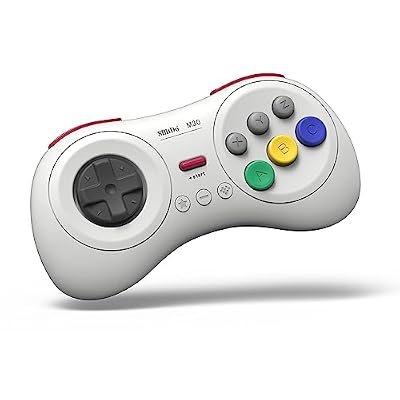
The Saturn pad’s six face buttons in two rows of three are the layout its fighters and shooters were designed around, and the M30 reproduces it with a floating D-pad modelled on the Japanese Saturn controller. It pairs over Bluetooth or works wired over USB-C, and RetroArch treats it as a standard controller on Linux.
Specs:
– Layout: six face buttons, two shoulder buttons, floating D-pad
– Connection: Bluetooth and USB-C wired
– Compatibility: Windows, Android, Switch, Raspberry Pi per the maker; standard Bluetooth on Linux
8BitDo Pro 2 Bluetooth Controller
For Saturn games that use the 3D Control Pad’s analogue stick, or for players who want one controller for every RetroArch core, the Pro 2 is the flexible option. The current model uses hall effect sticks, pairs over Bluetooth on Linux with no drivers, and maps cleanly onto the Saturn pad.
Specs:
– Sticks: hall effect analogue sticks with two analogue triggers
– Connection: Bluetooth and USB-C wired
– Compatibility: Switch, Windows, Android, Raspberry Pi and SteamOS per the maker
Valve Steam Deck OLED 512GB

The Deck is the most convenient Linux Saturn machine that is not a desktop: RetroArch and both core families install from Desktop Mode, Beetle Saturn handles most 2D titles at full speed, and Kronos suits the Deck’s GPU in demanding 3D games. Valve sells the Deck through its own store, so treat marketplace listings as third-party offers.
Specs:
– Display: 7.4-inch HDR OLED, 1280 by 800, up to 90 Hz
– Storage: 512 GB NVMe SSD with microSD expansion
– System: SteamOS on Linux with a full desktop mode
Samsung T9 Portable SSD 2TB

A combined retro collection grows fast, and a fast external SSD keeps disc images off a small internal drive. The T9 is a USB 3.2 Gen 2×2 drive; on more common Gen 2 ports it runs at that ceiling instead, still far beyond anything a CD image needs.
Specs:
– Capacity: 2 TB (model MU-PG2T0B/AM)
– Interface: USB 3.2 Gen 2×2 over USB-C
– Maker-rated speed: reads and writes up to 2,000 MB per second on a Gen 2×2 host
SanDisk 1TB Extreme microSDXC

For a Steam Deck or Linux handheld, a large microSD card is the simplest library expansion, and CHD files keep read demands low enough that a UHS-I card is never the bottleneck. This is the long-running Extreme line card, model SDSQXAV-1T00-GN6MA; a newer listing circulates under a different code, so match the model number when ordering.
Specs:
– Capacity: 1 TB microSDXC, UHS-I
– Ratings: A2 app performance class, V30 video speed class
– Maker-rated speed: reads up to 190 MB per second, writes up to 130 MB per second
How to choose
Start with your CPU. A modern desktop processor clears Mednafen’s floor comfortably, and Beetle Saturn inside RetroArch is the default recommendation: best compatibility, honest native resolution, one frontend for everything. If your machine is a laptop with a modest CPU but a real GPU, Kronos is the pragmatic pick — its OpenGL renderer shifts work to the graphics card and its upscaling makes 3D games presentable on a big screen, with more compatibility-list checking. Choose Yaba Sanshiro when the machine is weak on both fronts or you want the shortest path from install to playing. Either way, budget an hour for the groundwork: your own BIOS, converting discs to CHD, and the cartridge option for RAM-cart fighters.
Who should skip this
Skip Saturn emulation if your only computer is a low-power single-board machine — on Raspberry Pi-class hardware the frame rate is not playable for most 3D titles. Skip it if you are unwilling to dump a BIOS from your own console, because the accurate cores will not boot without one and the built-in substitutes cause exactly the weird failures that give Saturn emulation its reputation. And skip it if your interest is one famous game: check its compatibility-list entry first, since a handful of titles remain imperfect in every emulator today.
FAQ
Do I really need a BIOS file for Saturn emulation on Linux?
For Mednafen, Beetle Saturn and Kronos, yes — a BIOS dumped from your own Saturn is required, named sega_101.bin or saturn_bios.bin for Japanese or mpr-17933.bin for US and European machines. Yaba Sanshiro can boot with a built-in substitute, but its documentation steers you to a real BIOS.
Which is better for a Steam Deck, Beetle Saturn or Kronos?
Both install as RetroArch cores. Beetle Saturn is more accurate and handles most 2D games at full speed, but its CPU demand can show in heavy 3D titles. Kronos leans on the Deck’s GPU and adds upscaling, so it is smoother there. Many owners keep both cores and switch per game.
What is the best format for my Saturn disc images?
Cue and bin pairs, or CHD if you convert them. CHD keeps the data and CD audio tracks in a single compressed file and is supported by all three routes. Avoid plain ISO images: they strip the audio tracks, so games that stream music from the disc play in silence.
Do I need a 4 MB RAM cartridge for the fighting games?
Not physically. The emulators reproduce the 1 MB and 4 MB expansion cartridges in software, usually by auto-detection or a cartridge setting. If a Capcom or SNK fighter shows an error screen at boot, setting the correct emulated cartridge type is the fix.
Final verdict
Saturn emulation on Linux is no longer a compromise; it is a choice between two answers. Mednafen and Beetle Saturn are the reference: demanding, BIOS-strict and faithful down to native resolution. Kronos is the modern alternative, trading a little fidelity for GPU rendering and upscaling that flatter the Saturn’s 3D library, with Yaba Sanshiro as the easy on-ramp for modest hardware. Set up your BIOS and CHD images once, and the strangest architecture Sega ever shipped runs happily on a Linux desktop or a Steam Deck.










