A Ryzen 7 9800X3D with an RTX 5070 for gaming is a strong, well-balanced pairing: the 9800X3D is the fastest gaming-focused 8-core on AM5, and the RTX 5070 is a 1440p-class card with 12GB of GDDR7. At 1440p and 4K the RTX 5070 is the limiting part, so the CPU will almost never hold it back. Only at 1080p with competitive settings does the processor become the one waiting on the card.
- Is the Ryzen 7 9800X3D and RTX 5070 a good match?
- Will a 9800X3D bottleneck an RTX 5070 (or the other way around)?
- What FPS should you expect from a 9800X3D and RTX 5070?
- Frame budget: matching refresh rate to what the pair can deliver
- DLSS 4 and frame generation on this pair
- Settings that matter most at 1440p
- Power supply, cooling and platform for a 9800X3D and RTX 5070
- Real parts that fit this build
- Is the RTX 5070 the best GPU for a 9800X3D?
- Who should buy this combination, and who should skip it
- Common mistakes with a 9800X3D and RTX 5070 build
- Frequently Asked Questions
- Sources
That also answers the bottleneck question: a 9800X3D 5070 build is GPU-limited in nearly every modern game at 1440p, which is exactly where you want to be. Below is the reasoning with numbers, the resolution-by-resolution expectations, the power and board choices that fit, and when a different GPU makes more sense for this CPU.
Is the Ryzen 7 9800X3D and RTX 5070 a good match?
Yes, with one caveat about budget priorities. The 9800X3D sits at the top of the gaming CPU stack, while the RTX 5070 sits in the upper mid-range of the GPU stack. That makes the CPU the more expensive-per-tier part of the pair, so the combination is slightly CPU-heavy. It is still a good match because a gaming CPU lasts several GPU generations on the same AM5 socket, and you can drop in a faster graphics card later without touching anything else.
| Part | Key specs | Role in this pairing |
|---|---|---|
| Ryzen 7 9800X3D | 8 cores / 16 threads, Zen 5, 96MB L3 with 3D V-Cache, 120W TDP, AM5, up to 5.2GHz boost | Sets the ceiling for frame rate when the GPU is not the limit |
| GeForce RTX 5070 | 6,144 CUDA cores, 12GB GDDR7, 192-bit bus, 672GB/s bandwidth, 250W board power, PCIe 5.0 x16 | Sets the real frame rate in almost every 1440p and 4K scenario |
The 9800X3D exists to remove CPU limits. The RTX 5070 exists to hit high refresh at 1440p. Put together, the system spends most of its time waiting on the graphics card, and that is the efficient place for a gaming PC to be. The large L3 cache is the reason the chip leads in games: game code makes many small, scattered memory requests, and keeping more of that data on the processor die means fewer slow trips to system RAM. That advantage shows up as higher minimum frame rates and smoother frame pacing, not just a higher average.
Will a 9800X3D bottleneck an RTX 5070 (or the other way around)?
The 9800X3D does not bottleneck the RTX 5070 in any realistic gaming scenario. If anything, the reverse is true in the sense that the RTX 5070 is the part limiting frame rate. A bottleneck simply means one component caps the frame rate of the other, and every system has one at any given moment. The useful question is which part caps you at the resolution you play.
The simple frame-time check
Every frame needs the CPU to prepare it and the GPU to draw it. Whichever takes longer sets your frame rate. Take a hypothetical game where the CPU can prepare 220 frames per second in a CPU-bound scene, and the GPU can draw 95 frames per second at 1440p high settings. The slower number wins, so you get about 95 fps and the GPU is the limit. Lower the resolution to 1080p and the GPU may reach 150 fps, still below 220, so the GPU still leads. The CPU only becomes the limit when GPU capacity exceeds CPU capacity, which with a 9800X3D usually needs lighter settings, a lower resolution, or an esports title.
| Scenario | Typical limiter | What it means |
|---|---|---|
| 4K, high or ultra settings | RTX 5070 (heavily) | CPU sits mostly idle; upscaling helps most |
| 1440p, high or ultra settings | RTX 5070 | The target use case for this pair |
| 1080p, high settings | Usually RTX 5070, sometimes CPU | Both near their limits in lighter games |
| 1080p esports, low settings | Often the CPU or engine | Frame rates in the hundreds; 9800X3D shines here |
| CPU-heavy sims and strategy late game | CPU and memory latency | V-Cache gives the 9800X3D its biggest edge |
How to see which part is limiting you
- Run the game at your normal resolution and settings with an overlay such as the one built into the Nvidia app or a third-party monitor.
- Watch GPU utilization during a demanding scene. If it sits at 95 to 100 percent, the GPU is the limit, which is the healthy result for this build.
- If GPU utilization is well under 90 percent and one CPU thread is pinned near 100 percent, the game is CPU-bound in that scene.
- Lower the resolution one step. If frame rate barely changes, the CPU or the game engine is the cap. If it climbs, the GPU was the cap.
With a 9800X3D, step four almost always shows the GPU as the cap in AAA titles at 1440p. Be careful with one common misreading: a game engine that is poorly threaded can show low GPU use and low overall CPU use at the same time, because it is limited by a single thread. That is an engine limit, not a sign you bought the wrong CPU, and the 9800X3D handles that case better than almost any other chip.
What FPS should you expect from a 9800X3D and RTX 5070?
Expect smooth high-refresh play at 1080p and 1440p, and playable-to-good results at 4K with upscaling. The ranges below are approximate figures in line with what published reviews of this class of hardware tend to show; they vary with game, settings, patch version, memory speed and driver, so treat them as planning ranges rather than guarantees.
| Resolution | Heavy AAA, high settings | Mainstream and older titles | Esports, low settings |
|---|---|---|---|
| 1080p | Roughly 110 to 180 fps | Roughly 180 to 300 fps | Roughly 300 to 500+ fps |
| 1440p | Roughly 75 to 130 fps | Roughly 120 to 220 fps | Roughly 250 to 400 fps |
| 4K | Roughly 40 to 75 fps native, higher with DLSS | Roughly 70 to 130 fps | Roughly 150 to 250 fps |
The pattern matters more than any single number. Moving from 1080p to 1440p asks the GPU to draw about 78 percent more pixels (3.69 million versus 2.07 million), and 4K is 2.25 times the pixels of 1440p (8.29 million). The CPU workload barely changes with resolution, which is why frame rate drops as you climb while CPU headroom grows.
Does the RTX 5070 handle 4K with this CPU?
It can, with DLSS Super Resolution set to Quality or Balanced and sensible settings. The 12GB of VRAM is the thing to watch at 4K: a few current games with maximum textures and ray tracing can approach or exceed 12GB, which causes stutter long before average fps falls. Dropping texture quality one notch or using upscaling normally fixes that. If native 4K at high settings is your priority, an RTX 5070 Ti or a faster card is the better partner for this CPU.
Frame budget: matching refresh rate to what the pair can deliver
Targeting a refresh rate gives you a frame-time budget the GPU must beat. Work it out as 1000 divided by the refresh rate.
| Target | Frame budget | Realistic with 9800X3D + RTX 5070? |
|---|---|---|
| 60 fps | 16.7ms | Yes at 4K with upscaling, easy at 1440p |
| 120 fps | 8.3ms | Yes at 1440p in most games with high settings, or with DLSS |
| 165 fps | 6.1ms | Yes at 1440p in lighter games; use DLSS or tuned settings in heavy ones |
| 240 fps | 4.2ms | Esports at 1080p and 1440p; heavy titles need frame generation |
The 9800X3D is rarely the part that blows the budget, since its job at these rates is just preparing frames quickly. The GPU time per frame is where you win or lose, and that is tunable through settings, upscaling and frame generation.
DLSS 4 and frame generation on this pair
The RTX 50 series supports DLSS 4, including Multi Frame Generation, which can insert up to three generated frames between rendered ones. This matters for the pairing in a specific way: frame generation works best when the base frame rate is already healthy, and a fast CPU keeps that base steady. A 9800X3D helps keep frame pacing consistent when you turn it on.
- Use DLSS Super Resolution (Quality) first. It lowers the GPU load without adding latency in the way generated frames do.
- Turn on frame generation when your base frame rate is already around 60 fps or higher; below that, the added latency becomes noticeable.
- Skip frame generation in competitive shooters. Latency matters more than a high counter there.
- Cap the frame rate a few fps under your monitor refresh rate with variable refresh rate enabled, so the display stays inside its adaptive range.
Settings that matter most at 1440p
| Setting | Suggested value | Reason |
|---|---|---|
| Texture quality | High (Ultra only if VRAM stays under about 11GB) | Keeps the 12GB buffer from overflowing |
| Shadows | Medium to High | Large GPU cost for small visible gain |
| Ray tracing | Off or Medium unless the game uses it well | Biggest single fps cost on a 5070 |
| Upscaling | DLSS Quality | Roughly 30 to 40 percent more fps for a small image loss |
| Anti-aliasing | DLAA or DLSS | Cleaner than older temporal methods |
Power supply, cooling and platform for a 9800X3D and RTX 5070
This is an easy pair to power and cool. Combined, the CPU is rated at 120W TDP and the GPU at 250W board power. A worked power budget:
| Component | Typical gaming draw (approx.) |
|---|---|
| Ryzen 7 9800X3D under gaming load | 70 to 120W |
| RTX 5070 under gaming load | 200 to 250W |
| Motherboard, RAM, SSD, fans, USB | 50 to 80W |
| Estimated peak total | about 320 to 450W |
A quality 650W power supply is the manufacturer-recommended baseline for the RTX 5070, and 750W gives more headroom for transient spikes and a future GPU upgrade. If you plan to move to a 5070 Ti or higher later, buy 850W now and you will not need to replace it.
Cooling
The 9800X3D runs cooler than the previous generation of X3D chips because the 3D V-Cache now sits under the compute die rather than on top, which improves heat transfer. A good single-tower air cooler or a 240mm liquid cooler is plenty. You do not need a 360mm radiator for gaming. Case airflow matters more for the RTX 5070, which dumps up to 250W into the case, so two intake fans and one exhaust is a reasonable minimum.
Motherboard and memory
- Any AM5 board with a decent power-delivery design works. B650, B850 and X870 boards are all fine; you do not need an X870E for this pair.
- Use DDR5 in a 2x16GB or 2x32GB kit. Around DDR5-6000 with low latency (CL30 class) is the well-known sweet spot for Ryzen 9000 because it runs the memory controller and fabric in sync.
- Choose a board with PCIe 5.0 x16 for the GPU slot if you want to match the RTX 5070 interface, though the card runs fine on PCIe 4.0 with a negligible difference in games.
- Update the BIOS before installing the CPU if the board predates Ryzen 9000 support.
Real parts that fit this build
The listings below are real models that match the pair. We did not use them personally; specs shown come from the listing information.
AMD Ryzen 7 9800X3D
As an Amazon Associate we earn from qualifying purchases at no extra cost to you.

The processor at the center of this build: 8 cores, 16 threads, AM5 socket, with the large 3D V-Cache that drives its gaming lead. Best for players who want the highest frame rates in CPU-sensitive games and a platform that will outlast several GPU upgrades. Skip it if you mainly do heavy multi-threaded work such as rendering, where a 12-core or 16-core chip pays off more.
- Pros: top-tier gaming performance, efficient for its speed, cool-running for an X3D chip, AM5 upgrade path.
- Cons: only 8 cores for non-gaming workloads, premium over non-X3D chips.
ASUS Prime GeForce RTX 5070 12GB OC Edition

A 2.5-slot RTX 5070 with 12GB GDDR7, PCIe 5.0 and HDMI/DP 2.1 outputs, listed as SFF-ready. Best for compact and mid-size cases where a bulky triple-fan card will not fit. Skip it if you want a premium cooler with extra RGB and a large heatsink.
- Pros: compact size, current display outputs, solid cooling for a 250W card.
- Cons: priced above the reference baseline, limited extras.
MSI Gaming RTX 5070 12G Ventus 3X OC
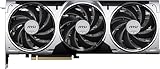
A triple-fan RTX 5070 with 12GB GDDR7 on a 192-bit bus and three DisplayPort outputs per the listing. Best for standard ATX cases where airflow and low fan noise at load are priorities thanks to the larger fan area. Skip it in a small-form-factor build; check the card length first.
- Pros: three fans for quieter operation, factory overclock, standard layout.
- Cons: larger than 2.5-slot cards; HDMI port count not listed in the excerpt.
PNY GeForce RTX 5070 EPIC-X RGB OC

A triple-fan RTX 5070 with 12GB GDDR7 on a 192-bit bus and a listed 2685 MHz boost clock. Best if you want RGB lighting and a factory overclock. Skip it if you prefer a plain, neutral look.
- Pros: higher listed boost clock, RGB, SFF-ready per the listing.
- Cons: real-world gain from the factory overclock is small, usually a few percent.
Is the RTX 5070 the best GPU for a 9800X3D?
The RTX 5070 is a sensible match, not necessarily the best. The best GPU for a 9800X3D depends on resolution and budget, because the CPU is strong enough that it will not limit any current graphics card at 1440p and above.
| Your goal | Better GPU tier for a 9800X3D | Why |
|---|---|---|
| 1080p high refresh, tight budget | RTX 5060 Ti class or Radeon RX 9060 XT class | The 9800X3D gives them headroom, but a 5070 is overkill at 1080p |
| 1440p high settings, 100+ fps | RTX 5070 or Radeon RX 9070 class | The best value balance for this CPU |
| 1440p ultra / entry 4K | RTX 5070 Ti or RX 9070 XT class (16GB) | More VRAM and bandwidth than the 5070 |
| Native 4K high settings | RTX 5080 class or above | The CPU is nowhere near the limit at 4K |
If you are on a fixed budget, a common mistake is overspending on the CPU and underspending on the GPU. For 4K gaming especially, a cheaper CPU with a stronger GPU usually gives more fps. The 9800X3D with RTX 5070 is justified if you value top CPU performance, play CPU-heavy games, or want the longest upgrade life from the platform. If your budget is closed and you play mostly at 1440p or 4K, check whether moving the CPU one tier down and the GPU one tier up is the better split.
9850X3D and other X3D options
AMD also lists a Ryzen 7 9850X3D, a higher-clocked refresh of the same design, and the older Ryzen 7 7800X3D remains a capable lower-cost alternative that is still very good with an RTX 5070 at 1440p.
AMD Ryzen 7 9850X3D

An 8-core, 16-thread AM5 chip for buyers who want the newest X3D silicon. It costs more than the 9800X3D for a modest clock gain, so it only makes sense if the price gap is small. Skip it if you are budget-limited; put the difference into the GPU instead.
- Pros: newest X3D part, same platform and cooling needs.
- Cons: small gain over the 9800X3D in games, higher cost.
Who should buy this combination, and who should skip it
- Buy it if you play at 1440p, want high refresh with room to grow, play CPU-heavy games such as simulation, strategy, or large multiplayer titles, or want a platform you can upgrade GPU-only for years.
- Skip it if you play mostly at native 4K and want maximum image quality now (spend more on the GPU), you have a strict budget and mostly play at 1080p (a cheaper CPU gives similar results), or you do heavy video rendering where more cores matter.
Common mistakes with a 9800X3D and RTX 5070 build
- Memory not running at its rated speed. Enable EXPO in the BIOS; otherwise DDR5 may run at a low default speed and cost you frame rate.
- Using a monitor that limits the build. A 60Hz or 1080p panel wastes the pair. Match a 1440p 144 to 240Hz monitor to what the GPU delivers.
- Undersized or old power supply. Use a quality unit with the correct modern GPU power connector and avoid bending the cable sharply at the plug.
- Old BIOS or chipset drivers. Ryzen 9000 boards need current firmware for best stability and boost behavior.
- Ignoring the 12GB VRAM limit. If a game stutters while GPU usage is below 100 percent, lower textures one step before blaming the CPU.
Frequently Asked Questions
Does the Ryzen 7 9800X3D bottleneck the RTX 5070?
No. The 9800X3D is faster than the RTX 5070 can use in nearly all games at 1440p and 4K. The graphics card is the limiting part, which is the normal and desirable state for a gaming PC.
Is the RTX 5070 a bottleneck for the 9800X3D?
In a technical sense, yes at higher resolutions, because the GPU caps frame rate first. That is not a flaw, since you pay for a CPU that stays fast across several GPU upgrades. If you want to use more of the CPU, play at lower resolution or upgrade the graphics card later.
What is the best GPU for the 9800X3D?
It depends on resolution and budget. The RTX 5070 or Radeon RX 9070 class suits 1440p, an RTX 5070 Ti or RX 9070 XT class suits ultra 1440p and entry 4K, and an RTX 5080 class card or above suits native 4K.
What power supply do I need for a 9800X3D and RTX 5070?
650W from a reputable brand is the baseline recommendation for the RTX 5070. A 750W unit leaves comfortable headroom, and 850W is the safer pick if you plan to upgrade to a higher-end GPU later.
Do I need a 360mm liquid cooler for the 9800X3D?
No. A good air cooler or a 240mm liquid cooler is enough for gaming. The 9800X3D has a 120W TDP and runs cooler than earlier X3D processors.
Is 12GB of VRAM enough on the RTX 5070?
For 1080p and 1440p it is enough in nearly all current games. At 4K with maximum textures and ray tracing, a few games can use more than 12GB, so you may need to lower texture quality or use upscaling.
Should I get the 9800X3D or save money with a cheaper CPU?
If you play CPU-heavy titles or want the best long-term platform, the 9800X3D is worth it. If you mostly play GPU-bound games at 1440p or 4K on a tight budget, spending less on the CPU and more on the graphics card gives more fps for the money.
Sources
AMD Ryzen 7 9800X3D product specifications; NVIDIA GeForce RTX 5070 product specifications; NVIDIA DLSS 4 technology overview; AMD EXPO memory technology documentation; manufacturer product listings for the cards shown above.
Last updated: October 2026