The switch under each key is the heart of a mechanical keyboard. It decides how a keypress feels, how loud it is, how much force it takes, and whether typing feels crisp or mushy. Yet switch terminology, linear, tactile, clicky, actuation force, is where most newcomers get lost. Understanding switches is the key to choosing a keyboard you’ll genuinely love, whether you prioritize fast gaming inputs or satisfying typing feedback.
This guide demystifies mechanical switches: the three main families and how they feel, what the specs mean, why hot-swappable boards matter, and how to pick the right switch for your style. By the end you’ll be able to read a keyboard listing and know exactly what typing experience it promises. Our recommended keyboards, spanning several switch types, are below.
As an Amazon Associate we earn from qualifying purchases.








The Three Main Switch Types
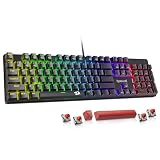
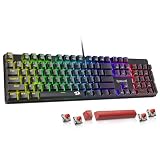
- Linear switches move smoothly with no bump, like the red switches on the Redragon wired keyboard, favored by many gamers for fast, quiet, consistent presses.
- Tactile switches have a noticeable bump at the actuation point, giving typing feedback without loud noise, a great all-rounder.
- Clicky switches, like the blue switches in the SteelSeries Apex 5 hybrid, add an audible click to the tactile bump for maximum feedback and sound.
Understanding Actuation Force and Point
Actuation force, measured in grams, is how hard you must press for a key to register. Lighter switches (around 45g) feel fast and effortless, while heavier ones resist accidental presses. The actuation point is how far down the key travels before it registers. Gamers often prefer lighter, shorter-actuating linear switches for rapid inputs, while typists may enjoy the deliberate feel of a slightly heavier tactile switch. There’s no universally best number, only what suits your hands and use.
Sound Profile and Your Environment
Switch choice largely determines how loud your keyboard is. Clicky switches are the noisiest and can annoy roommates or show up on a stream mic. Linear switches are quieter, and some boards go further with dampened designs; the SteelSeries Apex 3 uses whisper-quiet switches for near-silent operation. If you game late at night or work in a shared space, sound profile should weigh heavily in your decision.
Why Hot-Swappable Boards Are a Game-Changer
Traditionally, switches are soldered in place, so the type you buy is the type you’re stuck with. Hot-swappable boards like the Redragon wired keyboard and the AULA F75 Pro let you pull out switches and drop in new ones with no soldering. This means you can experiment, try linear for gaming and tactile for typing, or replace a failed switch instantly. For anyone curious about switches, a hot-swap board is the most flexible starting point.
Pre-Lubed Switches and Build Feel
Beyond type, small details shape the experience. Pre-lubed switches, as on the AULA F75 Pro’s Reaper switches, feel smoother and sound less scratchy straight out of the box. Keycap material matters too: PBT caps resist shine and feel more textured than cheaper ABS. Even a solid frame, like the aluminium-alloy body of the SteelSeries Apex 5, affects acoustics and stability. These refinements are why two boards with the same switch type can still feel quite different.
Tips
- Choose linear switches for fast, quiet gaming inputs and tactile or clicky for satisfying typing feedback.
- If you share a space or stream, avoid clicky switches and consider a quiet or dampened board.
- Pick a hot-swappable board if you’re unsure, so you can change switch types later without soldering.
- Look for pre-lubed switches and PBT keycaps for a smoother feel and better durability out of the box.
Frequently Asked Questions
Which switch type is best for gaming?
Linear switches like reds are the popular gaming choice because they’re smooth, quiet, and let you press rapidly without a tactile bump getting in the way. That said, plenty of gamers happily use tactile switches; it comes down to feel preference.
What does actuation force mean?
It’s the amount of pressure needed to register a keypress, measured in grams. Lighter switches feel effortless and fast, while heavier ones reduce accidental presses. Around 45g is a common, comfortable middle ground.
Are clicky switches too loud?
They’re the loudest type, which some people love and others find distracting, especially on a stream or in a shared room. If noise is a concern, linear or dampened quiet switches are much better neighbors.
What is a hot-swappable keyboard?
It’s a board that lets you remove and replace switches by hand, without soldering. This lets you try different switch types or fix a broken switch easily, making it ideal for anyone still figuring out what they prefer.
Conclusion
Mechanical switches are what make each keyboard feel unique, and understanding linear, tactile, and clicky types, along with actuation force and sound, lets you choose with confidence. Gamers often lean linear, typists toward tactile, and a hot-swappable board keeps your options open. Match the switch to how you play and work, and every keystroke becomes a pleasure rather than an afterthought.