

- Top Pick: Sparkle Intel Arc A380 ELF 6GB
- Runner-up: DTECH 4K HDMI Dummy Plug
- Also consider: UGREEN USB 3.0 Switch
GPU passthrough solves the hardest compatibility problem in Linux gaming: a Windows virtual machine gets a real graphics card, so games that refuse Proton run at full speed. It creates an awkward problem of its own, though. The passed-through card renders to its display outputs, which means a second monitor, a second input on the same monitor, or a desk that feels like two computers glued together.
Looking Glass is the open-source project built to erase that split. It mirrors the guest’s framebuffer into an ordinary window on the Linux desktop, so the Windows VM behaves like just another application. This guide explains how it works in the project’s own terms, what hardware it genuinely needs, where its limits sit, and the gear that rounds out a build.
As an Amazon Associate, we earn from qualifying purchases.
Quick answer
Looking Glass copies the frames a passed-through GPU renders inside a Windows guest into a window on the Linux host, using a shared-memory device called IVSHMEM and, ideally, the KVMFR kernel module so the GPU’s DMA engine moves the frames. You still need a second GPU or integrated graphics for the host, a correctly sized shared-memory region, and matching software versions on both sides.
The problem it solves
A graphics card handed to a virtual machine with VFIO is owned by the guest. Its display sockets are the guest’s outputs, and the Linux host cannot see the picture it draws. The traditional workarounds are clumsy: a second monitor eating desk space, an input switcher that blacks out for seconds per change, or remote-desktop software that compresses the image and adds delay.
Looking Glass takes a different route. Nothing leaves the machine and nothing is compressed for a network. The guest’s frames are copied through memory both sides share, and the host draws them in a window. Keyboard, mouse, clipboard and audio travel over a SPICE channel, so one set of peripherals drives everything.
How Looking Glass works
Two programs split the job. The host application runs inside the Windows guest, despite the confusing name, and captures the guest’s screen using the DXGI desktop duplication interface. On supported professional NVIDIA cards it can use the NvFBC capture API instead, but consumer GeForce cards are limited to DXGI. Captured frames are written into an IVSHMEM device, a slab of shared memory QEMU exposes to both sides of the boundary.
The looking-glass-client application runs on the Linux host, reads those frames out of shared memory, and presents them in a window on X11 or Wayland. The client needs an EGL-capable graphics driver, which every mainstream Linux stack provides.
How the frames cross matters. The simple option is a plain shared-memory file, where the CPU copies every frame. The recommended option is KVMFR, a kernel module the project publishes: with KVMFR in place, the GPU’s DMA engine transfers frame data directly, which the documentation describes as a substantial performance improvement and which is required for the client’s direct GPU import path. AMD and Intel host graphics commonly support that DMA-BUF path; NVIDIA host cards need a driver configuration that supports DMA-BUF import.
What you need before you start
The project’s requirements page is specific. The guest must run Windows 10 version 1803 or newer, or Windows 11. The host needs a Linux system that can run KVM and QEMU and build or install the client. For a responsive setup the documentation suggests at least six CPU cores with twelve hardware threads, and recommends reserving at least two physical cores, or four threads, for the host so the desktop, QEMU and the client are not starved by the guest.
The host also needs its own graphics: the passed-through card belongs to the guest, so the Linux desktop renders on integrated graphics or a second, modest GPU. PCIe bandwidth counts too; the documentation advises at least eight PCIe 3.0 lanes, or four PCIe 4.0 lanes, for the guest card.
The shared-memory region must be sized for the largest resolution the guest will use. The documentation’s formula multiplies width by height by bytes per pixel (four for SDR, eight for HDR), doubles it, adds ten mebibytes, and rounds up to a power of two:
| Guest resolution | SDR size | HDR size |
|---|---|---|
| 1920 x 1080 | 32 MiB | 64 MiB |
| 2560 x 1440 | 64 MiB | 128 MiB |
| 3840 x 2160 | 128 MiB | 256 MiB |
Undersizing truncates the bottom of the picture; oversizing wastes locked memory. Finally, versions must match: client, guest application, display driver and OBS plugin all come from the same release, and mixing releases is unsupported.
Setting it up, in outline
With passthrough working, the extra steps are contained. You add the IVSHMEM device to the machine definition, sized from the table above, backed by a shared-memory file or by KVMFR, which also needs its udev rules so your user can open the device. You install the host application inside Windows, ideally as a service so capture survives the lock screen and UAC prompts, and you keep a SPICE graphics device in the definition: SPICE carries keyboard and mouse input, clipboard synchronisation and, since B6, audio in both directions.
One annoyance has faded. Older setups needed the guest GPU plugged into a real monitor or a dummy plug so Windows would keep a display attached. Current releases ship an indirect display driver that creates a virtual monitor in the guest, and the recommended path no longer requires a display or a plug. Builders on the legacy host application still use dummy plugs, the cheapest fix when a guest insists its screen has been unplugged.
The honest limits
Looking Glass is a frame copy, not a teleport. The documentation is candid that capture rate depends on resolution and refresh rate, that some titles misbehave at initialisation until a task switch settles them, and that HDR frames are converted to SDR by current Linux display servers. High-refresh, high-resolution play stresses shared-memory bandwidth most, which is why the project pushes KVMFR.
The bigger caveat is contractual. Several publishers deploy kernel-level anti-cheat that refuses virtual machines outright, and Looking Glass changes nothing about that: it is a display tool, not a disguise. Part of choosing this route is accepting that some competitive multiplayer titles will stay on bare metal or stay unplayed.
Maintenance is real, too. Kernel updates can require the KVMFR module to be rebuilt, guest and client versions must move together, and the arrangement sits on a passthrough configuration that demands IOMMU groups and BIOS cooperation.
Gear that completes a Looking Glass build
Sparkle Intel Arc A380 ELF 6GB

A host GPU has one job: run the Linux desktop well while the serious card belongs to the guest. This compact Intel card fits that brief, and Intel graphics sit on the well-supported side of the DMA-BUF import path KVMFR uses.
Specs:
- GPU: Intel Arc A380, 8 Xe cores
- Memory: 6 GB GDDR6, 96-bit bus
- Interface: PCIe 4.0 x8, single fan, low profile
- Power: slot-powered, no external connector
- Outputs: 3 DisplayPort, 1 HDMI 2.0
DTECH 4K HDMI Dummy Plug

For legacy host-application setups, and for guests that misbehave without a display attached, a dummy plug is the ten-minute fix: it answers the GPU’s EDID handshake so Windows keeps rendering a desktop nobody watches.
Specs:
- Type: HDMI display emulator (headless ghost)
- Emulated modes: up to 3840 x 2160 at 60 Hz, plus 1080p modes
- Power: none, plug and play, no driver
UGREEN USB 3.0 Switch
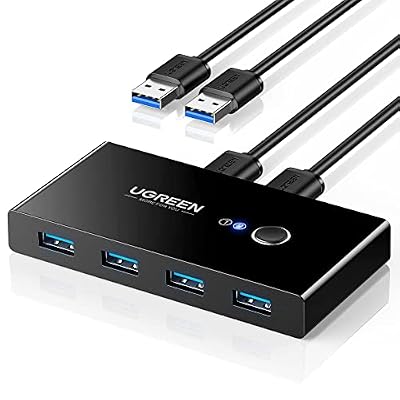
SPICE input covers the guest once it boots, but dual-purpose desks often share a keyboard and mouse with a second machine, or want switching that works before any software loads. This switch shares four USB devices between two computers at a button press.
Specs:
- Ports: 4 USB 3.0 Type A shared between 2 computers
- Data rate: USB 3.0, up to 5 Gbps
- Switching: front-panel button, 2 host cables included
WD Black SN850X 2TB NVMe SSD

A passthrough build juggles two operating systems and two game libraries. A fast Gen4 drive keeps guest installs and the host’s own library from queueing behind one slow disk, and 2 TB is where that lifestyle stops deleting games.
Specs:
- Capacity: 2 TB, model WDS200T2X0E
- Interface: PCIe Gen4 x4, NVMe, M.2 2280
- Sequential read: up to 7,300 MB/s (maker figure)
- Sequential write: up to 6,300 MB/s (maker figure)
LG UltraGear 27GP950-B 27-inch 4K 144Hz Monitor

The client window can only be as smooth as the panel it lands on. This 4K Nano IPS display runs at 144 Hz, or 160 Hz overclocked with Display Stream Compression, so a high-refresh guest gets a host screen that can keep up.
Specs:
- Panel: 27-inch Nano IPS, 3840 x 2160
- Refresh rate: 144 Hz, 160 Hz overclocked via DSC
- Response time: 1 ms GtG (maker figure)
- Sync: NVIDIA G-Sync Compatible, AMD FreeSync Premium Pro
- Inputs: 2 HDMI 2.1, 1 DisplayPort 1.4
How to choose
Start with host graphics, because it constrains everything else. If your processor has integrated graphics with a good Linux driver, use them and skip a host card entirely. If not, pick a modest AMD or Intel card: the documentation’s DMA path is happiest there, and the host card’s gaming power is irrelevant.
Size the shared memory for the resolution you will actually play at, not the panel’s maximum, and budget CPU cores honestly: a guest that takes every thread leaves the client nothing to render with. Choose KVMFR over a plain memory file; the project recommends it and the difference grows with resolution.
Who should skip this
Skip it if your must-play list is dominated by competitive titles whose anti-cheat blocks virtual machines; no display tool fixes a policy refusal. Skip it if you have a single GPU and no integrated graphics, because the host needs a picture of its own. Skip it if rebuilding a kernel module after updates sounds like a chore rather than a hobby, and if Proton already runs your library: this is a power tool for a specific gap, not a default.
FAQ
Does Looking Glass add input lag?
It adds a frame copy through shared memory, so it is not identical to a monitor wired straight to the guest card. The project describes the KVMFR path as using GPU DMA specifically to keep that copy fast, with SPICE as the standard input route. Players chasing the last fraction of latency for competitive titles should use a direct display connection instead.
Do I still need a dummy plug?
Usually not. Current releases include an indirect display driver that creates a virtual monitor in the guest, and the recommended setup does not require a physical display or a plug. Dummy plugs still help with the legacy host application and with guests that misbehave without a screen.
Can the host and guest share one GPU?
No. Passthrough gives the guest exclusive ownership of the card, so the host always needs integrated graphics or a second GPU for its own desktop. Single-GPU passthrough with a headless host exists in enthusiast circles, but it is outside what Looking Glass documents and what this guide recommends.
Does Looking Glass work on Wayland?
Yes. The client supports X11 and Wayland and needs an EGL-capable driver. One documented wrinkle: on GNOME under Wayland the window can appear without decorations unless the client is built with libdecor support.
Final verdict
Looking Glass turns GPU passthrough from a two-monitor stunt into a plausible daily setup: the Windows guest becomes a window and the Linux desktop stays home. It asks for hardware discipline in return: a host GPU, honest CPU budgeting, a correctly sized shared-memory region and matched versions. For the gamer whose library has a Proton-shaped hole and whose anti-cheat situation allows virtual machines at all, it remains the most elegant answer the open-source world has produced.










