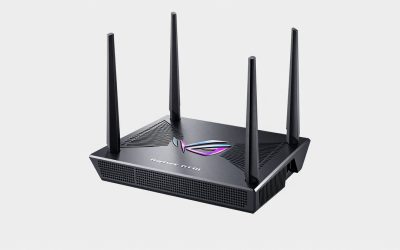
- Top Pick: ASUS ROG Rapture GT-BE98 Pro WiFi 7 Gaming Router – Quad-Band, 30Gbps, Mesh | Coverage up to 3,500 Sq. Ft., 10G Port x2, 2.5G Port x4. Game Boost for Low Latency Gaming & Streaming. VPN support
- Best Value: ASUS GT-BE19000AI Tri-Band WiFi 7 AI Gaming Router – 10G, Game Boost | Coverage up to 3,500 Sq. Ft., 10G Port x2, 2.5G Port x4. Game Boost for Low Latency Gaming & Streaming. VPN support
- Premium Choice: ASUS ROG Strix GS-BE12000 WiFi 7 Gaming Router – Tri-Band, 12Gbps, Mesh | Coverage up to 3,300 Sq. Ft., 2.5G Port x8. Game Boost for Low Latency Gaming & Streaming. VPN support
The best gaming routers for competitive online play are the ones that control bufferbloat with Smart Queue Management (SQM) or a well-implemented adaptive QoS, offer fast wired ports, and run stable firmware, with models like the ASUS ROG Rapture GT-BE98 Pro, the ASUS RT-BE96U, the TP-Link Archer GE800 and the ASUS RT-AX86U Pro covering high-end to value tiers. A router cannot shorten the distance to the game server, but it can stop your own household traffic from adding 50–200 ms of lag at the worst possible moment.
This guide explains where latency actually comes from, which router features reduce it, and when Wi-Fi 7 is worth paying for.
As an Amazon Associate we earn from qualifying purchases at no extra cost to you.


Where your ping actually comes from
Your in-game ping is the sum of several pieces. Only some of them are under your control:
| Latency source | Typical contribution | Can a router fix it? |
|---|---|---|
| Distance to server (fiber path) | ~1 ms per 100 km each way | No |
| ISP access network (fiber / cable / DSL) | 2–25 ms | No |
| Wi-Fi link (good signal) | 1–5 ms, with spikes | Partly, through better Wi-Fi or wired |
| Wired Ethernet link | under 1 ms | Yes, by giving you good ports |
| Bufferbloat under load | 20–200+ ms | Yes, with SQM or adaptive QoS |
The worked example: a player 800 km from a server on fiber sees roughly 16 ms round-trip from distance, plus about 5 ms of access network. That is a 21 ms baseline. If someone in the house starts a large download or a 4K stream and the router has no queue management, the upload or download buffer fills and ping can jump to 120 ms or more. With SQM, that same scenario usually adds only 2–10 ms. That difference is far larger than anything Wi-Fi standards or gaming branding can deliver.
Features that make a low latency gaming router
Smart Queue Management or adaptive QoS
SQM algorithms such as fq_codel and CAKE keep router buffers short and share bandwidth fairly. On ASUS routers, Adaptive QoS and the gaming-port priority feature serve the same goal. To work well, the bandwidth limit must be set to about 85–95% of your measured line speed, so the queue forms inside your router, where it is managed, rather than in the ISP’s equipment.
Wired gaming ports
Most gaming routers designate a LAN port that receives top priority. A 2.5 Gbps or faster port is useful if you also download large games, though the speed of the port has little effect on ping itself.
Stable firmware and processor headroom
QoS and SQM consume CPU time. On fast connections above roughly 500 Mbps, weaker routers may be unable to shape traffic at full speed, so a quad-core processor matters for high-bandwidth homes.
Wi-Fi quality
For gamers who cannot run a cable, a strong Wi-Fi signal and less congestion matter most. Wi-Fi 7’s Multi-Link Operation can use two bands at once and reduce latency spikes caused by interference, and the 6 GHz band is often much quieter than 5 GHz in apartment buildings.
Is a wifi 7 gaming router worth it?
| Your situation | Wi-Fi 7 benefit | Recommendation |
|---|---|---|
| Gaming PC wired by Ethernet | Minimal for gaming | Wi-Fi 6 or 6E router with good QoS is enough |
| Wi-Fi 7 laptop or handheld, crowded apartment | Noticeable: 6 GHz plus MLO reduces spikes | Wi-Fi 7 worth it |
| Older Wi-Fi 5 or 6 devices only | Little until devices are upgraded | Prioritize QoS over Wi-Fi generation |
| Multi-gig internet plan (2 Gbps+) | Needed for full wireless throughput | Wi-Fi 7 with 10 Gbps WAN |
Router for online gaming: tier comparison
| Router | Wi-Fi | Notable gaming features | Best for | Typical market range |
|---|---|---|---|---|
| ASUS ROG Rapture GT-BE98 Pro | Wi-Fi 7, quad-band | Dual 10 Gbps ports, gaming port priority, adaptive QoS | Enthusiasts with multi-gig internet | usually $600–$800 |
| ASUS RT-BE96U | Wi-Fi 7, tri-band | 10 Gbps ports, adaptive QoS, mesh support | High-end homes without ROG styling | usually $450–$600 |
| TP-Link Archer GE800 | Wi-Fi 7, tri-band | Game accelerator, dedicated game panel, 10 Gbps ports | Gamers wanting gaming-focused software | usually $400–$550 |
| ASUS RT-AX86U Pro | Wi-Fi 6 | 2.5 Gbps gaming port, adaptive QoS, mobile game mode | Best value for wired gamers | usually $220–$280 |
| Any router supporting OpenWrt with CAKE SQM | Varies | Excellent bufferbloat control | Technical users on a budget | usually $80–$200 |
Step-by-step setup for competitive play
- Measure your baseline: run a bufferbloat test that reports latency under load, ideally at a quiet time.
- Use a cable if at all possible: Ethernet removes Wi-Fi spikes entirely. Powerline or MoCA adapters are the next best alternatives.
- Enable SQM or adaptive QoS: set the download limit to about 90% and upload to about 85–90% of your measured speeds.
- Prioritize your gaming device: use the gaming port or device priority setting for your PC or console.
- Retest under load: start a large download and run the bufferbloat test again. Added latency should be below 10 ms.
- Update firmware: keep the router current for stability and security fixes.
What not to pay for
- Game-specific “accelerator” subscriptions: results vary and rarely beat good SQM plus a direct ISP route.
- Extreme external antenna counts: more antennas do not reduce ping on a wired connection.
- Flashy lighting: purely cosmetic.
Bottom line
For competitive online play, bufferbloat control and a wired connection matter far more than the Wi-Fi generation printed on the box. The ASUS RT-AX86U Pro is the value choice for wired players, the TP-Link Archer GE800 and ASUS RT-BE96U suit Wi-Fi 7 households, and the ROG Rapture GT-BE98 Pro serves multi-gig enthusiasts. Set up SQM or adaptive QoS carefully, and your ping will stay stable even when the rest of the house is busy.