

- Top Pick: LG BE14NU40 External Blu-ray Rewriter
- Runner-up: LG WP50NB40 Ultra Slim Portable Blu-ray Writer
- Also consider: ASUS BW-16D1HT Internal Blu-ray Writer
PlayStation 3 discs resist the treatment every older disc accepts. A PS3 game sits on a Blu-ray disc behind encryption, so imaging it in a random PC drive the way you would a PS2 DVD produces a copy RPCS3 cannot use. The emulator’s documentation describes exactly two working routes: read the disc inside a PlayStation 3 running a file manager, or read it on a PC with a compatible Blu-ray drive plus the right decryption file.
As an Amazon Associate, we earn from qualifying purchases.
This guide walks through both routes as the RPCS3 Quickstart and dumping wiki lay them out: what a finished dump looks like, how the console route works, why only certain PC drives read these discs, what an IRD file does, and where every piece lands inside RPCS3 afterwards.
This article contains affiliate links, and we may earn a commission if you buy through them at no extra cost to you.
Quick Answer
Dump a PS3 disc one of two documented ways. On a PlayStation 3 running custom or hybrid firmware, use a file manager such as Managunz or multiMAN to copy the disc’s contents to a USB drive. On a PC, use a Blu-ray drive from RPCS3’s compatible list with PS3 Disc Dumper and a matching IRD file.
What a Valid PS3 Dump Actually Contains
For a disc game, dumping means decrypting the Blu-ray image and extracting the files on it, in the wiki’s own framing. The result is not a single ISO. It is a folder of decrypted game data holding the game’s directory structure and serial code, ready to boot. If your process ends with one big encrypted image, the job is half done.
Digital games are a different shape. A PSN title lives on your console either as an installer package, a .PKG file, or as an installed folder named after its serial, such as NPUB or NPEB codes. Digital games also need their license, a small .RAP file tied to your account, without which the package will not run. Disc games need no license; the disc was the license.
Underneath everything sits the firmware: RPCS3 requires the PlayStation 3 system software, installed from the PS3UPDAT.PUP update file through the emulator’s firmware installer, because it carries libraries the emulator depends on.
Route One: Dump on Your Own PlayStation 3
The console route needs a PS3 running custom firmware or HEN, with a file manager homebrew installed. The Quickstart names Managunz, IRISMAN and multiMAN; the current wiki builds its walkthrough around Managunz File Manager, with Apollo Save Tool added for digital games and licenses. The homebrew packages install from a FAT32 USB stick.
The transfer drive wants the opposite format. FAT32 caps a single file at 4GB, and PS3 games run far larger, so the wiki’s instruction is specific: format the dumping drive as NTFS with an MBR partition scheme, which file managers like Managunz can read and which raises the console’s external drive ceiling to 2TB.
With the tools in place, a disc dump is a file copy. Insert the game disc, open the file manager, and the disc appears as its own directory, dev_bdvd. Create a folder named after the game on the USB drive and copy everything from dev_bdvd into it. On the PC side, that folder drops into the games folder inside your RPCS3 directory, or anywhere else you keep games; a drag onto the emulator window registers its path.
Digital games follow the same copy logic from different folders. A downloaded but uninstalled title waits as a .PKG in the console’s task folders; an installed one sits as a serial-named folder in the game directory. Copy either to the USB drive. Then back up the licenses: Apollo Save Tool exports every .RAP file in one pass, and those files later go into the exdata folder of RPCS3’s virtual drive.
Route Two: Dump on a PC With a Compatible Blu-ray Drive
The PC route exists for people whose console is gone or unmodified, and its gate is hardware. PS3 discs use a structure and read behaviour most Blu-ray drives refuse, so the Quickstart maintains a list of known compatible drives: specific LG, ASUS, Samsung, LITE-ON and other models confirmed able to read PlayStation discs. The wiki adds that the list is not exhaustive, and unlisted Mediatek-chipset drives with the right read offset sometimes work, but a standard shelf drive is expected to fail.
A compatible drive alone is not enough, because the disc is encrypted and the key lives outside the drive. The PC route needs an .ird file matching your game’s title ID, from the IRD database the project points to, or the decryption keys held by Redump, which one tool can use: PS3 Disc Dumper by 13xforever, the one-click dumper the wiki recommends first. Insert the disc, let it scan, and it produces the decrypted game folder beside the program, usually fetching the matching IRD automatically. Linux users get LibRay, a command-line equivalent that works from IRD files but cannot use the Redump keys.
If no IRD exists for your game, a modified PS3 running Managunz can create one from your disc, after which the PC drive can dump that title alone.
IRD Files: The Key and the Receipt
An IRD file is the disc’s decryption record. It identifies one exact pressing of one game, keyed to the title ID, and carries what a PC dumper needs to decrypt that disc and confirm the result matches the known-good data for that pressing. That dual role is why the PC route insists on a match: an IRD for a different region or pressing is not a close enough substitute.
This is also where verification enters. Because the IRD describes the expected disc, a dump completed against it has been checked as it was made. On the console route no IRD is involved, since the console decrypts with its own keys, so verification there is behavioural: the game boots in RPCS3 and its database entry matches the serial you dumped.
Folder Layout: Where Everything Goes in RPCS3
RPCS3 keeps disc and digital games in different places, and mixing them up is the most common reason a finished dump seems to vanish. Disc game folders go in the games folder in the RPCS3 root, or any folder you register with the emulator, but not inside the virtual hard drive’s game directory.
PlayStation Network games must live in dev_hdd0, then game, inside the virtual drive, and .PKG files reach there through the package installer under File, Install Packages/Raps/Edats, or by dragging the package onto the emulator window. The .RAP licenses belong in dev_hdd0, home, 00000001, exdata. Game updates are packages too, installed the same way, with one strict Quickstart rule: an update must match the game’s region, because cross-mixing regions can irreversibly damage the install.
Check the Game Before You Invest Hours
Dumping a large PS3 game is slow on either route, so check the destination first. RPCS3’s compatibility database grades every tested title as Playable, Ingame, Intro, Loadable or Nothing. Playable means the game can be finished with playable performance and no game-breaking glitches; Ingame and below warn of a title that cannot be completed or runs badly.
When a dump misbehaves, start with the documented causes. A game missing from the list usually means a folder in the wrong home: a disc folder inside the virtual drive, or a PSN folder outside it. A digital title that refuses to start usually means its .RAP file never reached the exdata folder. Corrupted files point back at the transfer: a wireless FTP session, an interrupted USB copy, or a FAT32 drive hitting its file-size limit.
Gear for the Job
LG BE14NU40 External Blu-ray Rewriter

The desktop-sized external on RPCS3’s compatible drive list.
Specs:
- Type: External Blu-ray, DVD and CD rewriter
- Interface: USB 3.0
- Blu-ray write speed: 14X
- M-DISC support: Yes
- Model: BE14NU40
LG WP50NB40 Ultra Slim Portable Blu-ray Writer
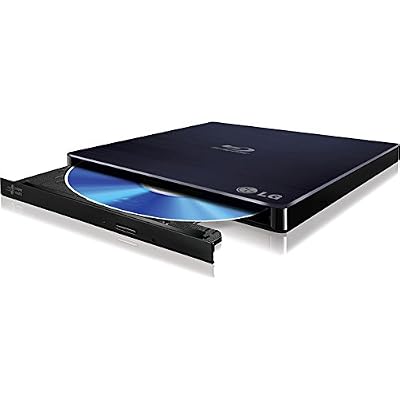
The slim external from the same compatible list, suited to laptops and small desks, with BDXL reading and writing.
Specs:
- Type: External slim Blu-ray writer, BDXL support
- Interface: USB 2.0
- Blu-ray write speed: 6X
- M-DISC support: Yes
- Model: WP50NB40
ASUS BW-16D1HT Internal Blu-ray Writer

The internal option from the compatible list for a desktop with a free drive bay, rated at 16X with BDXL support up to 128 GB per disc.
Specs:
- Type: Internal Blu-ray writer, 5.25-inch bay
- Blu-ray write speed: 16X
- BDXL support: Yes, up to 128 GB
- M-DISC support: Yes
- Model: BW-16D1HT
WD Elements Portable 2TB External Hard Drive

The console route’s transfer drive: 2TB matches the ceiling the RPCS3 wiki documents for an NTFS MBR drive attached to a PS3, so one drive carries a shelf of dumps.
Specs:
- Capacity: 2 TB
- Interface: USB 3.2 Gen 1, USB 3.0
- Model: WDBU6Y0020BBK-WESN
- Format out of the box: NTFS for Windows
Samsung T7 Portable SSD 1TB

Where the finished library lives on the PC side. PS3 game folders are among the largest in any emulation collection, and fast storage keeps installs and updates moving.
Specs:
- Capacity: 1 TB
- Interface: USB 3.2 Gen 2, USB-C
- Read speed: up to 1,050 MB/s
- Security: AES 256-bit hardware encryption
- Model: MU-PC1T0T/AM
How to Choose
Choose the route by what you still own. A working PS3 that can run a file manager makes the console route the surest path, and the only one that reaches digital games and their licenses. No console, or one you will not modify, means the PC route, which starts with checking a drive against the Quickstart’s compatible list. Own both and the routes reinforce each other: the console can mint a missing IRD, and the drive can then dump that disc without it.
Who Should Skip
Skip this if you no longer own the games or the console, because every documented route starts from your own media. Skip the PC route if your drive is not on the compatible list and you are not prepared to replace it; the failure is in the hardware, not your technique. And skip titles the compatibility database grades below Playable until you confirm one is worth the time.
FAQ
Can I dump a PS3 game with any Blu-ray drive?
No. Only specific drives confirmed able to read PlayStation 3 discs work, and the Quickstart publishes the known list. An unlisted drive with a Mediatek chipset and the right read offset may work, but an ordinary drive is expected to fail.
Do I need a modified PS3 to dump my games?
Only for the console route and for digital games. Disc games can be dumped on a PC with a compatible drive and a matching IRD file, no console involved. PSN games and their .RAP licenses can only come off a console running the file manager and license tool.
What is an IRD file, and where does it come from?
An IRD file holds the decryption and verification data for one exact pressing of a game, matched by title ID. The PC dumper usually fetches it automatically from the IRD database the project maintains. If none exists, a modified PS3 running Managunz can create one from the disc.
My dumped game does not appear in RPCS3. What is wrong?
Check the folder’s home first. Disc game folders belong in the games folder or another registered location, never inside the virtual drive’s game directory, while PSN games must be installed there through the package installer.
Final Verdict
Dumping PS3 games is the most demanding dumping job in mainstream emulation, but the RPCS3 project documents it completely. Work from your own console with a file manager, or from a listed PC drive with PS3 Disc Dumper and a matching IRD, keep disc and digital dumps in their separate homes, and check the compatibility database before a long copy.










