

- Top Pick: Nintendo Switch 2 Pro Controller
- Runner-up: Tomtoc Slim Carrying Case for Nintendo Switch 2
- Also consider: Belkin TemperedGlass Screen Protector for Nintendo Switch 2
Cloud gaming on Nintendo Switch 2 starts with an honest correction. There is no native GeForce Now app on Switch 2, and there is no native Xbox Cloud Gaming app on Switch 2 either. You cannot open a streaming storefront on the console, sign in, and play a library of streamed games the way you can on a phone, a tablet, or a computer.
What Switch 2 does offer is cloud-version games sold through the Nintendo eShop, where the game runs on a remote server and streams to your console while you play. It also offers GameChat, a built-in voice and screen-sharing feature. That combination is the real shape of cloud play on Switch 2, and it is why this guide focuses on the setup around the console: connection, controller, voice chat, protection, and power.
As an Amazon Associate, we earn from qualifying purchases.
Quick answer
Switch 2 has no native GeForce Now or Xbox Cloud Gaming app, so cloud play means cloud-version games from the Nintendo eShop, streamed from a remote server. A stable home Wi-Fi connection matters most, followed by the Pro Controller 2 for long sessions and a headset that connects through a USB-C transmitter for GameChat voice.
What to buy for Switch 2 cloud play
The five accessories below are all made for Nintendo Switch 2, and each covers a different part of the setup.
1. Nintendo Switch 2 Pro Controller

The Nintendo Switch 2 Pro Controller is the first accessory to buy for cloud play, because it is built around the console’s own social feature. Its C Button opens the GameChat menu at any time, so you can start or join a voice chat without putting the controller down. For streamed games, that direct access is genuinely useful rather than decorative.
Nintendo lists HD Rumble 2, motion controls, built-in amiibo functionality, a Capture Button, programmable GL and GR rear buttons, and an audio jack. The audio jack gives you a wired audio route when wireless audio is acting up, and battery life is listed at about 40 hours. This controller is made for Switch 2 only, and Nintendo states it cannot be used with the original Switch.
Specs
| Feature | Detail |
|---|---|
| Compatibility | Nintendo Switch 2 only |
| GameChat access | C Button opens the GameChat menu |
| Rear buttons | Programmable GL and GR buttons |
| Battery life | About 40 hours as listed |
| ASIN | B0F3VTFD6J |
2. Tomtoc Slim Carrying Case for Nintendo Switch 2

The Tomtoc Slim Carrying Case is built around the larger Switch 2 body rather than the original Switch. It is a hard-shell case with a felt interior, and its listing describes military-grade protection for the console inside. Twelve game card slots sit inside the case, so physical game cards travel with the console instead of rattling around loose in a bag.
Cloud-version games need no game card at all, but the case still earns its place. Streaming depends on a good Wi-Fi signal, and the best signal in a house or a hotel is rarely where the dock sits. A slim case lets you carry the console to the room with the strongest connection without worrying about the screen and Joy-Con 2 controllers taking damage on the way.
Specs
| Feature | Detail |
|---|---|
| Compatibility | Nintendo Switch 2 model 2025 |
| Shell | Hard shell with felt interior |
| Protection | Listing describes military-grade protection |
| Game card slots | 12 |
| ASIN | B0F1YBGJRC |
3. Belkin TemperedGlass Screen Protector for Nintendo Switch 2
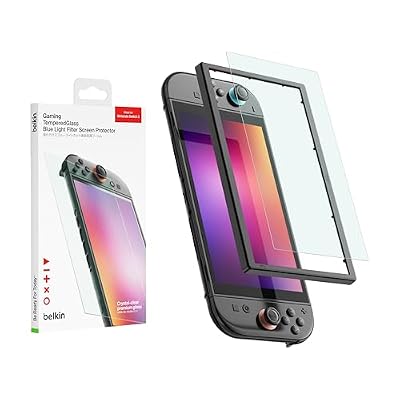
The Switch 2 screen is larger than the original Switch screen, so an old protector will not fit, and a bare screen is the part most exposed to scratches. The Belkin TemperedGlass Screen Protector is made for Switch 2 and includes a blue light filter, a 9H hardness rating, and an easy-align frame for bubble-free application. A microfiber cleaning cloth is included in the box.
The alignment frame is the detail that matters most for anyone who has fitted a screen protector freehand and ended up with a crooked edge or a trapped bubble. The frame holds the glass in position while it settles onto the display. The protector does not change stream quality or the connection. Its job is narrower and still valuable: keeping the display clear and undamaged through the handheld sessions that cloud-version games encourage.
Specs
| Feature | Detail |
|---|---|
| Compatibility | Nintendo Switch 2 |
| Material | Tempered glass |
| Hardness | 9H as listed |
| Filter | Blue light filter included |
| ASIN | B0FBHB5J27 |
4. OuQiDa 60W Charger for Nintendo Switch 2
Streaming is demanding on battery life because the console stays connected to Wi-Fi for the whole session while the screen, speakers, and controllers stay active. The OuQiDa 60W Charger is a USB-C fast charger made for Switch 2, with a 5-foot cable included and support for TV dock mode listed among its features. The listing also states compatibility with Switch OLED, Switch Lite, and Steam Deck.
This is a practical spare charger rather than a replacement for the official adapter that ships with the console. Keep the official adapter with the dock, and keep this one where you actually play handheld. One caution applies to every third-party charger. Nintendo notes that unlicensed products do not go through its testing and evaluation process and may have compatibility problems, and that an adapter with an output of 54W or more can be used to charge the console directly. This charger is listed at 60W, which clears that threshold, but use the official adapter for the dock when you want zero doubt about TV play.
Specs
| Feature | Detail |
|---|---|
| Compatibility | Nintendo Switch 2, Switch OLED, Switch Lite, Steam Deck |
| Output | 60W as listed |
| Connector | USB-C |
| Cable | 5-foot USB-C cable included |
| ASIN |
5. SteelSeries Arctis Nova 5 Wireless Headset

Voice chat is half of GameChat, and the SteelSeries Arctis Nova 5 Wireless Headset is the audio pick for Switch 2 cloud play because of how it connects. It is a multi-system wireless headset that works with Switch, and it connects to Switch 2 through its USB-C wireless transmitter for low-latency game audio. That route matters because Nintendo states that microphone input over Bluetooth is not supported on Switch 2, so a Bluetooth-only headset lets you hear friends without letting them hear you.
The listing describes neodymium magnetic drivers, more than 100 audio presets through the companion app, a 60-hour battery life, 2.4GHz wireless or Bluetooth, and a ClearCast Gen 2.X microphone. Use the USB-C transmitter on Switch 2 for voice, and treat Bluetooth as the route for listening to a phone or another device rather than for GameChat.
Specs
| Feature | Detail |
|---|---|
| Compatibility | Multi-system, connects to Switch 2 via USB-C transmitter |
| Wireless | 2.4GHz wireless or Bluetooth |
| Drivers | Neodymium magnetic drivers |
| Battery life | 60 hours as listed |
| Microphone | ClearCast Gen 2.X microphone |
| ASIN | B0D2YBQQ1P |
How to choose
Start with the connection, because no accessory fixes a weak signal. Play near your router, use the 5GHz band on your home Wi-Fi when it is available, and keep other heavy downloads paused while you stream. If the picture stutters in the same spot every time, move closer to the router before blaming the game.
Next, choose the controller you will hold for hours. The Pro Controller 2 is the natural pick for docked play and GameChat, while the Joy-Con 2 controllers are fine for short handheld sessions. Then sort out audio: a headset that connects through a USB-C transmitter gives you voice chat in GameChat, while a Bluetooth-only headset may only give you game audio. After that, add a slim case, a tempered glass protector, and a spare charger. Buy in that order, and skip anything that duplicates a job an accessory you already own handles well.
Who should skip
Skip this setup if you were hoping for a native GeForce Now or Xbox Cloud Gaming app on Switch 2, because no accessory creates one. If your home internet is slow or unstable, cloud-version games will frustrate you regardless of the controller or headset you buy. If you only play offline single-player games and never use GameChat, the headset and the Pro Controller 2 are optional rather than essential.
Owners of the original Switch should also pause before buying anything here. The Pro Controller 2 is made for Switch 2 only, the case is sized for the larger Switch 2 body, and the screen protector is cut for the larger Switch 2 display. If you already own a USB-C headset and a charger that keeps up with long sessions, do not buy duplicates just to complete a set.
Frequently asked questions
Can you play GeForce Now on Nintendo Switch 2?
No. There is no native GeForce Now app on Switch 2, and there is no official way to install one. GeForce Now streams PC games from its own service, and Nintendo does not offer that app on its console. To play GeForce Now, use a phone, tablet, computer, or television device that supports it.
What is a cloud-version game on Switch 2?
A cloud-version game is a game sold on the Nintendo eShop that runs on a remote server and streams to your Switch 2 while you play. The console sends your controller inputs to the server and receives the picture and sound in return. You need a steady internet connection for the whole session, and the game cannot be played offline.
Does GameChat work with a Bluetooth headset on Switch 2?
You can hear other players through a Bluetooth headset, but Nintendo states that microphone input over Bluetooth is not supported on Switch 2, so the other players will not hear you. For voice chat in GameChat, use a headset that connects through a USB-C transmitter, a wired headset plugged into the console or the Pro Controller 2 audio jack, or the console’s built-in microphone.
Do I need a case and a screen protector for cloud play?
They are not required for streaming itself, since a stream works the same on a bare console and a protected one. They matter because cloud-version games encourage handheld play away from the dock, where the screen and the console body take more knocks. If you only play docked on a television, skip both and spend the money on the controller or headset instead.
Final verdict
Cloud gaming on Switch 2 is real, but it is narrower than the phrase suggests. It means cloud-version games from the Nintendo eShop plus GameChat, not a native GeForce Now or Xbox Cloud Gaming app. Once that is clear, the buying decisions get simple: secure a stable connection, buy the Pro Controller 2 for GameChat and comfort, pick a headset that handles voice through a USB-C transmitter, and then add a case, a screen protector, and a spare charger.










