

- Top Pick: NETGEAR Nighthawk M6 Pro 5G Mobile Hotspot
- Runner-up: NETGEAR Nighthawk RAX30 Wi-Fi 6 Router
- Also consider: GL.iNet Slate AX Travel Router
Cloud gaming moves the heavy work to a remote server, so your connection becomes the console. Every button press travels up to the server, and every frame of video travels back down.
The two realistic choices are 5G mobile data and home Wi-Fi. Both can carry a cloud stream, but they fail in different ways and shine in different places. This guide compares them on latency, stability and data use, and the gear that helps each one.
As an Amazon Associate, we earn from qualifying purchases.
Quick Answer
Wi-Fi usually wins at home because it is steadier, uncapped and easier to wire up, while 5G wins away from home because it goes wherever you go. If your Wi-Fi is solid, use it; if you are travelling or your home broadband is weak, use a strong 5G signal.
The Scoreboard: 5G vs Wi-Fi at a Glance
| Round | 5G | Wi-Fi |
|---|---|---|
| Latency | Good near a tower | Lower and steadier |
| Stability | Varies with signal, congestion and movement | Varies with placement and other users |
| Data use | Every hour eats into a mobile plan | Usually unmetered |
| Weakest link | The mobile network | The router |
Latency: Where Games Are Won and Lost
Latency is the delay between a button press and the result on screen, and it decides whether cloud gaming feels responsive or sluggish. NVIDIA publishes 15 Mbps for 720p at 60 frames per second and 25 Mbps for 1080p at 60 frames per second on GeForce Now, with latency under 80 milliseconds as the target, while Xbox Cloud Gaming publishes 10 Mbps for its lower stream and 20 Mbps for 1080p.
On a strong 5G signal close to a tower, latency can sit inside the range cloud services want. But it is not fixed: it rises when the signal weakens, when the tower is busy, and when you move between towers. Home Wi-Fi has the opposite profile, since a good router on a decent broadband line usually delivers lower and steadier latency. The catch is your setup: a router in another room or a crowded 2.4 GHz band can add delay.
Stability: What Happens When Conditions Change
A cloud stream needs a steady flow of data, not just a fast burst.
5G is at the mercy of the radio environment: buildings, distance from the tower and the number of phones sharing the same cell all change the connection from moment to moment, and moving while you play makes it worse. Wi-Fi is steadier because nothing moves, so the main variables are how far you sit from the router and how many devices share the network. The 5 GHz band usually gives a cleaner, faster link than 2.4 GHz, and a wired Ethernet connection is the most stable option of all.
Data Use: The Hidden Cost of 5G
Cloud gaming uses far more data than ordinary online gaming, because the entire picture is streamed as video for the whole session. At NVIDIA’s published 25 Mbps requirement for 1080p at 60 frames per second, a stream running at that rate works out to roughly 11 GB per hour as a planning figure, though actual use varies.
That figure is where 5G gets expensive. Many mobile plans include a data allowance, and a few hours of cloud gaming can use a large share of it, while some slow the connection once the allowance is used up. Home Wi-Fi usually has no such problem, since most home broadband plans are unmetered or carry allowances gaming never approaches.
When 5G Wins
5G wins whenever there is no good Wi-Fi: hotel rooms with slow shared Wi-Fi, a train, or a home with a slow or unreliable broadband line. There, a strong 5G signal can beat the Wi-Fi on offer, without any setup.
5G also wins as a backup: when home broadband drops out, switching to a 5G hotspot keeps the session going, even if the stream runs at a lower resolution than on home Wi-Fi. The best 5G setup is a dedicated hotspot rather than a phone tether, since it has a larger antenna, a bigger battery, and it leaves the phone free.
When Wi-Fi Wins
Wi-Fi wins at home, and it is not close. A modern Wi-Fi 6 router on a decent broadband line gives lower latency, steadier throughput and no data allowance to watch, so long sessions and competitive multiplayer all favour Wi-Fi.
Wi-Fi also wins for households, since several people can share one home network and the router can be placed for the room where gaming happens. A wired Ethernet cable removes wireless interference entirely. The one thing Wi-Fi cannot do is travel: the moment you leave the house, the home network stays behind.
NETGEAR Nighthawk M6 Pro 5G Mobile Hotspot

The Nighthawk M6 Pro is the 5G side of this comparison in a single device: a dedicated hotspot that turns a 5G signal into a private Wi-Fi network for up to 32 devices. It supports 5G mmWave and Sub-6 bands, and its strengths for cloud gaming are the Wi-Fi 6E radio, the 2.5 Gigabit Ethernet port, and the 2.8 inch touchscreen.
Specs
| Spec | Detail |
|---|---|
| Connection | 5G mmWave and Sub-6, plus 4G LTE |
| Wi-Fi | Wi-Fi 6E, AXE3600 |
| Ethernet port | 2.5 Gigabit Ethernet port |
| Battery | Removable rechargeable battery, capacity not stated |
NETGEAR Nighthawk RAX30 Wi-Fi 6 Router

The RAX30 is the home Wi-Fi side of the comparison: a dual-band Wi-Fi 6 router rated AX2400, with combined wireless speeds of up to 2.4 Gbps, built for the small to medium homes where most cloud gaming happens. A wired connection from one of its gigabit LAN ports gives the steadiest possible link, and the 5 GHz band gives wireless devices a faster, less crowded channel than 2.4 GHz.
Specs
| Spec | Detail |
|---|---|
| Wi-Fi standard | Wi-Fi 6, dual-band |
| Speed class | AX2400, up to 2.4 Gbps combined |
| Coverage | Up to 2,000 square feet |
| Max devices | Up to 20 devices |
| LAN ports | 4 gigabit LAN ports |
GL.iNet Slate AX Travel Router
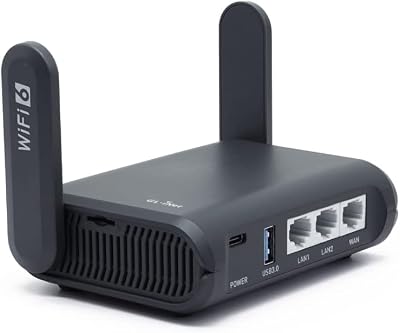
The Slate AX is the bridge between the two worlds: a pocket-sized Wi-Fi 6 travel router that takes hotel Wi-Fi, a wired Ethernet jack or a phone tether and turns it into a private network for your devices, which matters on the road, where public Wi-Fi is often slow and crowded. Its dual-band radio offers combined speeds of up to 1800 Mbps, it has three gigabit Ethernet ports and a microSD slot up to 512 GB, and built-in OpenVPN and WireGuard support lets it run a VPN tunnel.
Specs
| Spec | Detail |
|---|---|
| Wi-Fi standard | Wi-Fi 6, dual-band |
| Speed class | AX1800, up to 1800 Mbps combined |
| Ethernet ports | 3 gigabit Ethernet ports |
| Storage | MicroSD card slot, up to 512 GB |
| VPN support | OpenVPN and WireGuard |
TP-Link Archer T2U Nano USB Wi-Fi Adapter

The Archer T2U Nano is the smallest fix in this roundup: a nano-sized USB Wi-Fi adapter that adds dual-band wireless to a desktop or laptop with weak or missing Wi-Fi. For cloud gaming, it can be the difference between a device that streams and one that cannot. It is an AC600 adapter, with up to 433 Mbps on 5 GHz and 200 Mbps on 2.4 GHz, enough headroom for a 1080p cloud stream.
Specs
| Spec | Detail |
|---|---|
| Wi-Fi standard | Wi-Fi 5, dual-band |
| Speed | Up to 600 Mbps combined |
| 5 GHz speed | Up to 433 Mbps |
| 2.4 GHz speed | Up to 200 Mbps |
| Systems | Windows 11, 10, 8.1, 8, 7, XP and Mac OS X 10.9 to 10.14 |
Cable Matters USB-C to 2.5 Gigabit Ethernet Adapter

The Cable Matters adapter is the wired answer to an unstable wireless link. It plugs into a USB-C port and adds a 2.5 Gigabit Ethernet port, giving a laptop or tablet a wired connection faster than most routers offer. For cloud gaming, a wired link removes wireless interference, roaming and signal fade in one move. It also includes 100W charging pass-through, so the device can charge while it plays, and it works with Thunderbolt 4 ports.
Specs
| Spec | Detail |
|---|---|
| Ethernet speed | Up to 2.5 Gigabit Ethernet |
| Charging | 100W charging pass-through |
| Connector | USB-C |
| Thunderbolt | Compatible with Thunderbolt 4 |
| Android support | Not supported |
How to choose
Start with where you play most. At home, invest in the home network first: a modern Wi-Fi 6 router, a wired connection for the main device, and a 5 GHz link for anything wireless.
If you play away from home often, a 5G hotspot is the first purchase. Check the mobile plan’s data allowance first: shorter sessions and 720p streams stretch it, while 1080p sessions are best saved for Wi-Fi. A travel router earns its place for hotel gaming. For devices, match the adapter to the problem: weak Wi-Fi needs a USB adapter, and no Ethernet port needs a USB-C Ethernet adapter.
Who should skip
Skip 5G if your mobile plan has a small data allowance or slows the connection once it is used up, since cloud gaming burns through mobile data fast and a throttled connection turns a playable game into a slideshow.
Skip a new router if your current one already delivers a steady 5 GHz signal where you play and your broadband meets the published speed requirements, since a new router will not fix a slow broadband line. Skip the travel router and USB adapters if you never play away from home and your devices already have reliable Wi-Fi and Ethernet.
Frequently Asked Questions
Is 5G fast enough for cloud gaming?
Yes, on a strong signal. A steady 5G connection can clear the published speed requirements for 1080p streaming, which are 25 Mbps on GeForce Now and 20 Mbps on Xbox Cloud Gaming. The issue is consistency, not top speed, since signal strength and tower congestion change, and those changes show up as stuttering.
Does 5G use more data than Wi-Fi for the same game?
No, the stream uses the same amount of data on either connection at the same resolution and frame rate. The difference is who pays for it: home Wi-Fi is usually unmetered, while 5G draws from a mobile plan allowance that can run out.
Should I use 2.4 GHz or 5 GHz Wi-Fi for cloud gaming?
Use 5 GHz when the device is in the same room as the router or one room away, because it is faster and less crowded. Use 2.4 GHz only when the device is far from the router, because it travels through walls better. Next to the router, a wired Ethernet connection beats both.
Final verdict
Wi-Fi is the better connection for cloud gaming at home, and 5G is the better connection everywhere else. Build the home setup around a good Wi-Fi 6 router and a wired link, and keep a 5G hotspot ready for travel and outages.










