

- Top Pick: Samsung 990 PRO 4TB NVMe SSD
- Runner-up: Samsung T9 Portable SSD 2TB
- Also consider: Logitech MX Master 3S
Simulation is the genre Linux was quietly built for. Long before Proton made action games routine, the builders and management sims were already here: Paradox shipped its city builder with a Linux build on day one, Factorio’s developers treat Linux as a first-class platform, and the colony-sim scene grew up on open platforms. If your library leans toward zoning grids, production chains and transport networks, Linux is not a compromise platform here. For much of this catalogue, it is the native one.
This guide maps the genre in three sub-classes, city builders, colony sims, and transport and business sims, then separates the native catalogue from the Windows titles that arrive through Proton. It also covers the subject most genre guides skip: late-game load. Grand strategy and 4X are a neighbouring shelf; this guide stays with building and management sims, and every specification in it is maker-stated.
As an Amazon Associate, we earn from qualifying purchases.
Quick answer
Most of the genre runs well on Linux. Cities: Skylines, Factorio, RimWorld, Dwarf Fortress, Oxygen Not Included, Tropico 6 and Transport Fever 2 all have native Linux builds, and the big Windows-only titles such as Cities: Skylines II, Anno 1800 and Frostpunk run through Proton. The real limit is late-game simulation load on the CPU.
Three sub-classes, three different Linux stories
City builders are the headline class: roads, zoning, budgets and services, with a population simulation ticking underneath. This is where the biggest Windows-only sequel lives, and where the native original remains the safer Linux purchase.
Colony sims shrink the map and deepen the people: a few dozen colonists, dwarves or duplicants, each simulated individually. This class is the most Linux-native of the three, having grown out of indie and open-source development culture.
Transport and business sims are about networks and money: rail lines, supply chains, factories and freight, with the deepest Linux roots of all, reaching back to open-source projects that predate the modern storefront era.
The native catalogue, honestly
Cities: Skylines is the anchor. Colossal Order’s builder launched with a native Linux build and remains the complete city-builder package on Linux, its modding scene working through the same Steam Workshop route as on Windows. For most Linux players this, not its sequel, is the city builder to own.
Factorio is the genre’s Linux flagship. Wube Software maintains the Linux build with the same care as the Windows one, and its production-chain simulation is the benchmark every factory builder is measured against. Its sibling in spirit, the open-source OpenTTD, carries the transport class as a community-maintained tycoon that runs natively everywhere.
The colony class is native almost by default. RimWorld ships a Linux build and its mod scene works through Steam Workshop on Linux. Dwarf Fortress, the genre’s famously deep colony simulation, has an official Linux version in its current commercial release. Oxygen Not Included, Klei’s colony survival sim, is likewise native, as are Tropico 6 and Transport Fever 2, both published with proper Linux builds rather than compatibility wrappers.
The big Windows titles through Proton
Cities: Skylines II is the headline case, and its story is widely misunderstood. The sequel is Windows-only, and it does run on Linux through Proton. Its problem is not translation: the publisher’s own requirements were unusually heavy for the genre at launch, and a large city’s simulation load strains strong hardware on Windows too. On Linux you get the same game with the same late-game ceiling, plus the usual advice to check recent ProtonDB reports before buying.
Anno 1800, Ubisoft’s production-chain city builder, runs through Proton with a documented caveat: it launches through Ubisoft’s own Connect client, so first-run setup is the fiddly part rather than the game itself. Frostpunk and its sequel are Windows titles that run through Proton; the original is older and lighter, while Frostpunk 2 is a heavier modern release where recent reports count.
The current indie wave follows the same pattern. Manor Lords, Timberborn and Against the Storm are Windows releases Linux players run through Proton, all single-player games with no anti-cheat layer in the way. That is the genre’s structural advantage: the kernel-level anti-cheat that blocks competitive multiplayer on Linux barely exists in simulation, so Proton coverage here is limited by ordinary compatibility, not deliberate lockout.
Two habits protect you with any Proton sim: read the newest ProtonDB reports rather than the average, and keep the game on a native Linux file system, since Proton prefixes expect proper file permissions and symbolic links.
The late-game honesty section
Every simulation game has two performance profiles: the first hour and the fiftieth. A new city, colony or factory is a light load. A mature one simulates every citizen’s commute, every colonist’s needs, every item on every conveyor, every tick. That work lands on the processor, often concentrated on a small number of threads, which is why a stronger graphics card does nothing for a late-game slowdown.
The makers say this themselves. The published recommended specification for Cities: Skylines II asks for a recent performance-class processor and generous memory, a bar far above what the genre asked a decade ago, because the simulation is the product. Factorio’s community likewise measures mature factories by simulation updates rather than frame rates, because the two decouple once a factory grows large enough.
Linux neither fixes nor worsens this. The same city that slows a Windows machine slows a Linux one, and Proton adds no meaningful simulation cost, because the translation layer handles system calls, not the game’s arithmetic. What you can control is expectations and settings: most mature sims expose simulation speed controls, population limits and autosave intervals, and a large, fast SSD makes a long campaign’s growing save files painless. Judge any sim here by reports of its late game, not its opening hour.
How to choose
Start by sub-class, because the three scratches are different itches. If you want to zone a modern city, begin with the native Cities: Skylines and its expansions; move to the sequel through Proton only with a strong processor and current reports. If you want systems that interlock, Factorio is the deepest production-chain game on any platform and it is native here. If you want stories generated by simulated people, RimWorld is the gentler door and Dwarf Fortress the deeper one, both native. If networks and freight are the appeal, OpenTTD is the open-source starting point and Transport Fever 2 the modern native step up.
Then check the two practical gates: whether the title is native or Proton, using its store page and recent ProtonDB reports, and whether your processor suits the late game of the class you picked. In this genre the CPU decides how large your cities and factories get before the simulation slows, on Linux exactly as on Windows.
Who should skip this
Skip the genre on Linux if your one essential title is locked to a Windows-only launcher arrangement you are unwilling to troubleshoot, since a few publisher-client games make the first launch a project. Skip it if what you actually want is grand strategy or 4X conquest, a different catalogue with a different compatibility story. And skip the heaviest modern builders on an ageing processor regardless of operating system: no platform choice rescues a simulation the hardware cannot tick.
Gear for long simulation sessions
Simulation sessions run long and saves grow large, so the useful hardware is storage for a library of campaigns, a mouse precise enough for constant map work, and quiet cooling while the processor carries the simulation.
Samsung 990 PRO 4TB NVMe SSD

The library drive. A mature sim catalogue with expansions, mods and enormous late-game saves fills space faster than most genres, and this capacity holds all of it on one fast internal volume.
- Specs: Capacity 4TB
- Specs: Form factor M.2 2280
- Specs: Interface PCIe 4.0 x4, NVMe
- Specs: Sequential read up to 7,450 MB/s, maker-stated
- Specs: Model MZ-V9P4T0B/AM, without heatsink
Samsung T9 Portable SSD 2TB

The campaign archive. Moving saves and mod folders between machines, or backing up a long-running city before an update, is where a fast portable drive earns its place.
- Specs: Capacity 2TB
- Specs: Interface USB 3.2 Gen 2×2
- Specs: Sequential read up to 2,000 MB/s, maker-stated, host permitting
- Specs: Model MU-PG2T0B/AM
- Specs: Note: most Linux hosts connect at USB 3.2 Gen 2 speeds
Logitech MX Master 3S

The map-work mouse. Simulation play is hours of scrolling, zooming, and dragging routes and zones, the workload this mouse’s fast scroll wheel and high-resolution sensor are built around. Logitech lists Linux as supported.
- Specs: Sensor up to 8,000 DPI, maker-stated
- Specs: MagSpeed electromagnetic scroll wheel
- Specs: Connections: Logi Bolt USB receiver and Bluetooth
- Specs: Rechargeable over USB-C
- Specs: This listing: Graphite, with Logi Bolt receiver
Noctua NF-A12x25 PWM

The quiet case fan. A processor working through a late-game simulation runs its cooling for hours, and a fan rated for quiet operation keeps a long evening session from sounding like one.
- Specs: Size 120mm, 4-pin PWM
- Specs: Maximum speed 2,000 RPM, maker-stated
- Specs: Noise level 22.6 dB(A), maker-stated
- Specs: SSO2 bearing
- Specs: Model NF-A12x25 PWM
Noctua NH-D15 G2
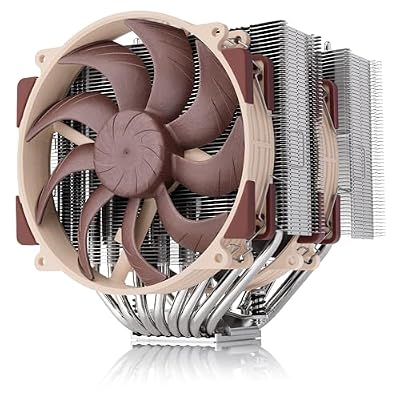
The simulation cooler. Because this genre’s load sits on the processor, sustained and often on few threads, a large dual-tower air cooler keeps clock speeds steady through a marathon session without liquid cooling complexity.
- Specs: Dual-tower design with two 140mm fans
- Specs: Sockets: AMD AM5 and AM4, Intel LGA1851 and LGA1700, maker-stated
- Specs: SecuFirm2+ mounting system
- Specs: This listing: standard version, not the LBC or HBC variants
FAQ
Do city builders run natively on Linux, or only through Proton?
Both, split by title. The established catalogue leans native: Cities: Skylines, Factorio, RimWorld, Dwarf Fortress, Oxygen Not Included, Tropico 6 and Transport Fever 2 all ship Linux builds. The newest big-budget entries, led by Cities: Skylines II and Anno 1800, are Windows releases that run through Proton.
Why does my city slow down late in the game when my graphics card is barely busy?
Because the bottleneck is the simulation, not the rendering. Every citizen, vehicle and production chain is recalculated each tick, and that processor work grows with your city while the graphics load stays roughly flat. It happens identically on Windows; the fix is simulation settings and expectations, not a bigger GPU.
Is Cities: Skylines II playable on Linux?
Yes, through Proton, with a caveat about load rather than compatibility. The game is demanding in large cities on every platform, as its own published recommended specifications suggest. Check the most recent ProtonDB reports for your hardware, and expect the late game to be the test.
Do mods work for these games on Linux?
For the native titles, generally yes through the same channels as Windows: Steam Workshop subscriptions work the same way for games such as Cities: Skylines and RimWorld, and Factorio’s built-in mod portal is platform-independent. Mods shipping Windows-only installer tools are the exception to check per game.
Final verdict
City builders and simulation games are among the safest genres on Linux. The back catalogue is unusually native, the current Windows-only titles are single-player games Proton handles without anti-cheat drama, and the one real limit, late-game simulation load, is a hardware truth on any operating system. Pick your sub-class, confirm each title’s native or Proton status from current reports, and size your processor to the world you intend to build.










