- Top Pick: Logitech C920x HD Pro PC Webcam with Microphone, Full HD 1080p/30fps Video | Stereo Audio, HD Light Correction, Works with Microsoft Teams, Google Meet, Zoom, Nintendo Switch, Mac/Tablet- Black
- Best Value: NUROUM C40 2K Video Conference Webcam with Microphone and Speaker | 4 Noise Cancelling Mics, 120° FOV, AI-Powered Auto Framing, 5x Zoom, 16ft Voice Pickup, Plug and Play, Broad Compatibility
- Premium Choice: TOUCAN 360-Degree Video Conference Camera, 1080p HD Webcam with 4 Noise Reduction Mics, Speaker, AI Tracking, Works with Zoom, Google Voice, Microsoft Teams and More, for PC/Mac/Tablet
A webcam for video conferencing has a harder job than one for a solo call. Instead of one face centered in the frame, it may need to cover three people around a table, pick up voices from across a small room, and keep everyone visible when somebody leans back or stands to point at a whiteboard. That is why the best choices here mix cameras with built-in microphones, speakers, and framing features instead of selling a bare lens.
This guide is for people setting up a home office, a huddle room, or a small team space who join Teams, Zoom, or Google Meet calls every day. We rank nine options by what the listings state: resolution, field of view, microphone count, speaker presence, zoom type, and certification claims. Buyers choosing for 2026 should also weigh whether they need to fit one person on a desk or four people around a table, since that single question separates most of these products.
Quick Picks
As an Amazon Associate we earn from qualifying purchases at no extra cost to you.


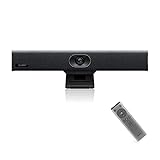
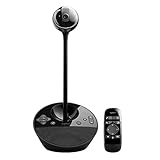


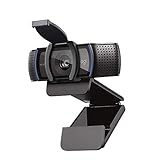
| Product | Best for | Key spec from the title |
|---|---|---|
| Logitech C920x HD Pro | Solo desk calls | Full HD 1080p at 30fps, stereo audio |
| NUROUM C40 | Small team rooms | 2K, 4 mics, speaker, 120 degree view, auto framing |
| TOUCAN 360-Degree Camera | Round-table meetings | 1080p, 4 mics, speaker, AI tracking |
| Yealink UVC34 | Huddle rooms | 4K, 8 microphones, speaker, 120 degree angle |
| Logitech BCC950 | Groups of one to four | 1080p webcam plus speakerphone |
| 4K AI Conference Webcam | Presenter tracking | 1080p at 60fps, 5x digital zoom, Zoom certified |
| NUROUM C10 | Portable plug-and-play use | 1080P, 4 MEMS mics, 90 degree view |
| NexiGo N990 Gen 2 | Flexible camera control | 4K PTZ, 5X digital zoom, position presets |
| Logitech C920S | Privacy-minded solo users | 1080p at 30fps, privacy shutter |
How to Choose
Field of view and room size
A single-person webcam works at around 78 degrees, while conference models stretch to 120 degrees or more so people sitting at the edge of a table stay in frame. A 90 degree lens suits a desk for two. If your room is wider than a standard meeting table, favor 120 degrees or a camera with pan and zoom control, and measure the distance from seats to the lens.
Microphones and speaker
Built-in audio matters as much as the picture. Look for several microphones, since a single mic struggles with people more than a few feet away. Listings quote voice pickup ranges such as 10ft or 16ft, which is a useful way to compare. A built-in speaker removes the need for separate gear, but a huddle room with echo may still need a dedicated speakerphone.
Resolution, frame rate, and zoom type
For meetings, 1080p is the baseline and 4K helps when you crop or zoom in. A 60fps listing is smoother for gesturing, though most calling apps limit the video they send. Be careful with “digital zoom” claims: it crops the image rather than adding detail. Optical or PTZ control, which pans and tilts the camera, is more flexible for a presenter.
Software, certification, and what to ignore
Plug-and-play USB use is common, and “Zoom certified” or Teams compatibility signals broad app support. Ignore vague “AI” labels unless the listing names the behavior, such as auto framing or tracking. Budget cameras often skimp on low-light handling and microphone clarity, so a bright room and a softer desk lamp can help.
The 9 Best Options
Logitech C920x HD Pro
A familiar choice for a single desk user who needs a reliable camera for daily calls. The title lists Full HD 1080p at 30fps, stereo audio, HD light correction, and compatibility with Teams, Google Meet, and other apps.
- Light correction helps in rooms with uneven lighting.
- Stereo audio covers basic call needs without a headset.
- Trade-off: it is a personal webcam, with no room speaker or wide conference view.
Skip it if more than two people will sit in front of it, or if you want a camera that follows a presenter around the room. It is best for a home office desk where one person sits close to the lens.
NUROUM C40 2K Conference Webcam
Meant for a small team room that wants a camera, microphones, and speaker in one box. It lists 2K video, four noise-cancelling mics, a 120 degree field of view, AI auto framing, 5x zoom, and 16ft voice pickup.
- The 16ft pickup range and four mics suit a shared table.
- Auto framing keeps people centered without manual adjustments.
- Trade-off: the zoom is digital, which reduces sharpness as you crop in.
Skip it if you only need a camera for one person and already own a good speaker. The audio package is the reason to buy it for group use, for example a sales team of three that crowds around one laptop for weekly client calls and wants everyone audible without leaning in.
TOUCAN 360-Degree Conference Camera
A camera for round-table meetings where people sit on all sides. The title lists a 360-degree view, 1080p HD, four noise reduction mics, a speaker, AI tracking, and support for Zoom, Google Voice, and Microsoft apps.
- The 360-degree design covers a whole table from a center spot.
- AI tracking helps pick out the person speaking.
- Trade-off: a 360-degree lens at 1080p spreads pixels thin, so faces look smaller.
Skip it if your meetings face one direction, such as a wall display, where a standard wide lens gives larger faces.
Yealink UVC34 4K Conference Camera
Built for huddle rooms, this all-in-one USB camera lists 4K video, eight microphones, a speaker, and a 120 degree wide angle. It targets teams who want a clean single-cable setup for Teams or Zoom.
- Eight mics offer the most voice coverage in this group.
- 4K resolution leaves room to crop to the speaker.
- Trade-off: it sits at the more costly end, so it is overkill for one person.
Skip it if your calls rarely include more than two people in the same room, or if your budget is tight. It earns its place in a dedicated meeting room that hosts clients, where a single cable to the laptop and a clear 4K picture reflect well on the company.
Logitech BCC950 Desktop Webcam and Speakerphone
A desktop conferencing device for groups of one to four in small rooms. It pairs a 1080p HD camera with a speakerphone in a single stand.
- Combines camera and speakerphone, which simplifies tabletop setups.
- The one-to-four person target is clear in the listing.
- Trade-off: the design is an older style, and the wide view figures are not listed in the title.
Skip it if you want 4K video or modern auto framing. It fits a small office that prizes a straightforward, desk-ready device, such as a clinic or a legal practice where two partners and an assistant meet remote clients from one desk and do not want to configure anything.
4K AI-Powered Conference Webcam
A generic but feature-heavy option for presenters. The title lists microphones, Zoom certification, auto framing, presenter tracking, 5x digital zoom, 1080p at 60fps, a 120 degree view, and a USB 3.0 link.
- Presenter tracking suits someone who moves while talking.
- 60fps at 1080p gives smoother motion than the usual 30fps.
- Trade-off: no brand name appears, so support and software updates are harder to judge.
Skip it if you want a recognized maker with a long support record. It is more attractive to a trainer, teacher, or speaker who walks around a room and values tracking and a smoother frame rate above a brand name.
NUROUM C10 1080P Conference Webcam
A compact choice for portable use, with a camera, microphones, and speaker in one unit. It lists a 2MP CMOS sensor, four noise-cancelling MEMS mics, a 90 degree view, and 10ft voice pickup, with plug-and-play operation.
- Portable size suits travelers who join calls from different rooms.
- Built-in mics and speaker mean no extra gear.
- Trade-off: a 90 degree view is narrower than the 120 degree models.
Skip it if your table seats more than three or four people. A freelancer who works from cafes, coworking desks, and client offices, and needs a camera that fits a laptop bag, is the clearest match.
NexiGo N990 (Gen 2) 4K PTZ Webcam
For users who want control over where the camera looks. The title lists Zoom certification, 4K PTZ operation, 5X digital zoom, a Sony Starvis sensor, position presets, and dual stereo audio.
- PTZ control and presets let you jump between saved views, such as a whiteboard and a table.
- A named sensor type signals attention to low-light behavior.
- Trade-off: more settings mean a steeper learning curve for casual users.
Skip it if you want set-and-forget simplicity for a single desk. It rewards a user who runs training sessions or lectures and wants to jump from a speaker view to a whiteboard view with one saved position.
Logitech C920S HD Pro Webcam
A variant of the C920 family with a physical privacy shutter. It lists Full HD 1080p at 30fps, clear stereo audio, light correction, and use with Skype, Zoom, and similar apps.
- The privacy shutter blocks the lens when not in use.
- Light correction smooths uneven room lighting.
- Trade-off: like the C920x, it is aimed at individuals, not rooms.
Skip it if you need conference-room microphones, a speaker, or a wide field of view. Remote workers who share a desk with family or housemates tend to value the shutter more than any extra feature.
Which One Fits Your Situation
You work from a home desk and hate being watched
The Logitech C920S adds a privacy shutter to a proven 1080p design, which gives peace of mind between calls.
You run a four-person huddle room
The Yealink UVC34 or the NUROUM C40 bring multiple mics and a wide view, with the Yealink offering 4K and eight mics.
You present while walking around
The NexiGo N990 and the 4K AI Conference Webcam give you PTZ or tracking so the picture follows you.
You meet around a round table
The TOUCAN 360-Degree camera sits in the middle and covers everyone from a single spot. Pair it with a quiet room and avoid placing it near a loud projector fan, which the microphones will pick up from the center of the table.
Common Mistakes
- Buying a personal webcam for a group room and then blaming the audio.
- Treating digital zoom as if it adds detail.
- Ignoring voice pickup range when seats sit far from the device.
- Placing the camera below eye level, which makes faces look unflattering.
- Skipping a check of app compatibility and USB port type.
Related guides
- Battery Operated Smoke And Carbon Monoxide Detectors
- Combination Smoke And Carbon Monoxide Detectors
- Aio Liquid Coolers For High Performance Gaming
Frequently Asked Questions
Do I need a separate speakerphone with these cameras?
Models that list a speaker and several mics can handle small rooms alone. Larger or echo-prone rooms may still benefit from a dedicated speakerphone.
Is 4K necessary for meetings?
No, 1080p is plenty for most calls. 4K helps when you crop or zoom, or when your display and app support higher quality.
What does Zoom certified mean?
It indicates the maker states the device works with that service. It is a useful compatibility signal, not a guarantee of quality.
Where should I place a conference camera?
Mount it near eye level at the end of the table or below a display, and keep it clear of strong windows behind the people it faces.