

- Top Pick: Razer Basilisk V3 Pro
- Runner-up: Logitech G502 X Plus
- Also consider: BenQ ZOWIE EC2-C
Baldur’s Gate 3 is a turn-based role-playing game, and that changes what a mouse needs to do. There are no flick shots to land and no split-second duels to win. A session is built from hundreds of small, deliberate clicks: rotating the camera around a battlefield, selecting a party member, picking a spell from the hotbar, looting a chest, and nudging a character one square to the left so a fireball does not catch a companion.
That slower rhythm also means comfort matters more here than in almost any other genre. A campaign can run for well over a hundred hours, and many players settle in for three or four hours at a stretch. The five mice below were picked for comfortable shapes, reliable sensors, and buttons that make the hotbar and camera easier to manage.
As an Amazon Associate, we earn from qualifying purchases.
Quick Answer
For most Baldur’s Gate 3 players, the Razer Basilisk V3 Pro is the best pick, because its comfortable right-handed shape and generous programmable buttons suit long turn-based sessions and a crowded ability hotbar. Players who want the lightest option should look at the Razer Viper V3 Pro, while the BenQ ZOWIE EC2-C is the simplest wired choice.
1. Razer Viper V3 Pro
The Razer Viper V3 Pro is the lightest mouse in this roundup, and that lightness is easy to appreciate during a long session. At 54 grams, it moves with very little effort, so dragging the camera across a large map never feels like work. Its symmetrical shape suits claw and fingertip grips, and it works for left-handed players too, which is rare among high-end gaming mice.
The Focus Pro 35K Optical Sensor Gen-2 tracks up to 35,000 DPI, and the included HyperPolling Wireless Dongle supports wireless polling up to 8,000 Hz, far beyond what a turn-based game demands. Battery life is rated up to 95 hours at 1,000 Hz polling.
Specs
- Sensor: Focus Pro 35K Optical Sensor Gen-2, up to 35,000 DPI
- Polling rate: Up to 8,000 Hz wireless with included HyperPolling Wireless Dongle
- Weight: 54 grams
- Buttons: 8 programmable buttons
- Battery life: Up to 95 hours at 1,000 Hz polling
- Connectivity: Razer HyperSpeed Wireless, wired via USB-C
- Shape: Symmetrical, ambidextrous
- Price tier: Premium
2. Razer Basilisk V3 Pro
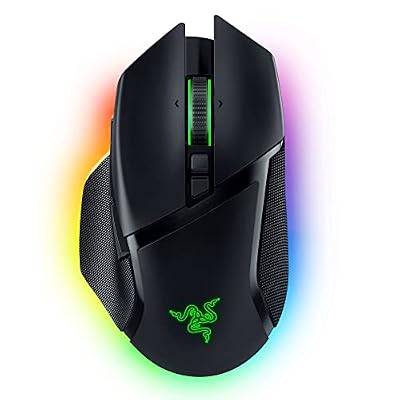
The Razer Basilisk V3 Pro is the best all-round pick for Baldur’s Gate 3, because it pairs a comfortable, supportive shape with more buttons than any other mouse here. Its right-handed ergonomic shell fills the palm and supports long sessions, while 13 programmable controls give room to bind camera rotation, end turn, jump, sneak, and several favourite spells without reaching for the keyboard every few seconds.
The HyperScroll Tilt Wheel is a genuine advantage in this game. It switches between a tactile stepped mode for precise scrolling and a free-spin mode for flying through a long inventory or a crowded spell list. The Focus Pro 30K Optical Sensor tracks up to 30,000 DPI, and the mouse connects over HyperSpeed Wireless, Bluetooth, or wired USB-C.
The Basilisk V3 Pro is heavier than the featherweight options here, at around 112 grams, but for a turn-based game that weight is a non-issue, since the mouse stays planted and steady during careful clicks.
Specs
- Sensor: Focus Pro 30K Optical Sensor, up to 30,000 DPI
- Polling rate: Up to 1,000 Hz wireless, higher with optional HyperPolling Wireless Dongle
- Weight: Around 112 grams
- Buttons: 13 programmable controls
- Battery life: Up to 90 hours over HyperSpeed Wireless
- Connectivity: HyperSpeed Wireless, Bluetooth, wired USB-C
- Shape: Right-handed ergonomic
- Price tier: Premium
3. Logitech G502 X Plus

The Logitech G502 X Plus is the classic all-rounder, and it remains a strong choice for a game that rewards having plenty of buttons within thumb reach. Its 13 programmable controls include a dual-mode scroll wheel that toggles between a precise ratcheted scroll and a free-spinning scroll, which is handy for long inventories and dialogue logs. The thumb cluster is easy to find without looking, so binding camera controls, the map, and a few go-to spells feels natural after a short adjustment period.
Under the shell, the HERO 25K sensor tracks up to 25,600 DPI, and LIGHTFORCE hybrid optical-mechanical switches give the main buttons a crisp, consistent click. The mouse weighs 106 grams and connects over LIGHTSPEED wireless, with battery life rated up to 130 hours with lighting off. It is a right-handed design, so left-handed players should look at the symmetrical Viper V3 Pro instead.
Specs
- Sensor: HERO 25K optical sensor, up to 25,600 DPI
- Polling rate: Up to 1,000 Hz wireless over LIGHTSPEED
- Weight: 106 grams
- Buttons: 13 programmable controls
- Battery life: Up to 130 hours with lighting off
- Connectivity: LIGHTSPEED wireless, wired USB-C
- Shape: Right-handed ergonomic
- Price tier: Mid-range
4. BenQ ZOWIE EC2-C

The BenQ ZOWIE EC2-C is the simplest mouse in this roundup, and for many Baldur’s Gate 3 players that simplicity is the point. It is a wired, driverless mouse: plug it in and it works, with DPI and polling rate adjusted by buttons on the underside rather than through software. There is no battery to charge and nothing to configure before the first session.
Its medium-sized, right-handed ergonomic shape is one of the most comfortable in gaming, designed for palm and claw grips, and it suits medium hands particularly well. The 3360 optical sensor offers four DPI steps of 400, 800, 1,600, and 3,200, and the polling rate can be set to 125, 500, or 1,000 Hz. The 24-step scroll wheel has a firm, deliberate feel that suits careful camera work.
With only five buttons, the EC2-C cannot match the Basilisk V3 Pro or the G502 X Plus for hotbar shortcuts, and players who want to bind a dozen abilities to the mouse will need to lean on the keyboard more.
Specs
- Sensor: 3360 optical sensor, 400 to 3,200 DPI in four steps
- Polling rate: 125, 500, or 1,000 Hz
- Weight: 73 grams
- Buttons: 5
- Battery life: Not applicable, wired only
- Connectivity: Wired USB with paracord-style cable
- Shape: Right-handed ergonomic, medium size
- Price tier: Budget
5. Razer DeathAdder V3 Pro with HyperPolling Wireless Dongle

The Razer DeathAdder V3 Pro with HyperPolling Wireless Dongle is the comfort-first premium pick. The DeathAdder shape has been refined over many generations into one of the most natural right-handed ergonomic designs available, with a raised arch that supports the palm and a ring-finger ledge that helps the hand relax during long sessions. At 63 grams, it is remarkably light for a mouse of this size.
This bundle includes the HyperPolling Wireless Dongle, which unlocks wireless polling up to 4,000 Hz, alongside the Focus Pro 30K Optical Sensor with sensitivity up to 30,000 DPI. Battery life is rated up to 90 hours at 1,000 Hz polling. Five programmable buttons keep the layout clean, though that is fewer than the Basilisk V3 Pro or G502 X Plus offer.
Specs
- Sensor: Focus Pro 30K Optical Sensor, up to 30,000 DPI
- Polling rate: Up to 4,000 Hz wireless with included HyperPolling Wireless Dongle
- Weight: 63 grams
- Buttons: 5 programmable buttons
- Battery life: Up to 90 hours at 1,000 Hz polling
- Connectivity: Razer HyperSpeed Wireless, wired via USB-C
- Shape: Right-handed ergonomic
- Price tier: Premium
How to choose
Start with your hand and grip. Players with medium to large hands who palm their mouse will be happiest with the Basilisk V3 Pro, the G502 X Plus, or the DeathAdder V3 Pro, while claw and fingertip players, and anyone with smaller hands, should look at the Viper V3 Pro or the medium-sized EC2-C. Shape matters more than sensor specifications in a turn-based game, because every mouse here tracks far more accurately than Baldur’s Gate 3 requires.
Next, count how many buttons you actually want on the mouse. The hotbar can hold a dozen or more abilities, and while the keyboard handles most of them, binding a few favourites to thumb buttons speeds up common actions like ending a turn or casting a staple spell. The Basilisk V3 Pro and G502 X Plus offer 13 programmable controls each, the Viper V3 Pro offers eight, and the EC2-C and DeathAdder V3 Pro offer five.
Who should skip
Players who already own a comfortable mouse with a decent sensor should skip this upgrade entirely. Baldur’s Gate 3 does not reward a faster sensor or a higher polling rate, and a mouse bought for a competitive shooter will not make a single combat encounter easier here. The money is better spent elsewhere unless the current mouse is uncomfortable, too small, or short on buttons.
Left-handed players should skip the right-handed ergonomic models here, namely the Basilisk V3 Pro, the G502 X Plus, the EC2-C, and the DeathAdder V3 Pro. The symmetrical Viper V3 Pro is the only left-hand-friendly option in this roundup. Players on a tight budget should skip the premium wireless models and look at the EC2-C instead, and anyone who mainly plays with a controller should not buy a mouse for this game at all, since Baldur’s Gate 3 has strong controller support.
Frequently Asked Questions
Do I need a high polling rate for Baldur’s Gate 3?
No. Polling rate matters most in fast competitive shooters. Baldur’s Gate 3 is turn-based, so a standard 1,000 Hz polling rate is more than enough. The higher rates on the mice here are a bonus for other games, not a requirement for this one.
How many mouse buttons are useful in Baldur’s Gate 3?
Five to eight buttons cover the essentials, such as camera rotation, ending a turn, jumping, and a couple of favourite abilities. Thirteen buttons, as on the Basilisk V3 Pro and G502 X Plus, give more room for hotbar shortcuts, but the keyboard remains the main tool for ability management.
Is a wireless mouse better than a wired mouse for Baldur’s Gate 3?
Neither is clearly better for this game. Wireless mice remove cable drag, while wired mice never need charging and usually cost less. Pick based on desk setup and personal preference.
Should I buy a mouse or a keyboard first for Baldur’s Gate 3?
Buy the keyboard first if you only have budget for one upgrade. The keyboard handles movement, ability selection, camera control, and dialogue shortcuts, while the mouse mainly points and clicks. A comfortable keyboard will change the feel of this game more than any mouse.
Final verdict
The Razer Basilisk V3 Pro is the best mouse for Baldur’s Gate 3 for most players. Its comfortable right-handed shape suits long sessions, and its 13 programmable controls and HyperScroll wheel handle the hotbar and inventory well. Players who want the lightest possible mouse should pick the Razer Viper V3 Pro, and players who want a simple wired mouse at a budget tier should pick the BenQ ZOWIE EC2-C. Whatever you choose, comfort and a few well-placed buttons matter far more than raw speed in this game.










