

Plugging a keyboard into a Linux machine is the easy part, because nearly every board types the moment it connects. The harder decision sits one layer deeper: where do remaps, macros and lighting settings actually live? Many gaming boards store nothing themselves and hand control to a Windows-only companion app that simply does not exist on Linux. Choosing well means picking a board whose full feature set stays reachable through open firmware, a browser editor, onboard memory or plain hardware switches.
This guide serves four kinds of buyers: programmers who remap keys daily, desk users switching between several machines, gamers who want macros without extra software, and office typists who value quiet keys. Every pick below was chosen from its Amazon listing name and printed specs, and our wider roundup of the best gaming keyboards compared side by side covers the gaming-first field if Linux support matters less to you.
Quick Picks
As an Amazon Associate we earn from qualifying purchases
| Product | Best for | Key spec from title |
|---|---|---|
| Keychron V1 | One wired desk where every key must stay remappable | QMK/VIA programmable with hot-swappable switches |
| Keychron K8 Max | Moving between a Linux PC and a laptop without cables | Bluetooth 5.1, 2.4 GHz and USB-C with QMK |
| Logitech MX Keys S | Quiet full-size typing in a shared office | Low-profile backlit keys with Logi Bolt receiver |
| Ducky One 3 | Gaming with macros recorded on the board itself | Cherry MX Blue switches with 1000 Hz polling |
| Leopold FC750RBT | A set-and-forget board with hardware key swaps | Cherry MX Brown switches with DIP switch swaps |
How to Choose
How the Board Gets Programmed
The programming path decides whether your layout survives a move to another machine. QMK boards such as the Keychron V1 and K8 Max store the layout in firmware, and you edit it in the VIA web app inside a Chromium-based browser: authorize the device, drag each remap onto the layout, and the board keeps the result on every host. DIP switch boards from Ducky and Leopold skip software entirely, trading flexibility for permanence. Vendor-app boards sit at the risky end, since the app may never ship for Linux. Undoing a VIA layout takes one reset click, so experiment freely.
Connections That Behave the Same Everywhere
A wired USB-C link is the reference point: it enumerates instantly, needs no pairing, and polls at full speed for gaming. A 2.4 GHz receiver behaves almost identically, which is why the K8 Max suits fast games away from a cable. Bluetooth trades polling speed for tidiness and multi-device pairing, fine for coding and office work. After connecting, run lsusb in a terminal to confirm the board or receiver registered, then type a test line before changing anything. If a wireless board misbehaves, fall back to its cable mode first; that separates a radio problem from a layout problem in one step.
Layout, Switch Feel and Keycaps
Size shapes your desk more than any spec sheet number. A 75% board like the V1 keeps a function row and arrows in a small footprint, a tenkeyless frame frees mouse room, and a full-size board keeps the number pad that spreadsheet work demands. Switches set the sound and feel: clicky Cherry MX Blue, tactile Brown and linear options all appear below. Hot-swappable sockets let you change switches without soldering, which extends the board’s life. Thick double-shot PBT keycaps resist shine and keep legends readable for years, while thinner caps feel lighter but wear smooth sooner.
What Still Works When the App Does Not
Assume the vendor app is unavailable and audit what remains. On the Logitech MX Keys S, typing, backlight and Bluetooth pairing work fully on Linux, yet Logi Options+ runs on Windows and macOS only, so function-row programming stays at defaults unless the community tool Solaar handles it. Boards with onboard memory keep macros and lighting after the app closes. For anything left over, xmodmap on X11 or a keyd rule on Wayland remaps keys at system level, and deleting that rule undoes the change completely. Prefer hardware control wherever your daily routine depends on it.
The 5 Best Options
Keychron V1

The V1 is the safest starting point for a Linux desk. Its listing states Mac, Windows and Linux support outright, and the QMK firmware with VIA configuration means every key, layer and macro is set in a browser and stored on the board itself. The 75% layout keeps a function row and arrow keys, a physical toggle settles the modifier mode, and hot-swappable Keychron K Pro switches let the feel evolve with you. Nothing about its setup depends on a desktop app, so the board behaves identically on a work laptop, a home PC and a fresh install.
Specs
- Layout: 75%, 84 keys, wired USB-C
- Firmware: QMK with VIA support
- Switches: Keychron K Pro, hot-swappable
- Keycaps: OSA PBT double-shot
- Backlight: south-facing RGB
- OS support: macOS, Windows, Linux (per listing)
Best for: Programmers who remap keys and want the layout to travel with the board.
Watch out for: It is wired only, so confirm your desk setup does not need a wireless link before ordering.
ASIN: B09NLWG6X1
Keychron K8 Max

Choose the K8 Max when one keyboard serves several machines. It connects over Bluetooth 5.1, a 2.4 GHz receiver or USB-C, and pairs with up to three Bluetooth devices, while the same QMK and VIA pairing as the V1 keeps remaps consistent on every connection. The tenkeyless aluminum frame carries hot-swappable Keychron Super switches and full RGB backlighting. For gaming, the receiver link polls far faster than Bluetooth, so keep the dongle in a front port for play and switch to Bluetooth for quiet desk work across the rest of the day.
Specs
- Layout: tenkeyless, 80%
- Firmware: QMK with VIA support
- Connection: Bluetooth 5.1, 2.4 GHz, USB-C
- Switches: Keychron Super, hot-swappable
- Backlight: RGB
- OS support: macOS, Windows, Linux (per listing)
Best for: Multi-machine desks that mix a Linux workstation with laptops.
Watch out for: Bluetooth polling is slower than the receiver link, so check which connection your games will use.
ASIN: B0DYHWMRDC
Logitech MX Keys S

The MX Keys S earns its place on typing quality alone. The listing names Linux support, and the board works completely as a keyboard: low-profile scissor keys, automatic backlighting and pairing over Bluetooth or the included Logi Bolt receiver suit long, quiet writing and coding days. The honest catch is configuration. Logi Options+, which programs the function row and Smart Actions, runs on Windows and macOS only. On Linux those extras stay at their defaults, with the community tool Solaar covering pairing, battery reporting and some function-key settings. Buy it for the keys, not the software.
Specs
- Layout: full-size, low profile
- Connection: Bluetooth, Logi Bolt USB receiver, USB-C charging
- Backlight: white, hand-proximity sensor
- Model: 920-011558, 810 g
- App: Logi Options+ (Windows and macOS only)
- OS support: Windows, Linux, ChromeOS, macOS (per listing)
Best for: Office typists who want a quiet full-size board and rarely remap anything.
Watch out for: Confirm you can live without Logi Options+ before buying, because its Smart Actions never reach Linux.
ASIN: B0BKW3LB2B
Ducky One 3

Ducky removes the software question by having no companion app on any operating system. Macros, lighting and key behavior on the One 3 are set through key combinations and DIP switches, so its Linux support is total by design rather than by port. This full-size Pure White model uses clicky Cherry MX Blue switches in hot-swap sockets, double-shot PBT keycaps and a dual-layer PCB, with a detachable USB-C cable and 1000 Hz polling. Onboard macro recording handles game bindings directly on the board. It is the pick for players who want per-key RGB and zero dependence on software arriving later.
Specs
- Layout: full-size, 108 keys
- Switches: Cherry MX Blue, hot-swappable
- Keycaps: double-shot PBT
- Connection: detachable USB-C, 1000 Hz polling
- Customization: onboard macros and DIP switches, no app
- Model: DKON2108ST-CUSPDPWWWSC1
Best for: Gamers who want macros and lighting controlled entirely from the keyboard.
Watch out for: The listed model uses clicky Cherry MX Blue switches, so check the switch type in the listing title before ordering.
ASIN: B09Y2HQQT1
Leopold FC750RBT
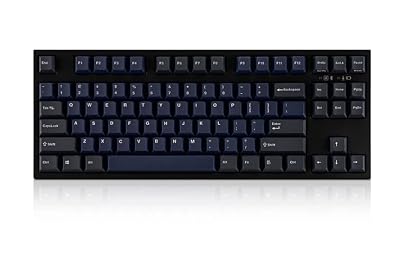
Leopold builds the quiet professional option. The FC750RBT pairs genuine Cherry MX Brown switches with thick 1.5 mm double-shot PBT keycaps and sound-absorbing padding, then connects over Bluetooth or USB-C, running wirelessly from two AAA cells. There is no software layer at all. Its DIP switches swap Caps Lock with left Ctrl, exchange the left Alt and Windows key positions, move the Fn key and lock the Windows key out entirely, all in hardware that holds on every machine. The manual is explicit that the board must be powered off before flipping a switch, so changes are deliberate, rare and permanent until you flip them back.
Specs
- Layout: tenkeyless, 87 keys
- Switches: Cherry MX Brown (other MX options exist)
- Keycaps: 1.5 mm double-shot PBT
- Connection: Bluetooth 5.1, USB-C wired, 2 x AAA for wireless
- Customization: DIP switches for key swaps and Windows key lock
- Software: none required
Best for: Touch typists who want classic Unix key swaps done once, in hardware.
Watch out for: Power the board fully off before touching the DIP switches, and note wireless runs on AAA cells rather than a rechargeable pack.
ASIN: B0BW25LPV6
Which One Fits Your Situation
You Remap Keys Every Day
Pick the Keychron V1. Programming work rewards layers, tap-hold keys and a Caps Lock that becomes Ctrl, and VIA makes those changes in a browser with the result stored on the board. Because nothing lives in a desktop app, the same layout greets you on a fresh distro install, a borrowed laptop or a dual-boot machine without any setup ritual.
Your Desk Runs Two or Three Machines
Pick the Keychron K8 Max. Three Bluetooth pairings plus a receiver and a cable mean one board covers a Linux workstation, a work laptop and a spare machine, and QMK keeps your remaps identical across all of them. The tenkeyless frame also leaves room for the mouse you keep reaching for between machines.
You Type All Day in a Shared Space
Pick the Logitech MX Keys S for its quiet, low-profile keys, and accept the app limit as the trade. If hardware key swaps matter more than silence, the Leopold FC750RBT is the alternative: tactile switches, sound-absorbing padding and DIP switch changes that need no software at all. Either way, your neighbors hear less and your hands travel less.
You Game and Refuse Extra Software
Pick the Ducky One 3. Onboard macro recording, DIP switches and 1000 Hz polling cover competitive play without a single vendor download, and hot-swap sockets let you soften or sharpen the feel later. Clicky Blue switches are loud, though, so shared rooms may push you toward the K8 Max instead.
Common Mistakes
- Buying a board for its app features without checking whether that app exists for Linux at all.
- Assuming Bluetooth and a 2.4 GHz receiver poll at the same speed, then blaming the game for input lag.
- Flipping DIP switches while the keyboard is still powered, against the manual’s warning.
- Choosing a layout by looks alone, then missing the function row, arrows or number pad daily.
- Forgetting that system remaps from xmodmap or keyd stay on one machine while onboard layouts travel.
Frequently Asked Questions
Do gaming keyboard apps work on Linux?
Mostly no. The major vendor suites for remapping and lighting are built for Windows, with macOS versions from some brands. That gap is exactly why this guide favors boards that store settings onboard, edit through VIA in a browser, or use DIP switches. Community tools such as Solaar and OpenRGB cover part of the remainder for supported models.
Is Bluetooth or 2.4 GHz better for gaming on Linux?
The 2.4 GHz receiver polls faster and behaves like a wired connection, which suits shooters and rhythm games where timing is tight. Bluetooth is perfectly fine for typing, coding, strategy titles and slower play, and it frees a USB port. Neither link needs a driver on a current kernel, so the choice is about latency, not compatibility.
Can I swap Caps Lock to Ctrl without special hardware?
Yes. Every major Linux desktop offers that swap in its keyboard settings, and xmodmap on X11 or keyd on Wayland applies it system-wide. The difference is portability: a desktop setting stays on one machine, while the Leopold’s DIP switch or a VIA layout on the Keychron boards carries the swap to any computer you plug into.
How do I undo a remap that went wrong?
Each method here reverses cleanly. In VIA, reset the layout to defaults and the board returns to stock. On DIP switch boards, power off and flip the switches back. For system tools, delete the xmodmap file or the keyd rule and restart the session. Nothing in this guide requires flashing firmware to recover a working layout.







