Our Short List of 3

All 4 Picks at a Glance
| Product | Specs | Action |
|---|---|---|
| 1. RAM MOUNTS Universal Vehicle Laptop Mount (RAM-VB-196-SW1) (B013FJEKHG) | Check price on Amazon | |
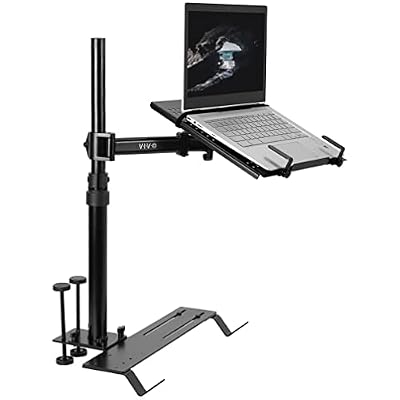 2. VIVO Single Laptop Car Mount (MOUNT-CAR01) (B0BXFT1HKH) | Check price on Amazon | |
 3. SPIRRELAB Car Laptop Mount with 2 Cooling Fans (B0D9N2NW74) | Check price on Amazon | |
 4. MELIPRON No-Drill Truck Laptop Mount (B0CSYBN83T) | Check price on Amazon |
Introduction
The best computer mount for vehicle use turns a parked car, truck, or van into a real workstation. Instead of balancing a laptop on the passenger seat or hunching over a steering wheel tray, a proper vehicle mount holds the screen at a usable height, keeps the keyboard steady, and lets you type, plan routes, file reports, or run diagnostics between stops. Field technicians, inspectors, delivery coordinators, and contractors all face the same problem: the vehicle was designed for driving, not for computing, and a mount is what bridges that gap.
Quick answer: if you want one mount that moves between vehicles and holds up to daily professional use, the RAM MOUNTS Universal Vehicle Laptop Mount (RAM-VB-196-SW1) is the strongest all-around choice. If your priority is fitting the widest range of cars, trucks, and SUVs without fuss, the VIVO Single Laptop Car Mount (MOUNT-CAR01) is the most adaptable pick. For hot climates and long sessions in a parked vehicle, the SPIRRELAB mount with two built-in cooling fans is the most practical option, while the MELIPRON mount suits workers who get in and out of the vehicle all day and need to detach the arm in one motion. Every mount in this guide is designed for use while the vehicle is parked, never while driving.
Quick Picks
| Product | Best For | Key Spec |
|---|---|---|
| RAM MOUNTS Universal Vehicle Laptop Mount (RAM-VB-196-SW1) | Multiple vehicles and heavy daily use | 10 to 16 inch laptops; dual swing arm; no-drill seat-bolt base |
| VIVO Single Laptop Car Mount (MOUNT-CAR01) | Universal fit across cars, trucks, and SUVs | Up to 17 inch laptops and 11 lb; 18.5 to 26.3 inch telescoping pole; 3 mounting feet |
| SPIRRELAB Car Laptop Mount with 2 Cooling Fans | Heat management in warm vehicles | 9 to 17 inch laptops; 2 USB cooling fans; 360-degree rotation |
| MELIPRON No-Drill Truck Laptop Mount | Quick-release use with frequent stops | Up to 17 inch laptops and 15 lb; 2 USB cooling fans; quick-release pole |
How to Choose the Best Computer Mount for Vehicle Use
Match the Mount to Your Seat Bolts
Most serious vehicle computer mounts anchor to the exposed bolts under the front passenger seat. The base plate uses the factory seat rail bolts as attachment points, so installation requires no drilling and no permanent change to the vehicle. Before ordering, pop off the plastic cap on a passenger seat bolt and confirm the bolt head is exposed and reachable. Some vehicles hide the bolts under fixed carpet or trim panels, and those vehicles need a different approach. The mounts in this guide include multiple base plates or mounting feet to cover common bolt patterns, but the seat bolt distance and angle still matter: RAM lists a seat bolt distance of 9 to 18.875 inches center to center for its universal base, and VIVO includes three foot styles for 0, 90, and 45 degree angled seat bolts.
Check Laptop Size and Weight Capacity
A modern work laptop with its power brick can weigh 7 to 10 lb, and rugged laptops such as the Panasonic Toughbook or Dell Latitude Rugged weigh more. The mount needs a weight rating with margin above your actual laptop, because vibration and movement on rough roads add stress that a static desk never produces. Check both numbers on the listing: the maximum screen size and the maximum weight. The VIVO and SPIRRELAB mounts are rated to 11 lb, the MELIPRON and RAM mounts to 15 lb, and tray size matters as much as weight. If your laptop is at the top of a mount’s stated range, moving up to a higher-capacity mount is the safer choice.
Decide Between a Fixed Workstation and a Quick-Release Mount
How often you leave the vehicle decides how much quick-release matters. If the mount lives in one dedicated work truck and the laptop stays with the vehicle, a fixed installation is fine. If you make a dozen stops a day, leave the vehicle unattended at job sites, or share a fleet vehicle, you need to take the laptop with you every time you step out. The RAM and MELIPRON designs disconnect the arm from the base with a lever or thumb screws in seconds, while simpler mounts require more effort to remove. VIVO uses a quick-disconnect mechanism that detaches the stand from the base by removing thumb screws, returning the space to a functional passenger seat.
Look at Height, Reach, and Swivel
The seat bolt anchor sits at floor level, so the telescoping pole does the work of bringing the screen up to a usable height. Pole range varies: VIVO adjusts from 18.5 to 26.3 inches, and taller cabins in trucks and vans benefit from a longer pole and a longer reach arm. A tray that rotates 360 degrees lets you angle the screen away from glare, turn it toward the driver seat for a quick look, or swing it out of your sightline before driving. Tilt adjustment sets the typing angle and keeps the screen readable when the sun hits the windshield.
Consider Cooling for Long Sessions in a Parked Vehicle
Cooling is the most overlooked specification in a vehicle computer mount. A laptop running routing software, work order systems, or inspection apps generates real heat, and a parked car in summer with limited airflow gives that heat nowhere to go. Thermal throttling slows the laptop exactly when you need it, and prolonged heat exposure shortens battery life over time. Vented trays help by letting air move under the machine, and the SPIRRELAB and MELIPRON mounts go further with two built-in USB-powered cooling fans that move air across the bottom of the laptop. If you work in a warm climate or run demanding software for hours at a time, fans are worth choosing deliberately.
Think About the Vehicle You Drive Every Day
A mount that fits a full-size pickup may crowd a compact sedan, and a mount built for a sedan may sit too low in a tall van. Cabin width decides how much room the pole and tray take from the passenger, and a mount that blocks the passenger airbag deployment path is a non-starter: position the tray toward the center console side, not toward the door. Fleet drivers who switch vehicles during the week should favor modular systems such as the RAM ball-and-socket design, where the arm and tray reposition or swap without tools and the same base configuration transfers between vehicles. Drivers with one personal vehicle should favor the mount that fits that specific cabin best, even if it is less transferable.
The Best Computer Mount for Vehicle Reviewed
1. RAM MOUNTS Universal Vehicle Laptop Mount (RAM-VB-196-SW1) (B013FJEKHG)
RAM Mounts is one of the most respected names in professional vehicle mounting equipment, with products used by law enforcement, military, and emergency services. The RAM-VB-196-SW1 brings that background to field service work in a universal no-drill package. The heavy-duty steel mounting base uses the front passenger seat rail bolts as attachment points, and the Tough-Tray holds laptops from 10 to 16 inches wide on a dual swing arm that repositions without tools.
The build uses powder-coated steel, marine-grade aluminum, and high-strength composite, and the whole unit weighs around 14 lb. Hole patterns around the perimeter of the tray allow additional RAM systems to be mounted alongside the laptop, so a phone or GPS unit can share the same workstation. The ball-and-socket mounting system is the real advantage here: the arm and tray can be repositioned or swapped without tools, and the mount transfers cleanly between vehicles that share the same base configuration.
Who it suits: drivers who manage multiple vehicles, fleet operators, and anyone who wants a mount that lasts through several vehicle changes.
Who should skip it: anyone with a 17 inch laptop, since the tray is specified for 10 to 16 inch machines. It is also the heaviest mount in this guide, so drivers who need to carry the mount between vehicles by hand may prefer a lighter option. There are no built-in cooling fans, so hot-climate workers should weigh that against the SPIRRELAB or MELIPRON picks.
2. VIVO Single Laptop Car Mount (MOUNT-CAR01) (B0BXFT1HKH)
The VIVO MOUNT-CAR01 is the most adaptable vehicle computer mount in this guide, and the safest choice when you are not sure what vehicle it will live in. It anchors to exposed floor seat bolts on the passenger side and ships with three different mounting feet designed for the seat bolts commonly found in cars, trucks, vans, and SUVs, covering 0, 90, and 45 degree angled bolts. The spacious 14.2 by 11.9 inch tray holds laptops, notebooks, and tablets up to 17 inches and 11 lb, with a ventilated surface that increases airflow and flexible tray clips that secure the device and release it quickly.
The telescopic pole adjusts from 18.5 to 26.3 inches, the arm bracket provides 9 inches of adjustment along the pole, and the mount articulates with tilt, swivel, and rotation for ergonomic positioning. A quick-disconnect mechanism lets the stand detach from the base by removing the thumb screws, returning the seat to a functional passenger area in moments. The steel construction keeps the workstation steady, and the ventilated tray helps with cooling during longer sessions even though there are no active fans.
Who it suits: drivers who want one mount that fits the widest range of vehicles, and anyone whose vehicle assignment may change. The three mounting feet remove most of the guesswork from compatibility, and the 17 inch tray covers nearly every standard business laptop.
Who should skip it: anyone whose laptop weighs more than 11 lb, including many rugged models, should choose a 15 lb rated mount instead. The mount itself weighs 11 lb, so it is substantial to move between vehicles, and it requires exposed floor seat bolts, which rules out vehicles where the bolts are fully covered.
3. SPIRRELAB Car Laptop Mount with 2 Cooling Fans (B0D9N2NW74)
The SPIRRELAB is the only mount in this guide whose headline feature is active cooling, and for drivers working in warm climates that feature matters more than any other specification. Two built-in USB-powered cooling fans sit in the laptop tray and move air across the bottom of the machine, powered from the vehicle’s USB port. The tray supports laptops, tablets, and notebooks from 9 to 17 inches up to 11 lb, and the aluminum and steel construction keeps the workstation rigid on rough roads.
Installation is a no-drill seat-bolt setup, and the bracket angle adjusts to 0, 45, and 90 degrees for different vehicle configurations. The tray rotates 360 degrees, the height adjusts across a useful range, and the whole unit disassembles quickly for storage or a vehicle change.
Who it suits: field workers in Texas, Arizona, Florida, or any hot climate, and anyone whose laptop runs warm under normal load. The fans address the exact problem that vented trays alone cannot solve.
Who should skip it: drivers who need quick-release removal at every stop, since this mount has no quick-release mechanism. Heavier rugged laptops above 11 lb also exceed its rating, and drivers who already work in cool conditions may get everything they need from a simpler vented tray.
4. MELIPRON No-Drill Truck Laptop Mount (B0CSYBN83T)
The MELIPRON is built for field workers who get in and out of their vehicle all day. Its standout feature is the quick-release telescoping pole: the arm detaches from the base in one motion, so taking the laptop with you between stops adds no friction to the workflow. For inspectors, delivery coordinators, and service representatives making a dozen or more stops a day, that adds up fast. The mount comes with three base plate configurations to cover a wide range of seat bolt patterns, and the no-drill installation requires no tools beyond what is needed to loosen the factory seat bolt.
Height and tilt are fully adjustable, the tray swivels 360 degrees, and two built-in USB-powered cooling fans run across the bottom of the laptop for workers in warmer climates or running demanding software. The 15 lb weight capacity puts it on par with the RAM mount and ahead of the 11 lb mounts, making it a solid choice for heavier rugged laptops as well as standard business machines up to 17 inches.
Who it suits: drivers with frequent stops, fleet and inspection work, and anyone carrying a heavier laptop who also wants cooling fans and fast removal. It is the most complete combination of capacity, cooling, and quick-release in this guide.
Who should skip it: drivers who want the lightest possible mount, since the heavy-duty build adds weight, and anyone who prefers a modular system that swaps accessories between vehicles, where the RAM ball-and-socket design has the edge.
What to Check Before You Buy
Confirm exposed seat bolts first. Remove a plastic bolt cap on the passenger seat and check that the bolt head is accessible and that the base plate fits the bolt pattern. Measure the distance between the seat bolts and compare it with the mount’s stated range before ordering.
Check airbag clearance. With the mount installed and the pole extended, make sure the tray does not obstruct the passenger airbag deployment path. Position the tray toward the center console side rather than toward the door.
Plan for parked use only. Vehicle computer mounts are designed for use when the vehicle is parked. Before driving, swing the tray out of your sightline, close the laptop, and secure the arm so nothing moves while you are in motion.
Confirm USB power if you buy a fan-equipped mount. The SPIRRELAB and MELIPRON fans run from a USB port, so check that your vehicle has a USB-A port within reach of the tray.
Think about passenger space. A seat-bolt mount occupies the front passenger area, so a regular passenger will have less legroom while it is installed. Quick-disconnect models solve this by letting you remove the stand and return the seat to normal use.
Check the laptop against both limits. Screen size and weight capacity are separate numbers, and a laptop can fit one while exceeding the other. A 17 inch ultrabook is light, while a 14 inch rugged laptop can be heavy, so confirm both figures against your exact machine.
FAQ
Do vehicle computer mounts require drilling?
No. All four mounts in this guide use a no-drill installation that attaches to the passenger seat floor bolts. The bolts are present in most cars, SUVs, vans, and trucks, and the mount can be fully removed and reinstalled without permanent modification, which makes these mounts suitable for personal, leased, and fleet vehicles.
What size laptop will these mounts fit?
The VIVO, SPIRRELAB, and MELIPRON mounts are rated for laptops up to 17 inches. The RAM-VB-196-SW1 is specified for 10 to 16 inch laptops, so 17 inch owners should choose one of the other three. Weight matters separately: the VIVO and SPIRRELAB mounts are rated to 11 lb, while the RAM and MELIPRON mounts are rated to 15 lb.
Can I use a laptop mount while driving?
No. Vehicle computer mounts are designed for use when parked, and using a laptop while operating a vehicle is illegal in most places. When driving between stops, push the tray out of your sightline and keep the laptop closed. Use a dedicated phone mount for navigation while in motion.
Will a seat-bolt mount fit my car, truck, or van?
The seat-bolt method works in the large majority of cars, SUVs, vans, and trucks, because the passenger seat is bolted to the floor through exposed bolt heads, usually covered by plastic caps. The main exception is a vehicle where the seat bolts are completely covered by fixed carpet or trim panels, so confirm accessibility before purchasing.
How do I keep my laptop cool in a hot parked vehicle?
Choose a mount with built-in cooling fans, such as the SPIRRELAB or MELIPRON, if you work in a warm climate or run demanding software for long stretches. Park in shade when possible, crack the windows when parked, and avoid leaving the laptop mounted in direct sunlight with the lid closed.
Bottom Line
The best computer mount for vehicle use is the one that fits your seat bolts, your laptop, and your working day. The RAM MOUNTS Universal Vehicle Laptop Mount (RAM-VB-196-SW1) is the strongest choice for drivers who move between vehicles and want a modular system built for the long term. The VIVO Single Laptop Car Mount (MOUNT-CAR01) is the most adaptable pick for a single vehicle with uncertain bolt geometry. The SPIRRELAB mount with two cooling fans is the right answer for hot climates and long parked sessions, and the MELIPRON mount is the best fit for workers who stop constantly and need quick-release removal with a 15 lb capacity. Check your seat bolts, confirm both the screen size and the weight of your laptop, and buy the mount that matches how you actually work.
Disclosure: As an Amazon Associate, we may earn from qualifying purchases.