The NZXT C850 Gold Core is the best 850 W Gold power supply for an RTX 5080 build in this group: it is fully modular, ships with a native 12V-2×6 cable, is rated ATX 3.1, and its listing cites a Cybenetics Platinum efficiency rating alongside the 80 PLUS Gold badge. The RTX 5080 is a 16-pin card with a total graphics power in the 360 W range, and NVIDIA publishes an 850 W system recommendation for it. That makes an 850 W Gold unit with a modern cable the sensible target, and the Thermaltake and ASRock models below suit buyers who prefer a different feature mix.
Quick List
- ASRock PRO 850G – best for a straightforward ATX 3.1 build with a native 12V-2×6 plug
- Thermaltake Toughpower GT 850W (black) – best for a Smart Zero Fan unit with a full set of connectors
- Thermaltake Toughpower GT 850W Snow – best for white builds that want a 600 W-rated 16-pin cable
- NZXT C850 Gold ATX 3.1 – best for a clean, fully modular, minimalist look
- NZXT C850 Gold ATX 3.1 (second color listing) – best for matching the same unit to a different case color
- NZXT C850 Gold Core – best overall for efficiency and a compact 150 mm depth
Which One Is Right for You?
| If you… | Choose |
|---|---|
| Want the strongest efficiency claim and a short chassis fit | NZXT C850 Gold Core |
| Are building in a white case and want a matching supply | Thermaltake Toughpower GT 850W Snow |
| Prefer a black unit with extra SATA and Molex connectors for older drives | Thermaltake Toughpower GT 850W (black) |
| Need a simple, clean-looking modular unit from a mainstream case brand | NZXT C850 Gold ATX 3.1 |
| Need the same NZXT unit but in the other color | NZXT C850 Gold ATX 3.1 (second listing) |
| Care most about a native 12V-2×6 plug and are comfortable verifying cable type on the listing | ASRock PRO 850G |
For an RTX 5080, all six meet the wattage target on paper. The practical split is between fully modular units, where you add only the cables you need, and units where the listing does not clearly state modularity. Read the connector counts, the cable length for your case, and the warranty term on the exact listing you choose.
All 6 Picks in Detail
1. ASRock PRO 850G – Best for a Straightforward ATX 3.1 Build
As an Amazon Associate we earn from qualifying purchases at no extra cost to you.

The PRO 850G is an 850 W, 80 PLUS Gold, ATX 3.1 and PCIe 5.1 ready unit with a native 12V-2×6 connector and a 120 mm low-noise fan. The listing title mentions a three-year warranty. It suits builders who want a current-generation cable without paying for premium extras, and who do not need a fully modular cable set.
- 850 W continuous output, 80 PLUS Gold
- ATX 3.1 and PCIe 5.1 ready with a native 12V-2×6 connector
- 120 mm low-noise fan; compact depth of about 140 mm per manufacturer data
- Three-year warranty per the listing title
- Protections include over-voltage, over-current and over-temperature
- Modularity is described inconsistently across sources, so confirm on listing
Build notes: this is the shortest and least expensive-looking spec sheet of the six, which is fine for a straightforward gaming tower with room behind the motherboard tray. If the cables are fixed rather than modular, check that the 16-pin lead is long enough to reach a card in a tall case without a sharp bend at the connector, because bending the cable close to the plug is the common cause of poor contact with 16-pin cards.
Pros:
- Native 12V-2×6 and ATX 3.1 support
- Compact enough for most mid-tower cases
Cons:
- Shorter warranty than the NZXT units
- Cable modularity needs verification
Against the Thermaltake black unit, it matches on wattage but offers a shorter documented connector list.
2. Thermaltake Toughpower GT 850W (Black) – Best for a Smart Zero Fan Unit with Plenty of Connectors

The Toughpower GT 850W is an ATX 3.1 supply with 80 PLUS Gold efficiency, a Smart Zero Fan mode and a native PCIe 5.1 connector. The listing title for this black version states a 450 W connector rating, which is lower than the 600 W figure on the Snow version, so confirm which rating applies on the product page. It suits builders who like the idea of the fan stopping at light loads and want many SATA and Molex outputs.
- 850 W, 80 PLUS Gold, ATX 3.1
- Smart Zero Fan stops the fan at low loads
- Native 12V-2×6 (12+4 pin) cable; listing states a 450 W rating, so confirm
- Fully modular, with multiple PCIe 6+2, SATA and Molex outputs per manufacturer data
- Roughly 140 mm deep; five-year warranty per the series
- Single +12V rail design
Build notes: an RTX 5080 draws well under 450 W on its own, so the connector rating in the black title is unlikely to limit that card, but it does matter if you plan to upgrade to a more power-hungry GPU later. Smart Zero Fan means the fan can sit still while browsing and light gaming; check that your case has enough ventilation for the supply itself at those loads.
Pros:
- Zero-fan mode helps at idle
- Large connector set with five-year warranty
Cons:
- Connector rating differs between sources
- No Platinum-class efficiency claim
The Snow version below is the better pick if you want a documented 600 W connector.
3. Thermaltake Toughpower GT 850W Snow – Best for White Builds with a 600 W-Rated Cable

This white edition of the Toughpower GT has the same 850 W, 80 PLUS Gold, ATX 3.1 and Smart Zero Fan base, and its listing title states a native 600 W PCIe 5.1 connector. It suits builders matching a white case and graphics card who still want a 16-pin plug rated for the highest standard load.
- 850 W, 80 PLUS Gold, ATX 3.1
- Smart Zero Fan technology
- Native 600 W 12V-2×6 connector per the listing title
- White finish with a fully modular cable set
- About 140 mm deep
- Five-year warranty per the listing
Build notes: a white power supply only helps visually if the shroud or case window shows it, so think about whether the color matters inside your build. The 600 W rating is the standard figure for a full 12V-2×6 cable and gives headroom if you later move to a larger card. As always with 16-pin power, seat the plug fully and avoid tight bends right at the connector.
Pros:
- Documented 600 W connector
- Matches white builds
Cons:
- Color is the main difference from the black unit
- Same Gold-class efficiency, not higher
Compared with the NZXT C850 Gold Core, it offers a shorter documented warranty and no Platinum-class efficiency listing.
4. NZXT C850 Gold ATX 3.1 – Best for a Clean, Fully Modular Look

The NZXT C850 Gold ATX 3.1 is a fully modular 850 W unit with ATX 3.1 compliance and an 80 PLUS Gold rating. NZXT’s product page describes it as quiet and PCIe 5 ready for modern graphics cards. It suits builders who want a minimal look and a single, well-documented cable set.
- 850 W, 80 PLUS Gold, ATX 3.1
- Fully modular with a 16-pin 12V-2×6 PCIe cable plus additional 6+2 pin cables
- Roughly 150 x 86 x 160 mm
- Available in black and white variants
- Warranty is longer on NZXT’s page than on many rivals, but regional terms can vary
- Up to about 70 A on the +12V rail
Build notes: at 160 mm deep, it is a little longer than the Core variant, so measure cases with a basement shroud or a rear drive bay. Fully modular cables are easier to route, and keeping unused cables out of the case helps airflow. NZXT lists the cables as a standard length, so check the 12V-2×6 lead reaches your card position in a larger tower.
Pros:
- Fully modular and quiet by design
- Long documented warranty on the manufacturer page
Cons:
- Slightly deeper than the Core version
- Standard Gold efficiency without the Core’s higher claim
The Core version beats it on depth and efficiency claims, while this unit keeps the broader color range.
5. NZXT C850 Gold ATX 3.1 (Second Listing) – Best for Matching the Same Unit to Another Case Color
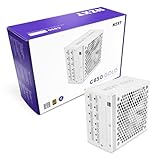
This second listing uses the same NZXT C850 Gold ATX 3.1 title and appears to be the alternate color of the same product. The core specifications should match the previous entry, including 850 W output, ATX 3.1, 80 PLUS Gold and full modularity. It suits buyers who want that unit but in the color the first listing does not offer.
- 850 W fully modular ATX 3.1 supply
- 80 PLUS Gold efficiency
- PCIe 5 ready with a 12V-2×6 16-pin cable
- Same dimensions as the first listing, about 150 x 86 x 160 mm
- Color is the likely difference; confirm which on the listing
- Same warranty terms as the first listing, subject to region
Build notes: because the two NZXT listings share a title in the data we worked from, double-check color, SKU and included cables before ordering. If your case has a white interior, a matching supply and sleeved cables can look tidy; in a standard black build the color rarely matters.
Pros:
- Same modular design in another finish
- Good fit for color-matched builds
Cons:
- Essentially a duplicate of the previous pick on specs
- Requires care to confirm the exact variant
It is functionally the same as the previous unit, so choose between them on color and availability alone.
6. NZXT C850 Gold Core – Best Overall for Efficiency and Compact Depth
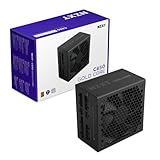
The C850 Gold Core is an 850 W ATX 3.1 supply that carries both an 80 PLUS Gold and a Cybenetics Platinum efficiency rating in its listing title. NZXT’s page lists it as fully modular with a 12V-2×6 cable, a 135 mm fluid dynamic bearing fan with zero-RPM mode, and a shorter 150 mm body. It suits builders who want the best efficiency claim and a longer warranty in one package.
- 850 W, 80 PLUS Gold with a Cybenetics Platinum rating
- ATX 3.1 with a native 12V-2×6 (16-pin) cable
- Fully modular
- 135 mm fluid dynamic bearing fan with zero-RPM operation per NZXT’s page
- About 150 x 86 x 150 mm
- Seven-year warranty per NZXT’s page; confirm regional terms
Build notes: the 135 mm fan and the higher efficiency claim point toward a quieter supply under moderate loads, which suits a gaming machine that also does everyday work. The 150 mm depth fits smaller cases that struggle with 160 mm units. Remember that efficiency ratings are measured under controlled conditions by certifiers, so use them as a guide to heat and noise rather than a guarantee.
Pros:
- Strongest efficiency claim and longer warranty than the Thermaltake and ASRock units
- Compact depth with a quality fan design
Cons:
- Warranty term needs checking for your region
- Fewer legacy Molex outputs than the Thermaltake
Compared with the Toughpower GT, it trades Smart Zero Fan for a larger, higher-quality fan with a zero-RPM mode and a stronger efficiency rating.
Specs Compared
| Model | Wattage | Efficiency | Modularity | 16-pin cable | Fan | Depth |
|---|---|---|---|---|---|---|
| ASRock PRO 850G | 850 W | 80 PLUS Gold | Confirm on listing | Native 12V-2×6 | 120 mm | About 140 mm |
| Thermaltake Toughpower GT 850W | 850 W | 80 PLUS Gold | Fully modular | Native, 450 W per title | Confirm on listing | About 140 mm |
| Thermaltake Toughpower GT 850W Snow | 850 W | 80 PLUS Gold | Fully modular | Native, 600 W per title | Confirm on listing | About 140 mm |
| NZXT C850 Gold ATX 3.1 | 850 W | 80 PLUS Gold | Fully modular | 12V-2×6 included | Confirm on listing | About 160 mm |
| NZXT C850 Gold ATX 3.1 (second listing) | 850 W | 80 PLUS Gold | Fully modular | 12V-2×6 included | Confirm on listing | About 160 mm |
| NZXT C850 Gold Core | 850 W | 80 PLUS Gold, Cybenetics Platinum | Fully modular | 12V-2×6 included | 135 mm FDB | About 150 mm |
How We Chose These
This guide rests on published specifications and listing details, not on personal use of the power supplies. We took the six 850 W Gold units in the current catalog set and compared them on the points that matter for a 16-pin graphics card: ATX 3.1 compliance, native 12V-2×6 cable, wattage headroom over NVIDIA’s published recommendation, modularity, fan design, depth and documented warranty. Where listings and manufacturer pages disagree, we say so rather than choose a figure, and where a listing is silent we write “confirm on listing.” Where two products are the same unit in different colors, we say that plainly.
What to Look For
How Much Wattage an RTX 5080 Really Needs
The RTX 5080 has a total graphics power in the 360 W range, and NVIDIA lists an 850 W system power supply as its recommendation. The recommendation allows for the rest of the machine: a modern high-end CPU may draw 120 to 200 W under load, and drives, fans and memory add another 30 to 60 W. As a rule of thumb, add the graphics card’s rated power to the CPU’s maximum power, add 100 W for the rest of the system, and then leave 20 to 30 percent of headroom. For a 360 W card and a 150 W CPU that math gives about 610 W plus headroom, which is why 850 W is a comfortable and efficient choice rather than a stretch.
12V-2×6, ATX 3.1 and Transient Loads
The 12V-2×6 connector is the updated 16-pin plug used by current RTX cards. It improves on the earlier 12VHPWR design with shorter sense pins to encourage full seating. ATX 3.1 tightens how a supply handles brief power excursions, which matter because graphics cards can spike well above their average draw for milliseconds. A native cable from the supply, rather than a four-way adapter, is the cleanest solution. Always push the plug in until it is fully seated and leave a little space before the first bend so the cable is not pulled sideways at the plug.
Efficiency Ratings: 80 PLUS and Cybenetics
80 PLUS Gold requires about 87 to 90 percent efficiency at typical loads at 115 V, and Platinum requires slightly more. Cybenetics runs a separate scheme that also grades noise. Higher efficiency means less waste heat and, over years of use, a modest saving on electricity, but the difference between Gold and Platinum is small compared with the choice of a good fan and quality capacitors. Treat the badge as one input among several.
Modularity, Cable Length and Case Fit
Fully modular supplies let you leave out unused cables, which improves airflow and tidiness. Non-modular or semi-modular supplies are fine in roomy cases but can leave bundles of spare cable to hide. Check three dimensions: the supply’s depth against the space in your case, the length of the 24-pin and 16-pin cables against the distance to the board and card, and the number of 8-pin and SATA connectors you actually need. A depth of 150 to 160 mm is common for 850 W units, and some compact cases limit you to 140 mm.
Installation Checklist for a 16-Pin Card
Before powering on, work through a short list. First, route the 16-pin cable so that it travels straight for at least 35 mm out of the plug; this is the commonly cited guideline for reducing side load on the connector. Second, push the plug in until the latch clicks and there is no visible gap at the plastic housing. Third, connect the card using one supply cable rather than daisy-chained leads, and never mix cables from different supply models, because pin layouts differ between brands even when plugs look identical. Fourth, update the motherboard firmware and graphics driver before the first heavy load. Finally, check that the supply fan faces a vent when the case allows it: bottom-mounted supplies usually draw air from below through a filter, so make sure the surface under the case is not a thick carpet.
Single Rail, Protections and Build Quality
Most modern 850 W units, including those here, use a single strong 12 V rail, which suits graphics cards that draw from one output. Look for the usual protections: over-voltage, under-voltage, over-current, over-power, over-temperature and short-circuit protection. Capacitor grade and fan bearing matter more over the long term than headline wattage, so a manufacturer page that names its capacitor source and bearing type is a better sign than a listing that only repeats the wattage.
Future-Proofing Without Overspending
It is tempting to buy 1000 W for future upgrades, but a supply tends to be quietest and most efficient in the middle of its load range, and an 850 W unit running a 360 W card plus a modern CPU sits right there. A higher wattage only makes sense if you plan a far more power-hungry graphics card or heavy overclocking. A better use of budget is a supply with a native 600 W 16-pin cable and a long warranty, since those features carry over to the next build.
Warranty and Fan Design
A longer warranty signals a manufacturer’s confidence in components. Fluid dynamic and hydraulic bearings generally last longer and run quieter than sleeve bearings. Zero-fan modes keep the supply silent at idle, but make sure your case has some airflow so the supply does not heat soak.
Questions
Is 850 W enough for an RTX 5080?
Yes, 850 W matches NVIDIA’s published system recommendation for that card. It leaves room for a high-end CPU and a few drives with good headroom.
Do I need a 12V-2×6 cable or can I use an adapter?
A native cable from the supply is preferable because it removes an extra connection point. Adapters work, but they add bulk and another place for poor contact.
Is ATX 3.1 required for an RTX 5080?
It is not strictly required, but it is the current standard and handles power excursions better than older designs. All six units here list ATX 3.1.
What is the difference between the two NZXT C850 Gold listings?
The titles are identical and the likely difference is color. Confirm the color and SKU on each listing page before ordering.
Is a Cybenetics Platinum rating better than 80 PLUS Gold?
It indicates higher measured efficiency, and Cybenetics also grades noise. In practice the real-world gap is small, so cable fit, warranty and fan design deserve equal weight.
Why does one Thermaltake list 450 W and the other 600 W on the connector?
The listing titles state different connector ratings for the black and white versions. Check Thermaltake’s specification sheet if the rating matters for a future upgrade.
Update History
- October 21, 2026 – Initial publication; product set drawn from current catalog listings.
- Check the product page for current specifications and availability before buying.
Sources
- Manufacturer product and specification pages for NZXT, Thermaltake and ASRock
- Retailer listing titles and specification fields for each power supply
- 80 PLUS and Cybenetics certification programs, for the efficiency categories described
- NVIDIA published power supply recommendations for RTX graphics cards