

Why 32 inch for 4K
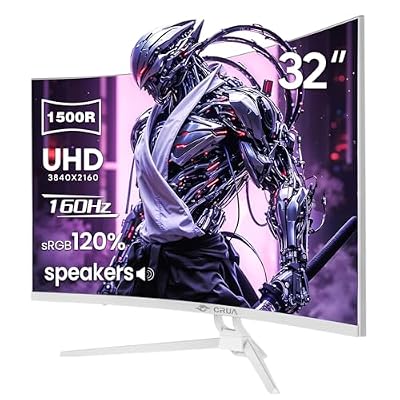
32 inches is the size where 4K actually makes sense on a desktop. At 27 inches, 4K gives you roughly 163 pixels per inch, which is sharp but forces 125-150% scaling in Windows to keep text readable. At 32 inches, you’re at about 138 ppi, close enough to 100% scaling that most people run native or near-native without everything shrinking to unreadable sizes. You also sit far enough back from a 32 inch panel that the pixel density looks right rather than overwhelming.
The trade-off is desk space and GPU load. A 32 inch 4K panel wants a serious chair-to-screen distance, usually 90cm or more, or you’re constantly swiveling your head to see the corners. And 4K at high refresh rates is brutal on hardware. Driving 3840×2160 at 144Hz means pushing roughly four times the pixels of 1080p at the same rate, so you need a GPU that can actually hit those framerates or the panel’s capability goes to waste.
As an Amazon Associate we earn from qualifying purchases at no extra cost to you.


Panel types: IPS vs VA vs OLED
Almost every 32 inch 4K gaming monitor on the market now uses IPS, VA, or OLED. TN basically doesn’t exist at this size and resolution anymore, which is fine because TN’s main advantage, cheap fast response, is less relevant when IPS and OLED have closed the gap.
IPS gives you the best color accuracy and viewing angles out of the box, which matters at 32 inches since edge-of-screen viewing angle distortion is more noticeable than on smaller panels. The weakness is black depth. IPS blacks look more like dark gray under any ambient light, which hurts in dark games.
VA panels get you deeper blacks and better contrast, often 3000:1 or higher native versus IPS’s typical 1000:1. The trade-off is slower pixel response in dark-to-dark transitions, which can cause smearing in shadowy scenes, and viewing angles that shift color at the edges on a panel this large.
OLED is the one with no real asterisk on image quality. Near-instant pixel response, true per-pixel blacks, and excellent color. The two things to be honest about: burn-in risk from static HUD elements if you leave them on screen for hundreds of hours, and that OLED panels in this size and resolution cost noticeably more than LCD alternatives. If you play a lot of games with static UI (MMOs, strategy games with persistent sidebars) and you’re budget conscious, that’s a real factor, not just marketing noise.
| Panel type | Contrast | Response time | Best for | Watch out for |
|---|---|---|---|---|
| IPS | ~1000:1 | Fast, consistent | Color work, fast competitive games | Weak blacks, IPS glow in dark scenes |
| VA | 3000:1+ | Good in bright scenes, slower in dark | Mixed gaming and movies, value buyers | Dark scene smearing, off-angle color shift |
| OLED | Near-infinite | Fastest available | Single-player, atmospheric games, HDR | Burn-in with static content, higher price |
What refresh rate actually matters here
At 4K, 60Hz is the floor and feels dated for anything competitive. 120Hz to 144Hz is the sweet spot for most people, since it’s a genuine, visible step up in smoothness without demanding an unreasonable GPU. Above 144Hz, say 160Hz or 240Hz at 4K, you’re in enthusiast territory. You’ll need a top-tier GPU to actually hit those framerates in modern titles, and the visual difference between 144Hz and 240Hz is smaller than the jump from 60Hz to 144Hz. Don’t pay a big premium for 240Hz at 4K unless you’ve already got the GPU horsepower and play fast multiplayer games where every frame counts.
Also check the panel’s actual supported resolution at max refresh. Some monitors list a high headline refresh rate that only applies at a lower resolution via DSC or chroma subsampling tricks, not full 4K. Read the spec sheet carefully, not just the box number.
The GPU reality check
This is the part people skip. A 32 inch 4K 144Hz monitor is wasted on a mid-range GPU in modern AAA games. If you’re running something like an RTX 4060 class card, you’ll likely be capped well under 100fps at native 4K in demanding titles, meaning you’re paying for refresh rate headroom you can’t use without turning on upscaling or dropping settings. If your GPU budget is modest, a 4K 60-100Hz panel, or honestly a 1440p high refresh monitor, is the more sensible match. Save the full 4K 144Hz tier for builds with a high-end GPU where you can actually push frames, or where you plan to lean on DLSS/FSR upscaling to get there.
HDR and connectivity, briefly
HDR on a cheap IPS or VA panel without real local dimming is mostly marketing, you’ll see a brightness boost but not the contrast HDR is supposed to deliver. OLED delivers HDR properly because of per-pixel light control. If HDR matters to you, weight that heavily toward OLED or a VA panel with a dense mini-LED backlight, not just any monitor with an “HDR400” sticker.
For connectivity, make sure the monitor has at least one full-bandwidth HDMI 2.1 port if you’re running a current console or want 4K at high refresh over HDMI, and DisplayPort 1.4 or newer for PC. Also check for USB-C with enough power delivery if you want to run a laptop off a single cable.
What to actually buy
If you want the safe, well-rounded choice, look at 32 inch 4K 144Hz IPS gaming monitors. They handle fast and slow games reasonably well and don’t carry OLED’s burn-in risk.
If deep blacks and movie night matter as much as gaming, consider 32 inch 4K VA gaming monitors as a budget-friendlier middle ground.
If you’ve got the GPU and the budget, and your games aren’t dominated by static UI, 32 inch 4K OLED gaming monitors are the best image quality you can get at this size right now, full stop. Just know what you’re trading for it.

















