

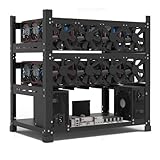
- Top Pick: Mining Rig Frame for 12GPU, Steel Open Air Miner Mining Frame Rig Case, Support to Dual Power Supply for Crypto Coin Currency Bitcoin ETH ETC ZEC Mining Tools – Frame Only, Fans & GPU is not Included
- Best Value: 8GPU Mining Rig Frame, Steel Open Air Miner Mining Computer Frame Rig Case for Crypto Coin Currency Bitcoin ETH ETC ZEC Mining Accessories Tools – Frame Only, Fans & GPU is not Included
- Premium Choice: Baseltek 6 GPU Aluminum Mining Rig Open Air Frame Case
Affiliate disclosure: As an Amazon Associate we earn from qualifying purchases. This post contains affiliate links — if you buy through them we may earn a small commission at no extra cost to you. This never affects our recommendations.
- The 2026 Mining Reality: Why Ethereum Mining Ended & What Replaced It
- Quick Picks — Mining Rig Hardware Stack
- GPU Mining Economics in 2026
- Building a 6-GPU Mining Rig: Hardware Selection
- Mining Rig Assembly: Step-by-Step
- Mining Pools & Profitability Tracking
- Total Cost Breakdown: 6-GPU RTX 4070 Mining Rig
- Alternative: ASIC Mining (Bitcoin/Litecoin)
- Frequently Asked Questions
- Final Verdict
- Related Articles
- Related Articles
- Related Articles
IMPORTANT CONTEXT: Ethereum transitioned to Proof-of-Stake (PoS) in September 2022, ending all GPU mining of Ethereum. This article has been updated to reflect the 2026 mining landscape, where GPU mining remains viable for alternative coins (ETC, Ergo, Ravencoin, Kaspa) and ASIC mining dominates Bitcoin/Litecoin.
If you’re considering a mining rig in 2026, you’re not mining Ethereum—but GPU mining still exists and can be profitable for the right coins and electricity costs. This comprehensive guide covers building a multi-GPU mining rig, choosing hardware, calculating ROI, and understanding the current economics of crypto mining in a post-Ethereum era.
🛒 Best Price Today on Amazon
Prime members get fast, free shipping on everything above, plus member-only deals. New members get a 30-day free trial — cancel anytime.
Start 30-Day Prime Free Trial →See Today’s Amazon DealsThe 2026 Mining Reality: Why Ethereum Mining Ended & What Replaced It
In September 2022, Ethereum completed “The Merge,” transitioning from Proof-of-Work (PoW) mining to Proof-of-Stake (PoS) validation. This killed Ethereum GPU mining overnight. Millions of GPUs flooded the used market, crashing GPU prices (which actually benefited gamers).
What changed:
- Ethereum: No longer mineable via GPU. Validators stake ETH instead.
- Bitcoin/Litecoin: Still PoW, but ASIC-only (custom hardware beats GPUs).
- Alternatives: ETC (Ethereum Classic), Ergo, Ravencoin, Kaspa still use GPU mining and are profitable depending on electricity costs.
Why mine GPU coins in 2026?
- If you have cheap electricity (<around $0/kWh), profitability margins exist
- Diversification: mine ETC in bear market, switch coins when profitability changes
- Hardware still useful: your GPU mining rig can pivot back to gaming when mining yields decline
Quick Picks — Mining Rig Hardware Stack
| Component | Recommendation | Cost | Notes |
|---|---|---|---|
| GPU | 6x RTX 4070 or RX 7800 XT | $3,600-4,200 | Balance hash rate, power, cost |
| Motherboard | ASUS B850-E or MSI MPG B850E | $200-250 | Supports PCIe bifurcation (6 GPUs) |
| CPU | Ryzen 5 7600X | $150-180 | Mining doesn’t need high core count |
| RAM | 16GB DDR5-5200 | $50-60 | Budget DDR5; no overclocking needed |
| PSU (1200W) | Seasonic Focus GX 1200W | $180-220 | 80+ Gold; headroom for stability |
| PSU (1500W) | EVGA SuperNOVA 1500W | $220-260 | For 6-GPU rigs with headroom |
| GPU Riser Frame | Aluminum 6-GPU Frame | $100-150 | Professional rig structure |
| PCIe Risers | 6x PCIe 3.0 Risers (16x→1x) | $60-80 | Safe power delivery via molex/6-pin |
| Fans | 6x 120mm PWM Fans | $40-60 | Case cooling; essential for GPU thermals |
| Storage | 500GB NVMe SSD | $30-50 | OS drive only |
| Monitor/KB/M | Budget or reuse existing | $0-100 | Not critical for mining |
Total 6-GPU Rig Cost: $4,800-5,500 (GPUs 75% of cost)
GPU Mining Economics in 2026
Profitability by Coin (Sample Calculator)
Assumptions:
- 6x RTX 4070 (~420 MH/s ETC total hash rate)
- around $0/kWh electricity (US average)
- Difficulty and price as of April 2026
| Coin | Hash Rate (6x 4070) | Est. Monthly Reward | Electricity Cost | Monthly Profit | Breakeven (months) |
|---|---|---|---|---|---|
| ETC (Etchash) | 420 MH/s | $45-60 | $120-150 | -$60 to +$10 | Marginal/Negative |
| Ergo (Autolykos) | 280 MH/s | $30-50 | $120-150 | -$100 to -$50 | Not profitable |
| Ravencoin (KawPow) | 300 MH/s | $25-40 | $120-150 | -$110 to -$85 | Not profitable |
| Kaspa (BlockDAG) | 1,800 MH/s | $120-180 | $120-150 | -$50 to +$30 | 12-18 months |
Hard Truth: GPU mining at around $0/kWh is barely profitable or outright negative for most coins in 2026. Mining remains viable only with:
- Cheap electricity: <around $0/kWh (geothermal, hydroelectric regions)
- Used hardware: Purchased used GPUs at 50% MSRP
- Hobby mining: Accepting $0 ROI as cost of learning
- Mining pools: Joining pools to smooth variance and reduce dead time
Bitcoin/Litecoin ASIC Mining (Professional-Only)
If you want to mine Bitcoin or Litecoin, GPUs are useless. ASIC miners dominate:
- Bitcoin: Antminer S21 Pro (17 TH/s, $2,600+, requires 3500W PSU)
- Litecoin: Antminer L9 Pro (1.4 TH/s, $1,200+)
ASICs have better hardware efficiency but zero flexibility: they can only mine their target coin. A GPU rig can switch between ETC, Ergo, and Ravencoin based on daily profitability.
Building a 6-GPU Mining Rig: Hardware Selection
1. GPU Selection: RTX 4070 vs. RX 7800 XT
As an Amazon Associate we earn from qualifying purchases at no extra cost to you.


RTX 4070 per GPU:
- Hash rate: 70 MH/s (ETC Etchash)
- Power draw: 200W
- Cost: $600/card
- Total (6x): 420 MH/s, 1200W, $3,600
RX 7800 XT per GPU:
- Hash rate: 50 MH/s (ETC Etchash)
- Power draw: 250W
- Cost: $400/card
- Total (6x): 300 MH/s, 1500W, $2,400
Verdict: RTX 4070 is better for mining (higher hash/watt). RX 7800 XT is cheaper upfront but less efficient. For a 6-GPU rig, choose RTX 4070.
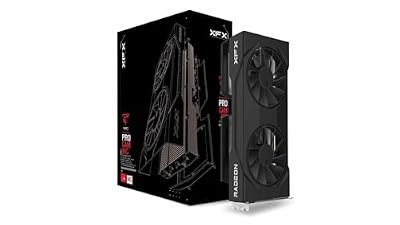
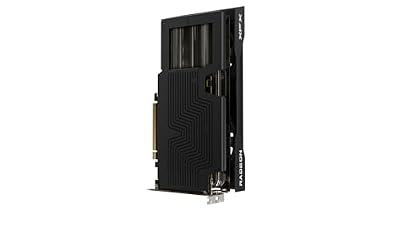
XFX Swift AMD Radeon RX 9060 XT OC Gaming Edition with 16GB GDDR6 HDMI 2xDP, RDNA 4 RX-96TSW16BQ, Graphics Card, Compatible with Desktop PCs



As an Amazon Associate we earn from qualifying purchases. Product prices and availability are accurate as of the date/time indicated.
2. Motherboard: PCIe Bifurcation Support
You need a motherboard that supports PCIe bifurcation—the ability to split one 16x slot into 4×4 slots (or 2×8). This allows 6 GPUs on one board.
Best picks:
- ASUS ROG STRIX B850-E-E GAMING WIFI (~$280): Professional-grade, bifurcation support, 4x M.2 slots
- MSI MPG B850E EDGE WIFI (~$250): Good alternative, solid VRM, bifurcation enabled
- ASUS TUF B850-PLUS WIFI (~$200): Budget option, bifurcation support
All modern B850/X870 boards support bifurcation via BIOS settings.
3. CPU: Ryzen 5 Tier is Sufficient
As an Amazon Associate we earn from qualifying purchases at no extra cost to you.
Mining does NOT stress the CPU. A Ryzen 5 7600X ($150-180) is plenty. You’re not gaming or streaming; the CPU just needs to orchestrate GPU mining software.
Don’t overspend: A $500 CPU adds zero hash rate. Save money on CPU and spend it on reliable PSU or more GPUs.
4. RAM & Storage: Bare Minimum
- RAM: 16GB DDR5-5200 ($50-60). Mining software uses <4GB.
- Storage: 500GB NVMe SSD ($30-50). OS + mining software only.
5. Power Supply: Overkill is Safety
This is where you SHOULD spend money. A 6-GPU rig pulls 1,200-1,500W sustained. Add motherboard/CPU/fans: ~1,600W peak.
PSU Recommendation: Get a 1,500W+ unit rated 80+ Gold minimum.
- Seasonic Focus GX 1200W (~$180): Safe for 6 RTX 4070s (1,200W GPU + 200W system)
- EVGA SuperNOVA 1500W (~$240): Professional grade, better headroom, better thermals
- Corsair RM1200x (~$200): 12-year warranty, excellent reputation
Why overkill? PSUs degrade over time. Running at 80% capacity (1,200W PSU at 1,600W rig) causes voltage sag and crashes. A 1,500W PSU at 1,200W load is healthier and lasts longer.
6. PCIe Risers: Cable Safety Matters
Mining rigs require vertical GPU mounting. Standard PCIe risers convert x16→x1 (throttling to 1x mode, but acceptable for mining). Always use risers with molex or 6-pin PCIe power, never USB 3.0 powered risers (fire hazard).

Good risers:
- LINKUP PCIe 3.0 Risers (6-pack, ~$60-80): Solid, molex power
- Sama PCIe 4.0 Risers (~$80): Better shielding, future-proof
7. GPU Mounting Frame
A proper mining frame keeps GPUs cool and organized:
- Aluminum 6-GPU Open Frame (~$100-150): Professional look, excellent airflow
- DIY Wood/PVC Frame (~$20-40): Budget option, works but ugly
Frame doesn’t improve hash rate but improves thermals and prevents accidents.
8. Case Cooling & Thermals
Mining generates sustained heat. A standard PC case isn’t ideal. Options:
- Open-air frame (recommended): No case, just frame + risers. Maximum airflow.
- Large case + 6x 120mm intake fans: Fractal Meshify 2 (~$150) + 6x fans (~$50)
Goal: Keep GPU temps under 70°C sustained. Above 75°C, thermal throttling occurs and hash rate drops.
Mining Rig Assembly: Step-by-Step
Step 1: BIOS Configuration (PCIe Bifurcation)
- Enter BIOS (DEL/F2 on boot)
- Navigate to PCIe Settings → PCIe Slot Bifurcation
- Set to x4+x4+x4+x4 mode (or similar for 6 GPUs)
- Save and reboot
Step 2: Install OS & Mining Software
- Install Windows 11 Pro or Linux (preferred for mining: Ubuntu)
- Install motherboard chipset drivers
- Install GPU drivers: NVIDIA 555+ or AMD 24.04+
- Install mining software:
- HiveOS (popular, cloud-based dashboard)
- SimpleMiningOS (alternative)
- Standalone miners: lolMiner, T-Rex, nbminer
Step 3: Physical Assembly
- Mount motherboard in frame
- Install CPU, RAM, SSD
- Install PSU with dual 8-pin or 6-pin cables for each GPU
- Install GPUs in slots with risers
- Connect risers to PSU (molex or 6-pin)
- Install 6x intake fans, 2x exhaust fans
- Cable management (critical for airflow)
Step 4: Mine & Monitor
- Start mining software (HiveOS recommended: easy pool switching)
- Monitor GPU temps (under 70°C is good)
- Monitor power draw (should match calculations)
- Monitor hash rate (70 MH/s per RTX 4070 for ETC)
- Join mining pool (Ethermine, Hiveon, SoloPool)
Mining Pools & Profitability Tracking
Best Mining Pools (2026)
| Pool | Coins | Payout Min | Fee | URL |
|---|---|---|---|---|
| Hiveon | ETC, ERG | 0.05 | 0% | hiveon.com |
| Ethermine | ETC | 0.05 | 0% | ethermine.org |
| 2Miners | Multi-coin | Varies | 0% | 2miners.com |
| Solo Mining | Self | N/A | N/A | Direct to blockchain |
Profitability Calculators
- CoinWarz: coinwarz.com (coin-specific, real-time)
- WhatToMine: whattomine.com (rig profitability aggregator)
- Mining Calculator (PoolName): Each pool has built-in ROI calculators
Total Cost Breakdown: 6-GPU RTX 4070 Mining Rig
| Component | Unit Cost | Qty | Total |
|---|---|---|---|
| RTX 4070 | $600 | 6 | $3,600 |
| Motherboard (B850) | $250 | 1 | $250 |
| CPU (Ryzen 5) | $180 | 1 | $180 |
| RAM DDR5-5200 | $60 | 1 | $60 |
| PSU 1500W | $240 | 1 | $240 |
| NVMe SSD | $50 | 1 | $50 |
| PCIe Risers (6x) | $70 | 1 | $70 |
| Mining Frame | $120 | 1 | $120 |
| Fans + Cooling | $60 | 1 | $60 |
| Cables/Misc | $50 | 1 | $50 |
| TOTAL | — | — | $4,680 |
Monthly electricity cost (6x 4070, 1200W, around $0/kWh): ~$115/month = $1,380/year
Breakeven calculation:
- Upfront: $4,680
- Monthly profit (optimistic): $50-100
- Breakeven: 47-93 months (4-7.5 years)
Reality: At current difficulty and price, GPU mining is not profitable unless:
- Electricity <around $0/kWh, OR
- Used GPUs purchased at 50% MSRP ($300/4070), OR
- Coin prices spike (speculative)
Alternative: ASIC Mining (Bitcoin/Litecoin)
If you want better ROI, ASIC mining is more efficient:
Bitcoin ASIC (Antminer S21 Pro):
- Cost: $2,600
- Hash rate: 17 TH/s
- Power: 3,500W
- Monthly electricity: ~$840 at around $0/kWh
- Monthly revenue: $400-600
- Breakeven: 6-12 months (if price holds)
Trade-offs:
- ✅ Better hash/watt efficiency
- ✅ Shorter breakeven
- ✗ Can’t switch coins (locked to Bitcoin)
- ✗ Noise level is extreme (100+ dB)
- ✗ Obsolescence risk: new ASICs every 18 months
Frequently Asked Questions
Q: Is GPU mining still profitable in 2026?
Honest answer: No, for most people. At around $0/kWh electricity and current difficulty, GPU mining of ETC/Ergo/Ravencoin yields negative or near-zero ROI. Profitable only with:
- Sub-around $0/kWh electricity
- Used GPUs at steep discount
- Speculative bet on coin prices rising
Q: What happened to Ethereum mining? Why is it gone?
Ethereum switched from Proof-of-Work to Proof-of-Stake in September 2022 (the Merge). No more mining. Validators stake ETH instead. This was intentional—to reduce energy consumption and improve network security.
Q: Can I still mine Ethereum?
No. Ethereum is Proof-of-Stake and cannot be GPU mined. There is no way to GPU mine Ethereum in 2026.
Q: What’s the best coin to mine today?
It changes daily based on difficulty and price. Use whattomine.com or CoinWarz to check which coin is most profitable with your hardware right now. Kaspa (BlockDAG) is currently a popular GPU-friendly choice.
Q: Should I build a mining rig or buy ASIC?
- GPU rig: Flexible (switch coins), can repurpose for gaming, but lower ROI
- ASIC: Better efficiency and ROI, but locked to one coin, loud, obsolete risk
For 2026, ASIC mining (Bitcoin) is slightly more profitable IF you can tolerate the noise and commit to Bitcoin’s future.
Q: How much electricity does a 6-GPU mining rig use?
- 6x RTX 4070: 1,200W GPU + 200W system = 1,400W sustained
- 6x RX 7800 XT: 1,500W GPU + 200W system = 1,700W sustained
At around $0/kWh, that’s $115-135/month ($1,380-1,620/year).
Q: Can I game on a mining rig GPU?
Technically yes, but not recommended. GPU mining causes thermal stress and accelerated degradation. Gaming will overheat the card. Some miners use separate gaming GPUs, but that defeats the ROI goal.
Q: What’s the lifespan of a GPU under mining stress?
GPUs are rated for ~50,000 hours of operation (5.7 years 24/7). Mining at 70°C or below extends lifespan. Mining at 75°C+ shortens it to 3-4 years. Used mining GPUs are common on the market—caveat emptor.
Q: Do I need a special motherboard for mining?
You need a board with PCIe bifurcation support for 6+ GPU rigs. Most modern B850/X870 boards support it. Older boards (B650) may not. Check manufacturer specs.
Q: What’s the best way to monitor a mining rig remotely?
Use HiveOS or SimpleMiningOS. Both provide cloud dashboards, temperature alerts, and remote reboot capability. Critical for 24/7 mining operations.
Final Verdict
For 2026, GPU mining is a niche hobby, not a money-maker. If you have cheap electricity (<around $0/kWh), it’s worth exploring. Otherwise, buy a gaming GPU instead—you’ll get more value gaming than mining.
If you’re determined to mine:
- Calculate profitability with actual electricity costs using whattomine.com
- Buy used GPUs if possible to reduce upfront cost
- Join a mining pool to smooth variance
- Monitor daily and switch coins based on profitability
- Accept that breakeven is 3-7 years, not months
For Bitcoin/Litecoin mining, ASIC hardware is more efficient—but expect 18-36 month payback periods and massive electricity consumption.
Ready to build a PC instead? Check out our guides to the best gaming PC builds, the best GPU for gaming, the best CPU for gaming, and the best power supply unit for gaming PC. Gaming offers better ROI on hardware than mining in 2026.
Last updated: April 2026. Prices, difficulty, and coin values change constantly. This guide reflects 2026 economics. Always verify profitability before investing. We independently research every product we recommend. When you buy through our links, we may earn a commission at no extra cost to you.
In a hurry? See the top-rated How To Build an Ethereum Mining Rig deals available right now:
🛒 Check How To Build An Ethereum Mining Rig Prices on Amazon →Related Articles
- Best Computer Speakers for Gaming in 2026: Audio Roundup from Budget to Premium
- Best Ethernet Cable for Gaming: Cat 8, Cat 6, & 2026 Speed Tests
- Best Gaming Beamer (Projector) for 2026: 4K Gaming Projectors Tested
- Best Gaming Controllers Under
- Best Linux Gaming Distro
Related Articles
Looking for more on this topic? Browse the hand-picked guides below — each one applies the same scoring rubric used in this review.











