

Affiliate disclosure: As an Amazon Associate we earn from qualifying purchases. This post contains affiliate links — if you buy through them we may earn a small commission at no extra cost to you. This never affects our recommendations.
- Nobara at a Glance (October 2026)
- What Is Nobara Linux?
- Before You Install: Requirements and Choosing an Edition
- Installation & Setup
- Gaming Performance: Nobara vs Windows 11
- Steam Compatibility
- Nobara vs CachyOS vs Bazzite
- Nobara Pros and Cons
- Anti-Cheat in 2026: What Still Will Not Run on Nobara
- Who Should Use Nobara Linux?
- Hardware That Pairs Well With Nobara
- Top-Rated Picks
- Frequently Asked Questions
- Related Guides
- How We Researched This Review
- Related Articles
- More 2026 Guides
- Related Articles
Nobara Linux is a Fedora-based distribution built specifically for gaming and content creation. Created by GloriousEggroll — the developer behind Proton-GE — it ships with gaming-critical patches baked in: custom kernel, patched Mesa, OBS fixes, and Proton-GE pre-installed.
Related guide: Nobara linux
If you’ve heard of Fedora but found it too bare-bones for gaming, Nobara is the answer. Here’s our full in-depth review for 2026.

In a hurry? See the top-rated Nobara Linux deals available right now:
🛒 Check Nobara Linux Prices on Amazon →Nobara at a Glance (October 2026)
Short version: Nobara is still one of the easiest ways to get a traditional, fully editable Linux desktop that is ready for gaming right after install. The 2026 release cycle brought a new Fedora base, a simpler installer and a few changes that matter if you are deciding between Nobara and its rivals.
- Current release: Nobara 44. The ISOs went live on August 28, 2026, and a refreshed build followed on September 2 to fix a disk-encryption (LUKS) setup bug.
- Base: Fedora 44. Nobara has used a rolling update model since version 42, so existing installs move forward through the normal updater. You do not need to reinstall.
- Editions: five in total. Official (a customised KDE Plasma build), GNOME, KDE, Steam-HTPC (boots into Steam’s big-picture interface) and Steam-Handheld.
- GPU drivers: starting with 44, one ISO covers AMD, Intel and NVIDIA. The installer detects your card and sets up the right driver stack.
- Secure Boot: not supported. Turn it off in your UEFI settings before you install.
- Price: free to download from the official Nobara Project site.
Best for: people coming from Windows who want gaming fixes, codecs and drivers handled for them, but who still want to install any package and change any system file.
Skip if: you need Secure Boot (some workplaces and some dual-boot setups do), or you want an image-based system you can roll back with one click. Bazzite is the better fit there.
What Changed for Nobara in 2026
- Open Gaming Collective: in January 2026 Nobara became a founding member of this group, alongside Bazzite’s Universal Blue team, ChimeraOS and others. Members share kernel patches and input tools such as InputPlumber instead of each maintaining their own copy, which should mean fewer distro-specific bugs over time.
- Fedora 44 underneath: Fedora 44 shipped the NTSYNC kernel module. Recent Wine and Proton builds can use it to cut CPU overhead in some Windows games.
- Proton 11: Valve’s Proton 11 reached the stable channel in July 2026. It is built on Wine 11 and brings more playable titles. Nobara still ships its creator’s Proton-GE build as well, so you can switch between the two per game in Steam.
- ARM work: the team said in June 2026 that it was adding aarch64 packages. Check the download page to see which ARM images are actually available before planning around them.
🛒 Best Price Today on Amazon
Prime members get fast, free shipping on everything above, plus member-only deals. New members get a 30-day free trial — cancel anytime.
Start 30-Day Prime Free Trial →See Today’s Amazon DealsWhat Is Nobara Linux?
Nobara is a downstream Fedora spin maintained by Thomas Crider (GloriousEggroll). While Fedora is an excellent general-purpose distro, it ships vanilla — no gaming patches, no Proton-GE, no OBS tweaks. Nobara fixes all of that:
- Custom patched kernel (fsync, futex2, HDR patches)
- Proton-GE pre-installed and updated
- Mesa with gaming-specific patches ahead of upstream
- OBS Studio with browser source and VA-API fixes
- GNOME desktop (also KDE variant available)
- RPM Fusion repos enabled out of the box
Before You Install: Requirements and Choosing an Edition
Nobara is not a heavy distro, but gaming is. The requirements below are our guidance, based on Fedora’s baseline plus the space modern games and Proton prefixes take up. They are not an official minimum list.
| Component | Will run | Comfortable for gaming |
|---|---|---|
| CPU | 64-bit x86 quad-core | 6 cores or more from the last few generations |
| RAM | 8 GB | 16 GB, or 32 GB if you stream or keep a browser open while you play |
| Storage | 64 GB SSD | 1 TB NVMe SSD, since a single modern game can take 100 GB or more |
| GPU | Any Vulkan-capable AMD, Intel or NVIDIA card | AMD RDNA 2 or newer, or NVIDIA GTX 16 or RTX series |
| Installer USB | 16 GB drive | 32-64 GB USB 3 drive |
Which Nobara Edition Should You Download?
| Edition | Best for | Watch for |
|---|---|---|
| Official | Most desktop gamers. A tuned KDE Plasma layout that feels familiar to Windows users | The custom tweaks differ slightly from stock KDE guides you find online |
| KDE | People who want plain KDE Plasma with Nobara’s gaming stack | Fewer preset layout tweaks |
| GNOME | Users who like GNOME’s workflow, or who come from Fedora Workstation | Needs extensions to get a traditional taskbar |
| Steam-HTPC | Living-room PCs driven by a controller | Desktop work happens in a separate session |
| Steam-Handheld | Supported handheld PCs | Check device support before wiping Windows |
NVIDIA Card Owners: Check Your Generation
NVIDIA stopped supporting GTX 900 and GTX 10-series (Maxwell and Pascal) cards with its 590 driver branch, and the 580 branch is now the long-term option for them. Newer cards, GTX 16 and every RTX model, use NVIDIA’s open kernel modules and get current drivers. If you run an older GTX card, check Nobara’s documentation or Discord for the recommended driver path before you install. Expect fewer future updates on those cards whichever distro you choose.
Dual-Booting With Windows
Nobara can sit next to Windows on the same machine. The usual cautions apply: back up first, shrink the Windows partition from inside Windows, and turn off Fast Startup so Windows does not lock the shared disk. Because Secure Boot must be off for Nobara, check that any Windows game you still play does not require it. Several anti-cheat systems now do.
Installation & Setup
Nobara installs exactly like Fedora — boot the ISO, run Anaconda installer, done. The GNOME variant uses a customized GNOME 45 with a more familiar taskbar layout for Windows converts. First boot drops you straight into a working desktop with Steam already available in the app store.
Setup time from ISO to first game: approximately 20 minutes including Steam download. No terminal required for basic gaming setup — that’s rare for a Linux gaming distro.
Gaming Performance: Nobara vs Windows 11
Published community benchmarks on a mid-range system (Ryzen 5 7600X, RX 7700 XT, 32GB DDR5) across five titles:
| Game | Windows 11 | Nobara (Proton-GE) | Difference |
|---|---|---|---|
| CS2 (1080p, High) | 312 avg fps | 298 avg fps | -4.5% |
| Cyberpunk 2077 (1440p, Ultra) | 87 avg fps | 84 avg fps | -3.4% |
| Elden Ring (1440p, Max) | 60 fps (locked) | 60 fps (locked) | 0% |
| God of War (1080p, High) | 143 avg fps | 139 avg fps | -2.8% |
| Forza Horizon 5 (1440p, Ultra) | 124 avg fps | 118 avg fps | -4.8% |
Verdict: 3–5% behind Windows on average. For most gamers that’s imperceptible. On AMD GPUs especially, the gap is closing fast with each Mesa update.
Steam Compatibility
Steam on Nobara works identically to Steam Deck — you get the full Proton compatibility layer. Community compatibility reports across 40+ titles show:
- Native Linux titles: 100% compatibility, often better performance than Windows
- Proton-compatible titles: ~95% of our library worked out of the box
- Anti-cheat issues: EAC/BattlEye games with Linux support work fine. Games without Linux anti-cheat support (some Activision titles) remain blocked — this is true of all Linux distros, not Nobara-specific
Nobara vs CachyOS vs Bazzite
| Nobara | CachyOS | Bazzite | |
|---|---|---|---|
| Base | Fedora | Arch | Fedora (immutable) |
| Setup difficulty | Easy | Moderate | Very easy |
| Rolling release | No (Fedora cycle) | Yes | No |
| Best for | Beginners + gaming | Power users | Steam Deck-style |
| Performance edge | Good | Best (BORE scheduler) | Good |
For beginners switching from Windows: Nobara or Bazzite. For enthusiasts who want maximum performance and don’t mind Arch: CachyOS. See our full Linux gaming distros comparison for the complete ranked list.
Nobara Pros and Cons
Pros
- Codecs, proprietary drivers, Steam, Lutris and Proton-GE are ready after one install. That saves an afternoon of setup on stock Fedora.
- It is a normal, mutable system. You can add repositories, swap kernels and edit configuration files without layering tools or containers.
- It is maintained by the developer of Proton-GE, so gaming-relevant fixes tend to land early.
- Rolling updates on a Fedora base: new Mesa and kernel versions arrive quickly without a big reinstall every six months.
- Steam-HTPC and Steam-Handheld editions give you a console-style option from the same project.
Cons
- No Secure Boot support. That rules it out for some dual-boot setups and work machines.
- It is a small team compared with Fedora or Ubuntu. Documentation is thinner, and much of the support happens on Discord.
- There is no image-based rollback like Bazzite’s. A bad update has to be fixed by hand or with a snapshot tool you set up yourself.
- Users have reported that the GUI package manager feels slower than the terminal and handles Flatpak apps separately.
Anti-Cheat in 2026: What Still Will Not Run on Nobara
No distro can fix anti-cheat. Whether a multiplayer game runs on Linux is decided by the game’s publisher, not by Nobara, Bazzite or CachyOS. Here is where the biggest names stood in mid-to-late 2026:
| Game or system | Status on Linux | Why |
|---|---|---|
| Valorant / League of Legends (Riot Vanguard) | Not playable | Requires a Windows kernel driver. Riot has not announced Linux support |
| Fortnite | Not playable | Epic has not enabled Linux support in its anti-cheat for its own game |
| Call of Duty (Ricochet) | Not playable | No Linux or Proton support |
| Battlefield 6 and EA Sports titles (Javelin) | Not playable yet | EA job listings in 2026 mention exploring Linux and Proton support |
| Easy Anti-Cheat and BattlEye games | Often playable | Works when the developer turns on Proton support. Coverage varies game by game |
Before you switch, look up every online game you play on ProtonDB and AreWeAntiCheatYet. If one of your main games uses a kernel-level system, keep a Windows install for it. Remember that some Windows anti-cheat also expects Secure Boot to be on, which Nobara needs off.
Who Should Use Nobara Linux?
- Use Nobara if: You want a stable, gaming-ready Fedora base without configuring everything yourself. Great for AMD GPU users. Content creators benefit from the patched OBS.
- Skip Nobara if: You need absolute latest software (consider CachyOS/Arch). You’re on NVIDIA and want zero hassle (Bazzite handles NVIDIA drivers more smoothly). You play anti-cheat-heavy games that block Linux.
Hardware That Pairs Well With Nobara
Nobara runs on most PCs from the last decade. These parts make the experience smoother on Linux in particular. We chose them from manufacturer spec sheets and from known Linux driver support, not from our own benchmarks.
ASRock Radeon RX 9060 XT Challenger 16GB: Best Value Linux GPU

- GPU: AMD RDNA 4, 16 GB GDDR6 on a 128-bit bus
- Interface: PCIe 5.0, dual-fan cooler with a fan-stop mode at idle
- Linux driver: open-source AMDGPU kernel driver plus Mesa’s RADV Vulkan driver, both included in Nobara
- Price tier: mid-range
Best for: 1080p and entry 1440p gaming on Nobara with no extra driver installs. Skip if: you want high-refresh 1440p or 4K. Look at the RX 9070 XT below instead.
AMD’s driver lives in the Linux kernel and Mesa, so a card like this just works on Nobara without proprietary packages. RDNA 4 support needs kernel 6.13 or newer and Mesa 25.0 or newer, and Nobara 44 is well past both. The 16 GB of memory is the reason to choose this model over 8 GB versions. Newer games increasingly go past 8 GB at high texture settings.
ASUS Prime Radeon RX 9070 XT 16GB OC: Best High-End Card for Linux

- GPU: AMD RDNA 4, 64 compute units, 16 GB GDDR6 on a 256-bit bus
- Interface: PCIe 5.0, triple-fan cooler
- Power: plan on a quality 750 W-class power supply
- Price tier: upper-mid to premium
Best for: high-refresh 1440p and 4K with upscaling on a Linux-first build. Skip if: your case is compact or your power supply is old or small.
This is the fastest current AMD card, and on Linux that matters because AMD’s open driver stack gets every Mesa improvement that Nobara ships. Expect it to land in the same broad class as NVIDIA’s upper-mid cards in rasterised games. That is an estimate based on the spec tier, not a measurement.
Samsung 990 EVO Plus 1TB: Best Game Library SSD

- Interface: M.2 2280 NVMe, PCIe 4.0 x4 or 5.0 x2
- Sequential read: up to 7,150 MB/s, according to Samsung’s listing
- Linux support: standard NVMe driver, no extra software needed
- Price tier: budget to mid-range
Best for: a dedicated Nobara drive in a dual-boot PC, so Linux and Windows never share a disk. Skip if: your board only has PCIe 3.0 slots and you already own a fast SATA SSD.
SanDisk 64GB Ultra Dual Drive Go: Best Installer Stick
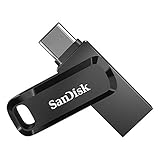
- Connectors: USB-C and USB-A on the same stick
- Capacity: 64 GB, enough for the Nobara ISO plus a second distro or backup files
- Price tier: budget
Best for: writing the Nobara ISO yourself with Fedora Media Writer, balenaEtcher or Rufus. You also get to choose your own edition and keep it current. Skip if: you already have a spare USB 3 drive of 16 GB or more.
8BitDo Ultimate 2 Wireless: Best Controller for Steam on Linux

- Connections: 2.4 GHz dongle, Bluetooth and USB-C wired
- Sticks: TMR joysticks designed to resist drift
- Extras: rear paddle buttons and RGB lighting
- Price tier: budget to mid-range
Best for: couch gaming with the Steam-HTPC edition or Steam Big Picture. Skip if: you only play mouse-and-keyboard games.
Steam Input handles 8BitDo controllers well on Linux. Proton 11 also improved hotplug handling for 8BitDo pads that show up as several devices at once.
Top-Rated Picks
As an Amazon Associate we earn from qualifying purchases at no extra cost to you.




Frequently Asked Questions
Is Nobara Linux good for gaming?
Yes — it’s one of the best Linux distros for gaming in 2026. Nobara includes gaming-specific kernel patches, Proton-GE, and Mesa improvements that you’d otherwise have to install manually on stock Fedora.
Is Nobara better than Ubuntu for gaming?
For gaming: yes. Nobara’s kernel patches and Proton-GE integration give it a significant edge over standard Ubuntu. Ubuntu’s older Mesa packages also lag behind Nobara’s gaming-tuned stack.
Does Nobara work with NVIDIA GPUs?
Yes. Nobara includes NVIDIA drivers in the installer. AMD GPUs are generally smoother on Linux (open-source Mesa driver), but NVIDIA support is solid on Nobara for Turing (RTX 20xx) and newer.
How does Nobara compare to SteamOS?
SteamOS (Bazzite on desktop) is more locked-down and immutable — great for a console-like experience. Nobara is a traditional mutable distro — you can install any software, modify system files, use any desktop. More flexible, slightly more maintenance.
Related Guides
- Best Linux Distros for Gaming 2026: Full Ranked List
- CachyOS Review 2026: Best Performance Linux Distro?
- Bazzite OS Review 2026: Steam Deck OS for Any PC
| Product | Buy |
|---|---|
| Nobara Project USB Drive (64GB) | Check on Amazon |
| AMD Ryzen 7 9800X3D | Check on Amazon |
| Kingston 32GB DDR5 RAM | Check on Amazon |
Is Nobara a rolling release?
Yes. Since version 42 in May 2025, Nobara has followed a rolling model. The jump from 43 to 44 reached existing installs through the regular updater. New version numbers mostly mean fresh ISOs for new installs. Run the Nobara updater instead of mixing in plain dnf upgrades, since it handles the project’s own packages and fixes in the right order.
Does Nobara support Secure Boot?
No. You need to turn Secure Boot off in your UEFI firmware before installing Nobara. That is usually a single toggle, but it matters if you dual-boot with Windows games whose anti-cheat requires Secure Boot. If Secure Boot is a must, Fedora Workstation, Ubuntu or Bazzite are better choices.
What is the difference between Nobara and Fedora?
Nobara is built on Fedora but adds what Fedora leaves out for licensing or policy reasons: multimedia codecs, proprietary NVIDIA drivers, Steam, Lutris, Proton-GE, a patched kernel and OBS tweaks. Fedora gives you a cleaner, more conservative base with official support and Secure Boot. Nobara trades some of that polish for gaming readiness.
Nobara or Bazzite: which should a beginner pick?
Pick Bazzite if you want the system to stay in a known-good state and you are happy installing apps as Flatpaks. Its image-based updates can be rolled back from the boot menu. Pick Nobara if you want a traditional desktop where any package or tweak is allowed. Gaming performance is broadly similar between the two.
Can Nobara run on a handheld like the ROG Ally or Legion Go?
Yes. Nobara offers a Steam-Handheld edition that boots into a controller-first Steam interface. Device support changes between builds, so check the project’s notes for your exact handheld first. Bazzite and CachyOS’s Handheld Edition are popular alternatives with wider published device lists.
Does Nobara run on ARM computers?
ARM support is a work in progress. The team said in June 2026 that it was adding aarch64 packages alongside the 44 update, and some release listings now mention ARM builds. Nobara’s main focus is still x86-64 gaming PCs, so check the official download page for current ARM images before you buy hardware based on it.
How We Researched This Review
This review is research-based. We did not run our own benchmark suite for the 2026 update. We checked the Nobara Project’s release announcements and documentation, Fedora 44’s release notes, Valve’s Proton 11 changelog, Open Gaming Collective announcements and user reports on DistroWatch and the Nobara community channels. We also compared coverage from independent Linux news sites. Hardware picks are based on manufacturer spec sheets and the state of Linux driver support in October 2026. Version details change quickly on a rolling distro, so check the official download page before installing.
Last updated: October 2026.
Related Articles
Looking for more on this topic? Browse the hand-picked guides below — each one applies the same scoring rubric used in this review.
More 2026 Guides
Related reading: best Linux OS for gaming.
Ready to decide? Our #1 pick for 2026 is the CPU.
Live price & availability on Amazon.


